
Participating Frequently
November 4, 2022
Answered

Adobe Acrobat Preflight broken

  • November 4, 2022
  • 2 replies
  • 6160 views

Hello,


I have installed the latest version of Acrobat from the CC. After i tried to run the Preflight, it says its installing preflight, so i waited. After some time i restarted the acrobat and it said, that it has finished installing Preflight.

So i ran it, but didnt load any presets into it. (not even the default ones) ... so i decided to import the kfp files into it manually - some did work, some didnt.

The one i desperately need is the "convert fonts to outlines" and i believe this one is in the Acro2015.kfp - but i cannot import it "Unable to import Preflight profile file Acro2015.kfp"...
I am using Windows 11 Pro. I tried reinstalling acrobat but the behaviour was the same. Installed also the Optional update 22.003.20263, didnt fix the problem.
 

Correct answer Pallastein

I am having the exact same problem.  No permission issues, I am one guy on a machine not managed or permissioned by anyone else.  Uninstalled and reinstalled, running PRODUCT VERSION 25.1.20467.0.  For all that is good and holy I just want to flatten these stupid pdfs without losing image quality.  How is this so hard in 2025?  It is such a joke to me that these programs have become industry standard, have existed for decades, and cannot just function intuitevly at all.  If I put as much effort into the saxaphone as I have freaking adobe and word I'd be Kenny G by now, but for all of the years of effort I have put in to try and be a knowledgable user of this freaking program I still feel like I cannot do anything or access any support or solutions.  Again, its 2025! HOW is this still so bad!!!!????!!!!


I was able to get an Adobe tech on the phone.  Bottom line - flattener doesn't work.  But he suggested a work-around that works for me generally - adding security to the Document Properties.  You can set it so that, without the password, no one can copy, edit and even open or print your file.  Edit > Protection > Security Properties > Security Tab > Security Method - change this from No Security to Password Security.  It pulls up a new window for the Password Security Settings.  I hate Kenny G but I hope this helps

2 replies

Amal.
Community Manager
Community Manager
April 12, 2023

Hi there


Hope you are doing well.


The new version of Adobe Acrobat (23.01.20143), addressing this issue is now available. Please update the application from the Help menu > Check for updates and reboot the computer once.

You may also download the patch manually from the link https://www.adobe.com/devnet-docs/acrobatetk/tools/ReleaseNotesDC/index.html


Let us know how it goes.


Regards

Amal

Participant
April 23, 2025

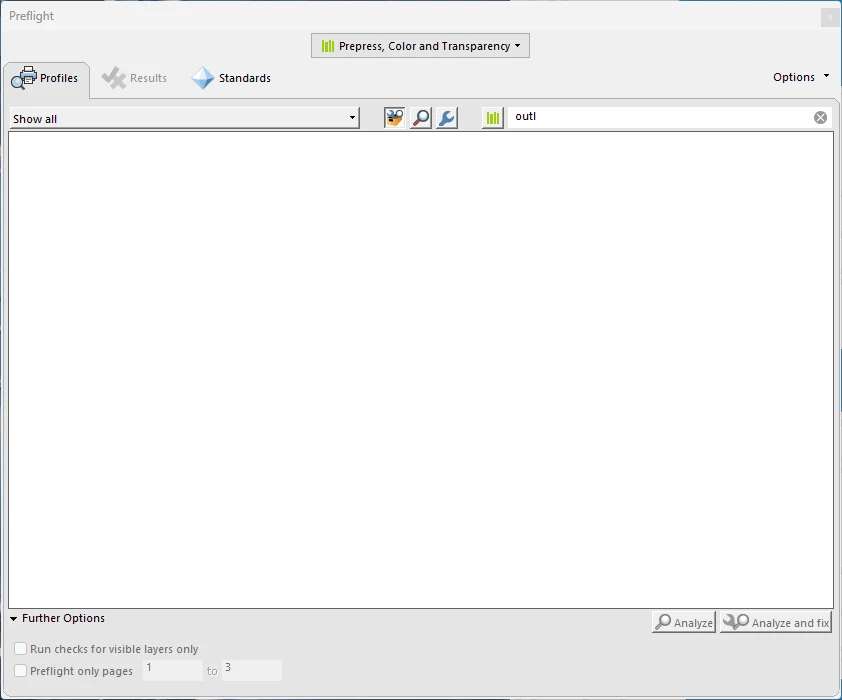
My colleagues and I used a Preflight fixup to flatten pdfs so that our signature can't be lifted, but we lost the entire Preflight library a few weeks ago.   When we open preflight, we see only blank space.  I spent 1.5 hours on with an Adobe tech this afternoon who got the library back somehow, but the fixup didn't actually flatten any more.  Now, 2 hours later, the library's gone.  Again.  Attached screenshots: preflight window and Acrobat Pro version

Community Manager
April 24, 2025

Hi @Pallastein


Sorry for the trouble you experienced. 

If the machine you are using is your personal machine, try creating a new user Profile and check if the issue is reproducible.

Judging from the description and issue understanding, this seems to be a permission issue on the machine. 


If this is a work machine, check with your IT help to see if anything is getting flushed or if recent changes in permissions are being enforced on the user profile after some time. 


~Tariq

Karl Heinz  Kremer
Community Expert
Community Expert
November 4, 2022

If some weird behavior survives a re-install, I use the Acrobat Cleaner (https://www.adobe.com/devnet-docs/acrobatetk/tools/Labs/cleaner.html), which removes all traces of Acrobat from your system. I would try that and then re-install from a fresh download. If this still does not fix your problem, there may be something wrong with your system, and Acrobat may not find e.g. a library that it needs to do it's job, or it could be due to a corrupt font (I had a problem with that many years ago when dialogs kept coming up blank). In that case, I would assume that getting in touch with Adobe's customer support is advised. They know how to look for log files and more importantly, knowhow to interpret those.

4ntoniosAuthor
Participating Frequently
November 14, 2022

Thank you for the answer.