
Participant
April 20, 2020
Question

Adobe Acrobat Pro 2017 Document Property UI

  • April 20, 2020
  • 1 reply
  • 293 views

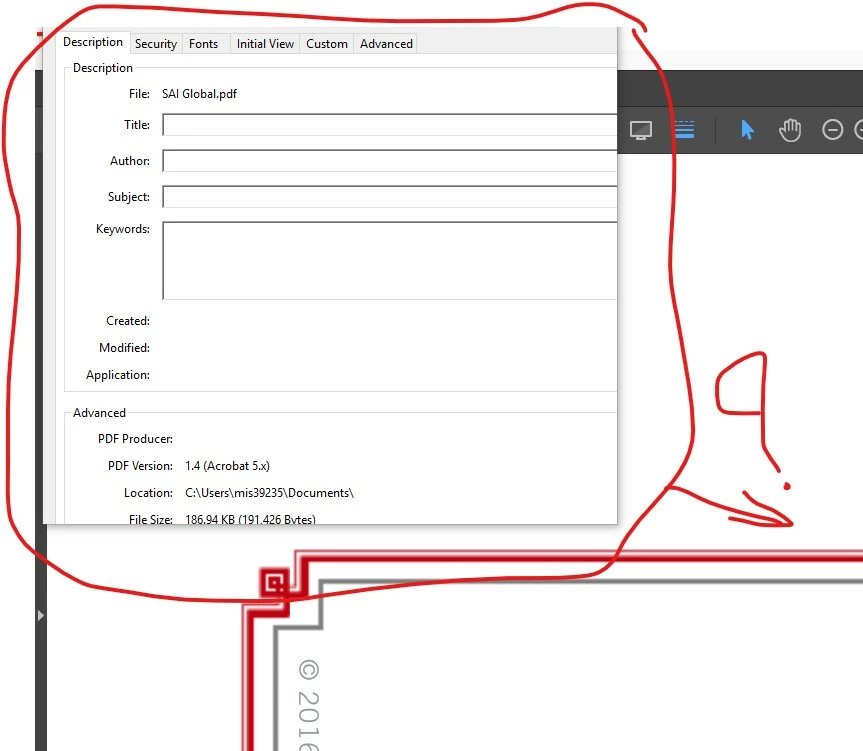
My Adobe Acrobat Pro 2017, document property dialogue box are appearing in upper left corner of the scree neighter I move it or I can see all the details of the documents, could you please help me out how can i do see in middle of the screen with all the details.


For your understating herwith attached the screen shot of my issue...
This topic has been closed for replies.

1 reply

Amal.
Community Manager
Community Manager
April 21, 2020

Hi Dips,


We are sorry for the trouble. As described the document property dialogue box are appearing in the upper left corner of the screen and you are unable to move it or view completely. 


Please try to quit the application, reboot the computer and try again.


If it still doesn't work, please try to adjust the screen resolution of your computer. You may also try to decrease the view size of the page Ctrl (-) Minus for Windows or Cmd (-) Minus for Mac.


If it still doesn't work 


Let us know how it goes


Regards

Amal