Participant
July 6, 2021
Answered

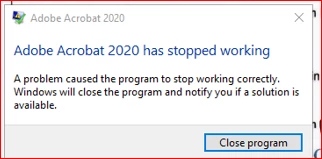
Adobe Acrobat Pro 2020 has stopped working

  • July 6, 2021
  • 1 reply
  • 1684 views

HI,


we have user encounter the Adobe Acorbat 2020 has stopped working when they open file from network drive 


The error will pop up when user perform the fowlloing action. This issue is intemitten on all pdf file.

Aanyone have solution to this. This is a new installation and user started facing this issue.


  • Open file and scroll the page
  • Insert signatuyre from fill and sign.


Version: 2020.004.30005

OS: Windows Server 2016


This topic has been closed for replies.
Correct answer Amal.

Hi Gingerz


Hope you are doing well and sorry for the trouble and the delay in response. I hope you would be able to fix it by now, if the issue still exists:


- What happens when you try to open the PDF file that is not on a network drive (Stored locally on the computer)?


Please try to turn off the protected mode for testing (Win Only) Go to Edit > Preferences > Enhanced Security > Uncheck 'Enable Protected mode at startup' Turn off the Protected mod and Uncheck 'Enhanced Security' > Click OK and reboot the computer once.

Note: Please turn on the security after testing to avoid any security risk.


If turning off the protected mode works for you, please try to add the file and the folder path to Adobe Acrobat Go to Edit > Preferences > Enhanced Security > Add File and Add Folder Path > Click OK and check.


Regards

Amal


1 reply

Amal.
Community Manager
Amal.Community ManagerCorrect answer
Community Manager
July 13, 2021

Hi Gingerz


Hope you are doing well and sorry for the trouble and the delay in response. I hope you would be able to fix it by now, if the issue still exists:


- What happens when you try to open the PDF file that is not on a network drive (Stored locally on the computer)?


Please try to turn off the protected mode for testing (Win Only) Go to Edit > Preferences > Enhanced Security > Uncheck 'Enable Protected mode at startup' Turn off the Protected mod and Uncheck 'Enhanced Security' > Click OK and reboot the computer once.

Note: Please turn on the security after testing to avoid any security risk.


If turning off the protected mode works for you, please try to add the file and the folder path to Adobe Acrobat Go to Edit > Preferences > Enhanced Security > Add File and Add Folder Path > Click OK and check.


Regards

Amal