
Participant
December 6, 2023
Answered

Adobe Acrobat Pro Auto-tagging Stuck at 20%

  • December 6, 2023
  • 1 reply
  • 3284 views

Hello, I am currently unable to auto-tag any PDF documents. When I attempt to, the progress bar begins immediately at 20%, but them remains there indefinitely. I left the process running for over an hour on one attempt, without change. This is happening on documents that I have previously successfully auto-tagged as well (just to test it out), all different lengths.

Regular, manual tagging is working, it is only the auto-tagging where I am finding the issue.

My Adobe Acrobat Pro is currently up to date, at Version 2023.006.20380.

Any ideas on what to do?
Correct answer Amal.

Hi @RebeccaW1 


Hope you are doing well and thanks for reaching out.


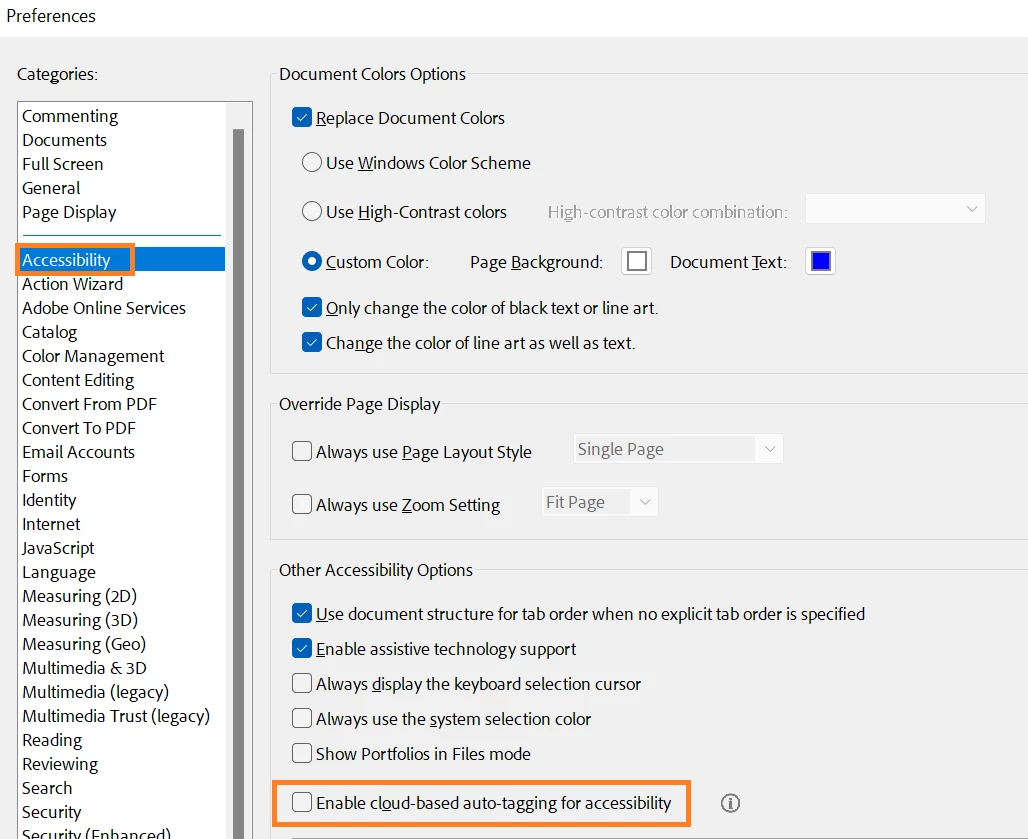
Please Go to "Preferences" (Ctrl, CMD+K) -> "Accessibility" and Uncheck the box for "Enable cloud-based auto-tagging for accessibility" (near the bottom) and reboot the computer once and see if that works.


Let us know how it goes.


~Amal

1 reply

Amal.
Community Manager
Amal.Community ManagerCorrect answer
Community Manager
December 7, 2023

Hi @RebeccaW1 


Hope you are doing well and thanks for reaching out.


Please Go to "Preferences" (Ctrl, CMD+K) -> "Accessibility" and Uncheck the box for "Enable cloud-based auto-tagging for accessibility" (near the bottom) and reboot the computer once and see if that works.


Let us know how it goes.


~Amal

RebeccaW1Author
Participant
December 13, 2023

It looks like this may have solved the issue - my test document is auto-tagged. Thank you, Amal!