
Participant
December 6, 2023
Answered

Adobe Acrobat Pro Auto-tagging Stuck at 20%

  • December 6, 2023
  • 1 reply
  • 3282 views

Hello, I am currently unable to auto-tag any PDF documents. When I attempt to, the progress bar begins immediately at 20%, but them remains there indefinitely. I left the process running for over an hour on one attempt, without change. This is happening on documents that I have previously successfully auto-tagged as well (just to test it out), all different lengths.

Regular, manual tagging is working, it is only the auto-tagging where I am finding the issue.

My Adobe Acrobat Pro is currently up to date, at Version 2023.006.20380.

Any ideas on what to do?
Correct answer Amal.

Hi @RebeccaW1 


Hope you are doing well and thanks for reaching out.


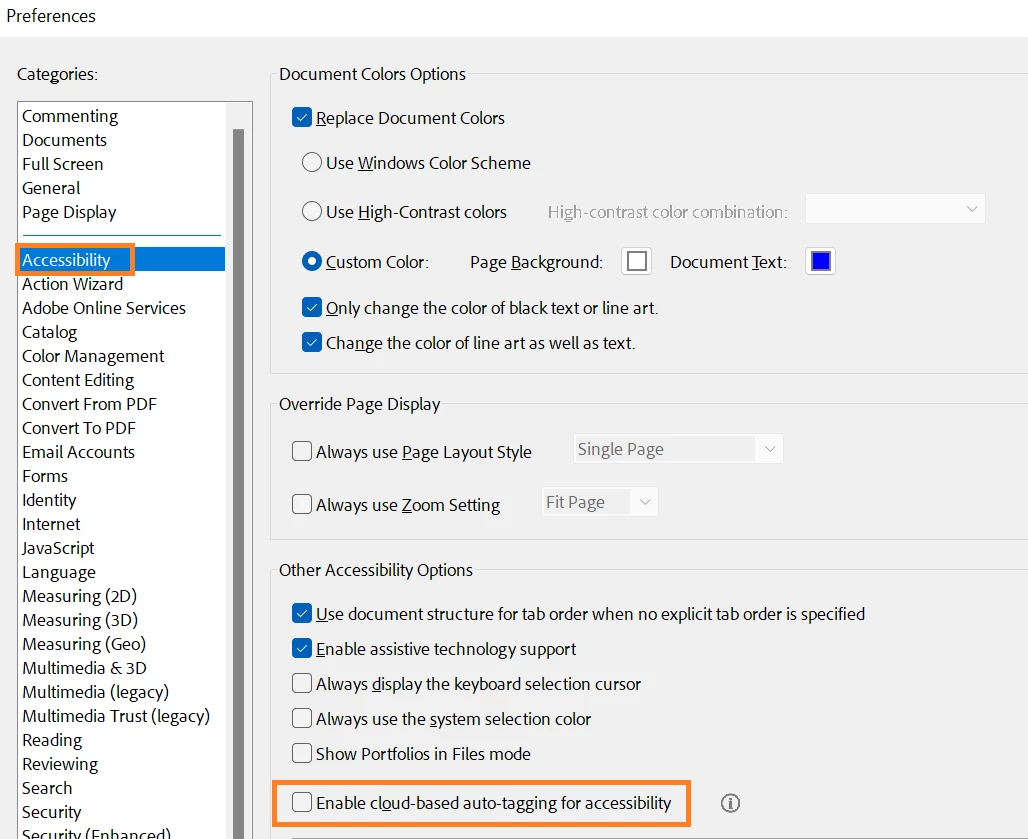
Please Go to "Preferences" (Ctrl, CMD+K) -> "Accessibility" and Uncheck the box for "Enable cloud-based auto-tagging for accessibility" (near the bottom) and reboot the computer once and see if that works.


Let us know how it goes.


~Amal

1 reply

Amal.
Community Manager
Amal.Community ManagerCorrect answer
Community Manager
December 7, 2023

Hi @RebeccaW1 


Hope you are doing well and thanks for reaching out.


Please Go to "Preferences" (Ctrl, CMD+K) -> "Accessibility" and Uncheck the box for "Enable cloud-based auto-tagging for accessibility" (near the bottom) and reboot the computer once and see if that works.


Let us know how it goes.


~Amal

Participant
March 4, 2025

Hello Amal


I’m seeking more clarity on the difference in quality between locally tagged and cloud-based tagged documents in Adobe. I'm preparing communications for my university colleagues about digital accessibility, and we’ve received a few inquiries on this. I want to ensure transparency in explaining the pros and cons of disabling the cloud-based tagging feature, and if there's a way to still use it when it offers greater accuracy than local tagging.

Community Manager
April 21, 2025

Hi @Kenneth3795175146jg,


For more information on Cloud-Based tagging, please visit: https://adobe.ly/4cHmiAF


Acrobat now offers a cloud-based auto-tagging feature to enhance accessibility and generate detailed tags for eligible PDF documents. When a document is opened for auto-tagging, Acrobat assesses its layout, structure, and content to determine if it's eligible. The feature provides accurate results, identifies scanned text, and includes capabilities like:

  • Identifying heading levels across the document.
  • Spotting tables, regardless of borders.
  • Detecting lists and nested lists.
  • Establishing reading order for multicolumn layouts.


~Tariq