
Participant
February 14, 2018
Answered

Adobe Acrobat Pro DC - Error. The value entered does not match the format of teh field.

  • February 14, 2018
  • 2 replies
  • 2707 views

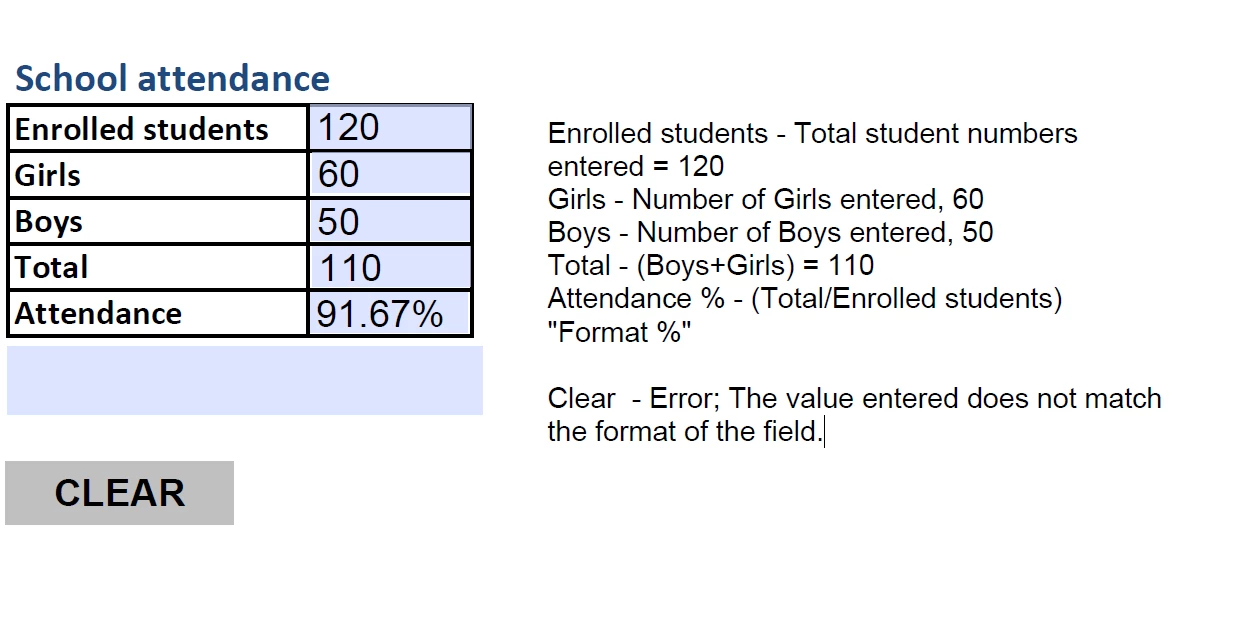
Good afternoon, Appreciate some help...I am new to using the Adobe Acrobat CD Pro in Preparing forms and have come up with this error problem. I have tried what I believe are the right scripts and options...While this is a little more complex in the form I am preparing this is the simple basis...

Appreciate any assistance. The Adobe DC Acrobat looks to be a very good tool...if I can get over this proble.

Regards

Ren Kelly
This topic has been closed for replies.
Correct answer Thom Parker

The error is being reported by the format script. If you remove the formatting you won't see the error message, but of course the error will still happen and you won't have a format.

This topic has come up many times so you'll find the answer in another post.

2 replies

Thom Parker
Community Expert
Thom ParkerCommunity ExpertCorrect answer
Community Expert
February 14, 2018

The error is being reported by the format script. If you remove the formatting you won't see the error message, but of course the error will still happen and you won't have a format.

This topic has come up many times so you'll find the answer in another post.

Thom Parker - Software Developer at PDFScriptingUse the Acrobat JavaScript Reference early and often
Participant
May 17, 2020

I presume by now there is no way to just turn off Division Errors?

The form is going to need 2 fields to be populated.  So when I Enter a value in Field1 = I get the error and have to click OK then Enter a value in Field 2 for.  


I also have a Checkbox Script that does some auto-population and field reseting to null and then I get a slew of Division Format Errors


Rather aggrivating

Thom Parker
Community Expert
Community Expert
May 18, 2020

You can script the calculation so that an error never occurs. Test for invalid values and set the result to 0 if the calculation cannot proceed. 

Thom Parker - Software Developer at PDFScriptingUse the Acrobat JavaScript Reference early and often
Inspiring
February 14, 2018

In Acrobat forms a field with a null value or blank field is treated as javing a value of zero in calculations. So 0 boys + 0 girls is 0 divided by 0 enrolled students. Divison by zero is not possible. You need to test that your divisor is not 0 and not do the calculation if the divisor is zero. Use search for finding more answers to this wuestion.