Participant
February 22, 2019
Answered

Adobe Acrobat Pro DC freezes for several seconds after opening a PDF - Windows 10

  • February 22, 2019
  • 53 replies
  • 106550 views

Hi Adobe Community,

Anyone have an issue with Adobe Acrobat Pro DC freezing for several seconds after opening a PDF on Windows 10. I tried uninstalling and installing as well and changing a few settings I saw suggested online like reducing the number of documents listed in the history. This problem just started today after having no issues for a long time. I didn't download, install, or update anything today.

Thanks!

This topic has been closed for replies.
Correct answer Tariq Ahmad

Hi all,

Sorry for the experience and thank you for bringing this to our notice. We appreciate your patience on this.

I would like to mention deleting Acrocef.exe is not an Adobe’s recommended solution or a workaround for this issue. Deleting the process might lead to malfunction of the various features of the product associated with the process. That being said, we are currently tracking this issue and will keep you posted. 

You may help us further by providing logs from your machine to investigate it further. For performance-related issues please follow the following steps carefully and help us with the logs:

  1. Logs from task manager:
  • Launch Adobe Acrobat Pro or Adobe Acrobat Reader.
  • Launch Task Manager, by right-clicking on the taskbar of the screen and choose Task Manager. Make sure you have the “Processes” tab available/clicked.
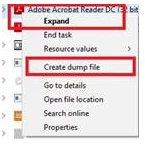
  • When the issue occurs right-click on Acrobat of Reader process to create dump files (screenshot attached)
      

Step 1: Download the Procmon tool from https://docs.microsoft.com/en-us/sysinternals/downloads/procmon

Step 2: launch procmon.exe.

Step 3: Set the below filter in procmon (optional ), do the required steps/ workflow and save the logs in the end.

The process dumps along with procmon logs will help us investigate the issue in detail. Once the logs are available, please upload the log files to either ( Dropbox, OneDrive, Google Drive or any other cloud option you have) and share the public link with us via private message:

How to send a private message: https://forums.adobe.com/thread/1184148?start=0&tstart=0

Tariq Dar

53 replies

Participant
October 16, 2019

In the past few days I have had the app on my teams mobile phones (both Apple and Android) start to do the same thing.  Wwe will open a document and start to fill & sign.  Then the app will freeze for a minute or so and all changes to the document are lost.  We need a solution to this fast!!!  It is killing us in the field and causing more work.  Please help!!

ls_rbls
Community Expert
Community Expert
October 18, 2019

Is this started happening after an update?


Does the PDF form that is crashing being shared simultaneously by many users in networked environment , or cloud storage service? Is is this one file that crashes or every PDF document?


Try having the creator of the form convert the form back to its original file format where it eas exported from. Like if it was an MS Word document, save the file to MS Word amd then convert back to PDF and see if this resolves part of the issue.


ls_rbls
Community Expert
Community Expert
November 7, 2019

MODIFIED REPLY:


From any available computer with Adobe Acrobat Pro DC, apply updates to your version of Acrobat PRO.


Then open the misbehaving PDF  and see if by converting the file  to MS Word , for example, and export back to PDF will eliminate the issue.


Just for trobleshooting purposes, You can also disbable or modify the settings to manual instead of Automatic in a few areas  of  the Acrobat Pro Preferences :


  • Automatic Thumbnail Pages embedding
  • Automatic Digital Signature Verification
  • In Trust Manager under Preferences, disable Automatic Adobe Approved Trust List (AATL)
  • Disable Optimize for fast Web view
  • Uncheck everything uner Accesibility
  • Then SaveAs Reader Extended and test the document again in your mobile device
  • Check if Convert to PDF setting for MS Word needs to be modified as well and lower the standards and presets


Ensure that you are able to compare and annotate observations if the problems manifests when you use the Adobe Acrobat mobile app while you're logged inwitg your user account or not logged in at all.

ls_rbls
Community Expert
Community Expert
October 6, 2019

Hi, 


++Adding to the voting suggestion, did you run the Compatibility Mode Troubleshooter and select an earlier version of Windows to host the AdobeAcrobat.exe file?

Bevi Chagnon - PubCom.com
Legend
October 7, 2019

I'm not sure why rolling back to a previous edition of Windows would help.

Given that this bug appeared 1.5 years ago, that would require a very deep rollback!

And given that we run many programs in my shop that require the latest builds, I'm not even going to attempt a rollback.

|    Bevi Chagnon   |  Designer, Trainer, & Technologist for Accessible Documents ||    PubCom |    Classes & Books for Accessible InDesign, PDFs & MS Office |
ls_rbls
Community Expert
Community Expert
October 7, 2019
Tracking. I see what you're saying. My suggestion comes from noting how many users here have expressed experiencing this issue as they migrate to Windows 10 from earlier versions of Windows. A lot of user threads also point out that they never seen this before the upgrade, that the Acrobat was working fine and then all of a sudden this happens. I remember one of your last replies in another thread about the monopoly. Microsoft have announced the end-of-support for many of their products and how they will move forward into 64bit technologies. Adobe on the other hand, have followed this trend but not for the Acrobat product. It is still a 32bit application that has been tested to run in 64 windows version. They only have a true 64bit version available for download for macOS. So, long answer short, It made sense to me that rather than a bug this looks more like a 33bit vs 64 bit compatibility issue (or a market share control war?) In which the users or consumer are paying the price literally. And in which case the compatibility troublshooter in Windows10 or even earlier versions, is convenient to try as it will to host only that misbehaving program in an environment where the acrobat product was known to work before without a problem to begin with
Bevi Chagnon - PubCom.com
Legend
October 6, 2019

This is still a problem in all versions of Acrobat running on Windows.

Post your comments here:

  • https://acrobat.uservoice.com/forums/590923-acrobat-for-windows-and-mac/suggestions/34968937-acrobat-dc-process-hangs
  • https://acrobat.uservoice.com/forums/590923-acrobat-for-windows-and-mac/suggestions/35190460-acrobat-pro-dc-hangs-not-responding-at-first-run
  • https://acrobat.uservoice.com/forums/590923-acrobat-for-windows-and-mac/suggestions/36353515-acrobat-dc-standard-hangs-while-loading-license-st


And VOTE!

Neither Adobe's engineers nor the marketing department monitor this help forum, but they do tally up the votes in UserVoice and decide what to work on, determined by the vote count.

So vote early and often. And tell your friends to vote, too.

|    Bevi Chagnon   |  Designer, Trainer, & Technologist for Accessible Documents ||    PubCom |    Classes & Books for Accessible InDesign, PDFs & MS Office |
Participant
October 6, 2019

I am having the exact same problem for more than 12 months. I have Adobe Acrobat DC 2015 installed with all updates and all Windows 10 upates. Double clicking, and clicking multiple times after that will not open a PDF file until after a long delay. Adobe is set as the default PDF program. I have uninstalled and reinstalled Adobe several times and no resolution the problem. I use the preview viewer pane in Windows Explorer. This issue is listed all over the internet in numerous forums and no resolution proposed works. Adobe needs to fix the bug. 


Using Adobe Acrobat Standard DC 2015 V 2015.006.30503

Participating Frequently
September 28, 2019

I finally solved the problem by uninstalling Adobe Acrobat Reader DC and using Microsoft Edge instead, try that method and you will thank me later 🙂


Adobe Acrobat Reader DC has been buggy for years now!

Participant
September 29, 2019
I'm not sure I'll be thanking anyone who recommends I use Microsoft Edge 😉
Participating Frequently
October 1, 2019

Trust me, MS Edge is a superb pdf reader...!

You can try Foxit reader, it is very good too.

Piontek
Inspiring
September 28, 2019

This issue is still existing in sep/oct 2019 with version 2019.012.20040.

Participant
September 26, 2019

I'm having the same issue.  It hangs for a minute or more every time I open the program.  None of the suggestions in this thread have helped.  Any real, permanent solution?

Participant
September 26, 2019

Same startup freezing issue here on v19.012.20040, though lately Windows 10 simply marks it as Not Responding and the duration is up to almost a minute now.

This is definitely an issue with the cloud authentication/verification and none of the suggestions provided here seem to help. It's something that needs to be addressed.

Bevi Chagnon - PubCom.com
Legend
September 26, 2019
Finding the same "hang" with v 19.012.20040. I'm teaching a class in Acrobat and it's taking 1.5 - 2 minutes before I have access to the left or right hand panels. Sometimes I can start scrolling through the document before then, but no access to thumbnails, tags, etc. panels on the left, nor Edit PDF, Accessibility, etc. tools on the right.
|    Bevi Chagnon   |  Designer, Trainer, & Technologist for Accessible Documents ||    PubCom |    Classes & Books for Accessible InDesign, PDFs & MS Office |
Bevi Chagnon - PubCom.com
Legend
September 26, 2019
Takes even longer for comments to populate the Comments panel.
|    Bevi Chagnon   |  Designer, Trainer, & Technologist for Accessible Documents ||    PubCom |    Classes & Books for Accessible InDesign, PDFs & MS Office |
Tariq AhmadCommunity ManagerCorrect answer
Community Manager
July 31, 2019

Hi all,

Sorry for the experience and thank you for bringing this to our notice. We appreciate your patience on this.

I would like to mention deleting Acrocef.exe is not an Adobe’s recommended solution or a workaround for this issue. Deleting the process might lead to malfunction of the various features of the product associated with the process. That being said, we are currently tracking this issue and will keep you posted. 

You may help us further by providing logs from your machine to investigate it further. For performance-related issues please follow the following steps carefully and help us with the logs:

  1. Logs from task manager:
  • Launch Adobe Acrobat Pro or Adobe Acrobat Reader.
  • Launch Task Manager, by right-clicking on the taskbar of the screen and choose Task Manager. Make sure you have the “Processes” tab available/clicked.
  • When the issue occurs right-click on Acrobat of Reader process to create dump files (screenshot attached)


Step 1: Download the Procmon tool from https://docs.microsoft.com/en-us/sysinternals/downloads/procmon

Step 2: launch procmon.exe.

Step 3: Set the below filter in procmon (optional ), do the required steps/ workflow and save the logs in the end.

The process dumps along with procmon logs will help us investigate the issue in detail. Once the logs are available, please upload the log files to either ( Dropbox, OneDrive, Google Drive or any other cloud option you have) and share the public link with us via private message:

How to send a private message: https://forums.adobe.com/thread/1184148?start=0&tstart=0

Tariq Dar

Participant
October 7, 2021

So, in summary, as per yourself: there is no solution, no fixing, customers need to undergo further work and, again, with no solutions on sight, send you reports so that we can understand what you are selling to us? Ridiculous... And would it be also a good idea to have DC pro uninstalled, however, not possinle too, ending up affecting our PC's... Arrogance, presumptiousness, ripp-off, what else you want to add to the list?

Participant
July 18, 2019

I'm using version 19.012.20035 and both reader and DC hang for several seconds every time I attempt to open the software, open or scroll a .pdf.

Very frustrating.

I first noticed it occurring after a Windows 10 update to Version 1903 Build 18362.239.

The acrobat software worked perfectly since I've had this HP desktop for about 2 years and the only recent change was the windows update but it could be a coincidence or even be the acrobat update itself.

Acrobat version 19.012.20034 was only released 5/14/2019 so the version 19.012.20035 that I am running must have only been released recently although would not explain all the others on this thread going back to February.