
New Participant
June 28, 2021
Answered

Adobe Acrobat Pro DC - Redaction tool not working

  • June 28, 2021
  • 14 replies
  • 78543 views

I continually have a problem with Adobe Acrobat Pro DC when I try to use the redaction tool. 


  • I select the text I want to redact 
  • I click 'Apply' 
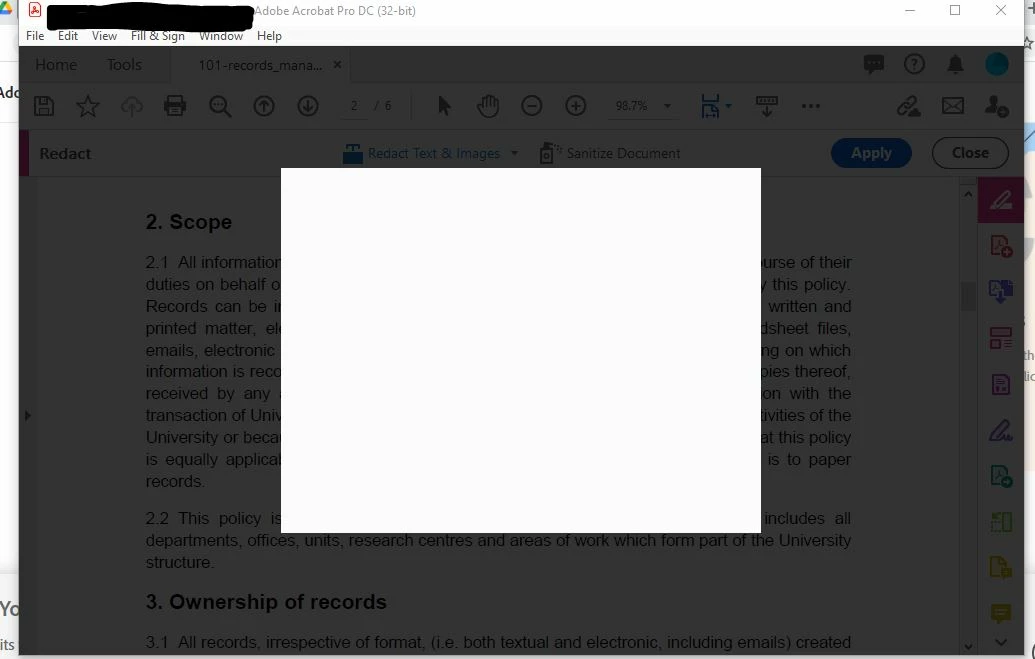
  • The pop-up which should appear (confirming redaction, etc.) appears as a blank box, and the entire programme basically freezes. I can do nothing else, except open my computer's Task Manager and click 'End Task' for Adobe Acrobat. 
    (See attached image.) 


This is a huge problem, since my role as an employee and my unit's function requires the ability to fully and securely redact on a daily basis.  


I am using Adobe Acrobat Pro DC - Version 2021.005.20048 


Can anyone help? 
 

Correct answer defaultrn3jqv0z3j3v

Got help from support and this worked!

  1. Click on the Print icon and select "Adobe PDF" as Printer
  2. Under the Print setting page select "Advance" and then 3. check the box "Print as Image" >> Ok
  3. Then print the PDF
  4. Save it to your system

14 replies

New Participant
November 29, 2021

I've tried the workaround and it won't save after I apply the JavaScript so I have to print with the redaction and then re-scan.  We redact hundreds of pages a week.  What is being done about this?

New Participant
November 30, 2021

I also am having many problems with redaction. Many of the items I am trying to redact are not found. I try various subsets of the text string and sometimes they work and sometimes not. It would be far easier at this point to print, mark out with a market pen, and scan.

New Participant
November 3, 2021

Has Adobe came up with a fix for this yet? The provided workaround is a little time consuming when having to work on 600 page documents.

Participating Frequently
July 31, 2024

Apparently they have not. It's August 2024 and still having same issue.


New Participant
October 12, 2021

I think I have a temporary solution to this. 

1. add JavaScript to the side pannel 

2. Click redact and highlight the areas you want redacted 

3. open the JavaScript tab then on the top of the page hit debugger 

4. In the bottom box paste the following :

this.applyRedactions(); 


5. Click CTRL and enter at the same time after pasting the above text

Participating Frequently
October 12, 2021

Thank you so much, this worked!

AkanchhaS8194121
Brainiac
June 28, 2021

Hi Joan,


Thanks for sharing the detailed information. 

There are couple of possibilities for such behaviour of Acrobat.

1- The document you have been working on and trying to redact content is secured. Which isn't letting you to complete the process. Open PDF>right click (Ctrl+D)>Document Properties>Security

and for testing, check with a different file. 

2- If this is the case with multiple files, then there's a slight change we need to make in the application's preferences settings. 

Navigate to Acrobat>Edit>Preferences>Security (Enhanced)>disable "Protected Mode at Startup", "Protected View" and "Enhanced Security">OK>close and reopen Acrobat.

Note: these changes are only for testing purpose. Once tested, please change it back to the previous setting. 


Let us know if any of the suggestion helps.


Thanks,

Akanchha 

New Participant
October 11, 2021

Hey, 


I have followed these steps yet I still have the issue. I have even re installed the program and this still happens!

Participating Frequently
October 12, 2021

I have the same problem. I have tried multiple documents and the same problem appears with every document, also have checked that the documents are not secured. I also disabled the settings in phase 2, but it has not solved the problem.