
Participant
June 28, 2021
Answered

Adobe Acrobat Pro DC - Redaction tool not working

  • June 28, 2021
  • 14 replies
  • 78848 views

I continually have a problem with Adobe Acrobat Pro DC when I try to use the redaction tool. 


  • I select the text I want to redact 
  • I click 'Apply' 
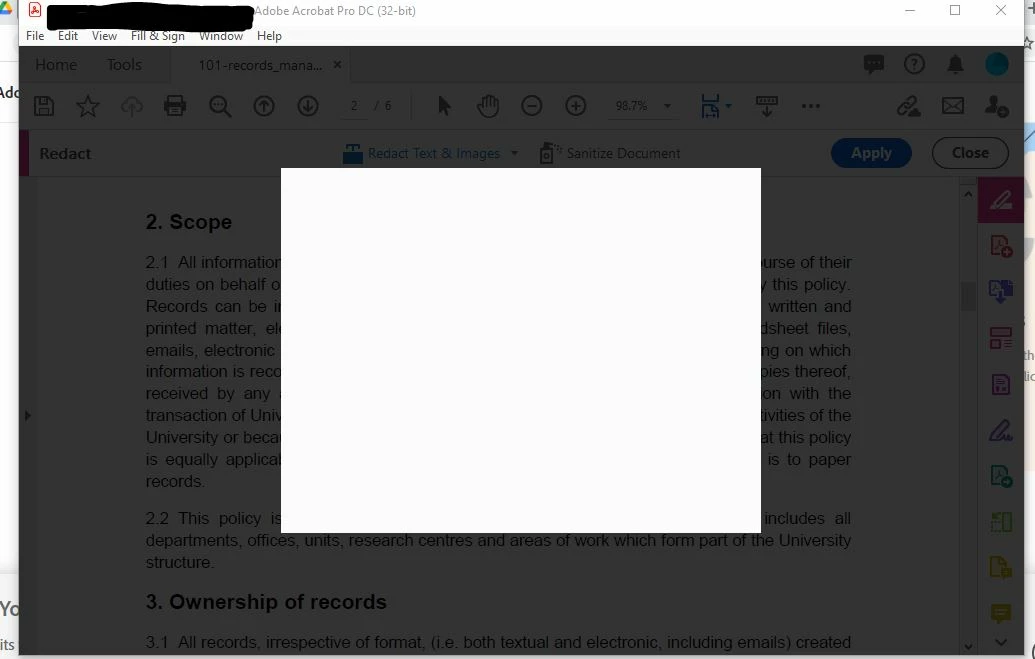
  • The pop-up which should appear (confirming redaction, etc.) appears as a blank box, and the entire programme basically freezes. I can do nothing else, except open my computer's Task Manager and click 'End Task' for Adobe Acrobat. 
    (See attached image.) 


This is a huge problem, since my role as an employee and my unit's function requires the ability to fully and securely redact on a daily basis.  


I am using Adobe Acrobat Pro DC - Version 2021.005.20048 


Can anyone help? 
 

Correct answer defaultrn3jqv0z3j3v

Got help from support and this worked!

  1. Click on the Print icon and select "Adobe PDF" as Printer
  2. Under the Print setting page select "Advance" and then 3. check the box "Print as Image" >> Ok
  3. Then print the PDF
  4. Save it to your system

14 replies

Participant
August 12, 2024

Could you please Print PDF the file and try to redact it.

steps to print to PDF:

  1. Click on the Print icon and select "Adobe PDF" as Printer
  2. Under the Print setting page select "Advance" and then 3. check the box "Print as Image" >> Ok
  3. Then print the PDF
  4. Save it to your system

Got help from support and this worked.

Participant
June 13, 2024

So, 3 years later and I'm having this issue.  I have tried every single thing here and none of it works.  Not the javascript.  Not the security preferences.  Not reinstalling the program.  Not changing the registry key.  NOTHING.  I have a 900 page document that needs to be redacted, and for what we pay for this program yearly, this feature should work.

defaultrn3jqv0z3j3vCorrect answer
Participant
August 12, 2024

Got help from support and this worked!

  1. Click on the Print icon and select "Adobe PDF" as Printer
  2. Under the Print setting page select "Advance" and then 3. check the box "Print as Image" >> Ok
  3. Then print the PDF
  4. Save it to your system
Participating Frequently
August 1, 2025

How is this the "correct answer" to the question about the redaction tool? Whiskey tango foxtrot? Even the forum has glitches.

Participant
February 9, 2024

I'm encountering the identical issue. When I click apply, a blank white box pops up and the entire system freezes. The only way out is through Task Manager and End Task. I've been using the redaction tool without any issues before, but now I'm facing the same problem as others have described in their posts. I've attempted the suggested remedies, but none have worked. Adobe, it's crucial to address and resolve all these bugs promptly!

Participating Frequently
February 8, 2024

Issue has been confirmed by Adobe as a corrupt registry entry that relates to AcroCEF.exe


Resolution is to delete the key:


HKEY_LOCAL_MACHINE\SOFTWARE\Microsoft\Windows NT\CurrentVersion\Image File Execution Options\AcroCEF.exe


Delete all sub keys as well


Fixed!


Participating Frequently
February 8, 2024

Oh, this key will return on subsequent updates if it starts to happen again.

Participant
October 31, 2023

Go into Preferences and then on the language tab select "Select at application start". Restart the application and select "English". Mine was set to "English with support for Arabic". Once I'd done this redaction worked. 

Participant
August 17, 2023

Same problem here. Also happens when trying to add signatures to an Acrobat document using the "Request E-signatures" tool and "Sign yourself” tool (on the “Fill & Sign" tool palette). Both generate a black box when trying to add signatures, similar to what happens when I click on the “Apply” button with redactions.


OS: macOS Monterey v12.6.8

Acrobat: Continuous Release Version 2023.003.20269


The suggested fixes I've tried so far:

  1. Uncheck "Enable Enhanced Security" (at Preferences->Security (Enhanced)).
  2. Uncheck both "Show online storage when opening files" and "Show online storage when saving files" (at Preferences->General).

Neither of the above fixes the problem.


I did have some success using the JavaScript debugger to execute the following script:


this.applyRedactions();


That JavaScript applied the redactions successfully, but I really just need the "Apply" button to work per its designed fuctionality. I'm working with Adobe Customer Care now, and will post back if anything they advise yields a proper solution.

Participant
August 25, 2023

Work-around solution (from Adobe Customer Support for me on macOS Monterey v12.6.8):


Navigate to the following folder and change the permissions for that folder (using the “Get Info” command; Command-i) to “Read & Write” (from “No Access”) for the “everyone” group.


/Library/Application Support/Adobe/Acrobat/DC/WebResources


Note: the Library folder near the start of the path specification above is not the user’s Library folder, nor is it the System’s Library folder. It’s the Library folder at root.


Hope this helps. Adobe Customer Support has identified this as a bug experinced by many (?) or at least several users. They expect to fix it in an update to Acrobat next month.

Participant
September 7, 2023

Good god, this has been driving me insane for the past month! Thank you so much!!

I can confirm this works on my M2 Macbook Pro on macOS Ventura 13.5.1.

Participant
March 3, 2023

All this is just dandy, well and good, when one has time to play with workarounds.  I'm on a time-sensitive, 2-day deadline with 327 pages needing redacts and hundreds of other documents to collect, preview, edit, and, from and with them, write more than 40 court-required responses for, and haven't the time to figure out how to make a program do what the program -- I PAID for -- is supposed to do!  Please get me a fast, working answer ASAP! 

Participant
April 17, 2023

I've been stuck with this for weeks, the following solution has fixed the problem:

Navigate to Acrobat>Edit>Preferences>Security (Enhanced)>disable "Protected Mode at Startup", "Protected View" and "Enhanced Security">OK>close and reopen Acrobat.

Hope it's not too late for you.

Participant
June 14, 2023

Thank you so much - this has driven me MAD - you are a superstar for this

Participant
January 25, 2023

One way I was able to solve this was to use the action wizard. I used the 'search and remove text'command, which lets you set phrases you want to remove followed by the 'apply redactions' command - this is where I was running into the bug previously, when trying to apply the redactions, however via this method I had no issues.


P.S. In my particular use case I had one repeated phrase I was trying to redact across multiple files. If your situation requires you to redact different phrases, it would require you to input them in the settings under the 'search and remove' command. 


Participant
January 10, 2023

I have the same problem for months now.

Acrobat Pro - Version 2022.001.20169 | 64-bit
Running on Microsoft Windows [Version 10.0.19044.2364]


Participant
January 22, 2024

For my company it's wasnt specifically related to just inserting .doc it was a little bit of everything. The blank white screen after authenticating, followed by the error that some features in adobe are unaviable, to redacting, to merging, to fill in sign. After working with Adobe the fix seemed way to simple but it did the trick for us! 

Adobe Support had me go to 
C:\Program Files\Adobe
Right Click Adobe DC
Click Properties
Click Security Tab
Click Advance
Remove both SID permission profiles starting with the letter "S" in our case it was 
S-1-15-3-1024-3635283841-2530182609-996808640-1887759898-3848208603-3313616867-983405619-2501854204
S-1-15-2-1980882837-3654086619-1222525990-3753702683-3075969641-4188866857-51130414

According to Adobe, these SID's are meant to be be removed after the install/update is completed. However for what ever reason for versions after the September release the SID's are remaining in the profiles and when launching Adobe it's defaulting to the Adobe SID's instead of the Entitled User. Adobe is working with Microsoft on this issue.


Participant
May 21, 2025

THANK YOU SO MUCH!  This did the trick for me, too!  Also, I'm not great with troubleshooting and/or repair, but with your perfectly detailed instructions I did it myself & got it on the first try.  You just saved me hours of workaround.

Participant
February 3, 2022

I am having exactly the same problem...I click apply, blank white box appears and everything freezes.  The only escape is Task Manager and 'End Task'.  I have used the redaction tool on a regular basis with no problem, but now I experience the same issue that other posts describe.  I have tried the suggested fixes with no success.  Adobe, please get your act together and fix all of these BUGS!

Participant
April 12, 2022

I too had the same problem and have tried almost all the fixes here.  Nothing worked.  Then, after I ended the task from Task Manager, I hit "More Details" in the Task Manager and saw that Acrobat and its related programs were still running.  I ended them all and then relaunched Acrobat again.  I was able to redact!