
Participating Frequently
August 2, 2017
Question

Adobe Acrobat Pro DC uses 45 GB of system memory!

  • August 2, 2017
  • 6 replies
  • 23174 views

Hello people,

A colleague of mine has a strange problem since a few weeks. Several times per day he gets the message that all of the system memory is used up and some open apps turn into pause. The workstation is also very slow when this occurred.

When I look in the Activity Monitor, I see that Acrobat Pro DC uses 45 GB of memory. That is twice as much memory as installed on the system! I guess the system uses virtual memory heavily at that time. That's why the system is slow. The strangest thing is, that there are no documents open in Acrobat. I have no idea why this program uses that much memory.

My colleague said to me that the problem started after the editing of a very large pdf file.

See the screenshot I've made of the Activity Monitor.
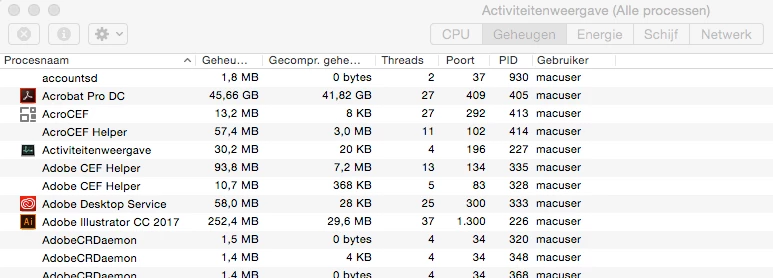
I've tried to solve this problem to uninstall Acrobat Pro and install the app again through the Adobe Desktop App, but after that the problem remains.

Maybe I have tot delete temporary files or delete cache files also, but in Preferences of Acrobat Pro I cannot find that option.

Maybe somebody recognizes this problem and knows the solution.

ThnX in advance!

Specs workstation and software:

iMac 27" 2011

RAM: 20 GB

OS: OSX Yosemite 10.10.5

Adobe CC 2017 (InDesign, Photoshop, Illustrator, Bridge, Acrobat Pro DC, Camera Raw CC)

This topic has been closed for replies.

6 replies

Participant
August 10, 2020

I have a similar problem with the Adobe Synchronizer background program on Mac OS Catalina (10.15.4) on a MacBook Pro (15" mid-2014). In 1-2 days of hanging around, it ate up 27GB of memory. See it at the top of this list in this screenshot of my Activity Monitor:

Participating Frequently
November 1, 2018

We worked for a couple of weeks without the Acrobat memory problem. But unfortunately the problem is 100% back.

I give up hope from a solution from Adobe. I guess the only solution is to make a new user account. <lot of work!>

mariab46542292
Participant
November 2, 2018

Hello,

I subscribe to Adobe Creative Cloud and did just today discover that Acrobat DC takes 16,3 GB ! And maybe this is why my computer is so slow?
Using Windows (not Mac) .
Should I uninstall Acrobat DC?

Dov Isaacs
Legend
November 5, 2018

As a 32-bit application, it is absolutely impossible for Acrobat to use anything more than about 3GB of Windows virtual memory at any one time. Exactly what are you looking at that claims 16.3GB is being used? Task Manager display? Perhaps you are looking at the Windows Control Panel Programs and Features? That could conceivably show a number that large as an amount of disk space used (not memory) and even that control panel number is known to be in error (issue with Microsoft's installer functionality).

          - Dov

- Dov Isaacs, former Adobe Principal Scientist (April 30, 1990 - May 30, 2021)
Participating Frequently
October 8, 2018

Finally! the memory problem on 2 of our Mac systems are gone. I've installed the 2 latest updates for Acrobat Pro. I'm running now on version 2019.008.200.71.

I've waited a whole year for this!

General wondering: Why doesn't the Adobe CC Desktop App notifies me when there is an update available for Acrobat Pro DC? To see if there's an update I must click on 'Help' in Acrobat and then select 'Check for updates'. This is weird, because all of the other Adobe apps will notifiy me through the Desktop App.

Adobe Employee
March 19, 2018

Hi,

Could you pls. let us know the answer to the following queries:

1. What all third party plugins are installed on the system apart from PitStop Pro

2. Does the issue happen after a certain workflow?

3. Does the issue depend on some specific type of PDFs (e.g. editing a large PDF as described in the posts above)

4. If possible could you pls. provide a sample PDF.

Thanks,

Vinod

Participating Frequently
March 22, 2018

Hi vdobhal,

ThnX for your reply.

Answering your questions:

1. There are no other (third party) plugins installed within Acrobat.

2. Not I’m aware of. My colleague uses Acrobat Pro mostly to examine pdf files. After this examination he closes the files.

After a (forces) quit of Acrobat Pro due to the memory leak he opens as a test 30 pdf files to see how the program reacts to this. I see that the amount of used memory in the Activity Monitor increases. This amount decreases to a normal level (approx. 130 MB) when he closes these files. A normal situation.

But after a while he checkes the Activity Monitor again and he sees that this memory amount has been raised to dozens of GB’s. At this point there are no pdf files open. Not a normal situation.

3. The workflow of my colleague contains a lot of small pdf files. Most of them are smaller then 1 MB.

I think this memory leak is not file size related. When you open a certain file and close them again, the program should release the used memory. Acrobat fails to do that.

4. See answer 3.

In the meanwhile we’ve switched on this workstation from Yosemite to Sierra to High Sierra. The problem persists.

I see on the internet that some users have the same problem. They decide to install a lower version of Acrobat Pro DC and the problem is gone. Of course this is an temporary solution.

My question to you: In the Adobe Desktop App I cannot install an other/older version of Acrobat. How can I install a lower version like Acrobat XI?

Participating Frequently
April 4, 2018

In addition to my previous reply:

This morning I received a message from another colleague from Prepress that her system suddenly had the same memory problem as my other colleague!

A few weeks ago she received a brand new iMac. I’ve copied her old workspace to the new workstation with the Migration Assistent. The source was the Time Machine backup I've made that day.

After this action all of the software worked perfectly for a couple of weeks.

The strangest thing: She had installed Enfocus Pitstop Pro 13 some years ago on her old system. Acrobat worked fine in combination with this plugin.

But after 2 weeks after this migration Acrobat shows the memory leak on the new system.

I have really no idea what causes this problem and how to solve this. For the moment I have advised my colleague to close Acrobat every time when she has finished a job. There are a lot of jobs during a day.

My questions:

1) is it still a coincidence that another system with Acrobat and Pitstop Pro installed shows the memory leak?

2) Is it possible to reset the preferences or cache of Acrobat? Maybe that solves the problem.

3) I ask this question again: How can I install a former version of Acrobat (2015 or XI) as a temporary workaround while waiting on a solution to this problem? The Adobe Desktop App doesn’t provide that option. (Why not?) We all work with the most expensive Adobe prescriptions and I see it as a service that Adobe in this case provides an older Installer of Acrobat. On the internet I read that a lot of people use this workaround with succes.

A month ago I did a chat with an Adobe employee to solve the problem. But he couldn’t.

Please help!

Participant
February 16, 2018

Hi guys,

same issue here with a MacPro (end 2013) with 32Go ram.

I think that the problem arrived with the last update of Acrobat DC.

So i Have changed it to the 2015 Acrobat DC version :

Architecture: x86_64

Build: 15.9.20069.159242

AGM: 4.30.61

CoolType: 5.14.5

JP2K: 1.2.2.35078

It seems to solve the problem. I'll tell you about later.

Participating Frequently
October 10, 2017

Due to a hardware problem the above mentioned iMac has being switched for latest iMac with OSX Sierra.

I transferred the user account via Time Machine to the new system and guess what: the Acrobat problem is still present.

At our prepress department with 6 users we all use the same software, but only one user suffers from this problem. Weird!

The only difference with the other iMacs is that several months ago on the concerning iMac Enfocus Pitstop Pro v13 was installed. The user removed this program after some weeks. I don't know if this is problem related.

In the meantime I did the following things:

I've uninstalled Acrobat Pro DC via the officiial Acrobat uninstaller, removed the remaining files and folders related to Acrobat and restarted the system. Then I've installed Acrobat again. As a test I've opened several pdf files ans close them again. At first glance the problem seems solved. But after half an hour the memory buildup starts again.

More Acrobat Pro DC users on the internet encounter this problem. See this link and this link.

Please help!

Participating Frequently
October 26, 2017

I think I found the solution of this problem.


Since on our department only one workstation suffers from this problem ánd this iMac is the only workstation with an uninstalled plugin of Enfocus Pitstop Pro 13, I’ve searched in the system folder and user folder for Pitstop installation residue on the system, based on this tutorial from Enfocus.

I found some files and folders that didn’t trashed during uninstall of this plugin. So I removed them manually, emptied the trash an restarted the system.

After one week problemfree working with the system I can state that the problem finally has been solved!

I don't know in this case if I must blame Enfocus for an incomplete uninstall procedure or Adobe for a bad protection in Acrobat when third party software is being (un)installed.

Participating Frequently
November 10, 2017

The memory leak problem is 100% back. ;-(

My colleague worked problem free for a week. I've installed CC 2018 and after this install Acrobat becomes very memory hungry again. (I don't know if this action is related to the problem.)

Back to square one.

Adobe help us please!