
Participant
July 19, 2023
Answered

adobe acrobat pro placing form fields wont go where I am placing. very choppy not smooth placement

  • July 19, 2023
  • 1 reply
  • 412 views

so I create form fill documents all the time and for some reason now when I try to place a text box or any other form idem like a checkbox etc... the box clicks outside of where i am trying to place it vesus neatly allowing me to match the boarders in the place i want to place the field. i expand and so on but it randomly stopp working

thi sis adobe acorbat pro on a pc. again worked fince and now it seems there is an invisable grid where it wont let me place the box neatly where i want it to go.


Please help!
This topic has been closed for replies.
Correct answer Thom Parker

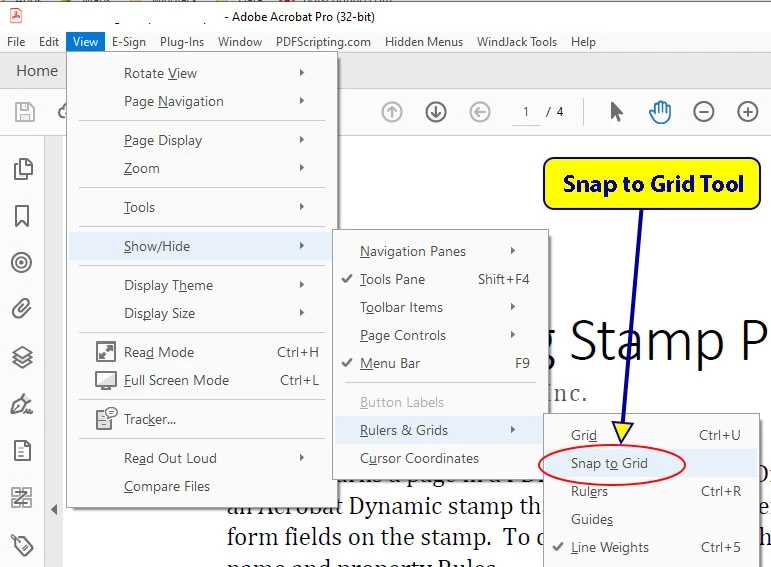
Turn Off the Snap to Grid Tool


1 reply

Thom Parker
Community Expert
Thom ParkerCommunity ExpertCorrect answer
Community Expert
July 19, 2023

Turn Off the Snap to Grid Tool


Thom Parker - Software Developer at PDFScriptingUse the Acrobat JavaScript Reference early and often
Participant
July 19, 2023

you are amazing! thank you its fixed!


Luis

Thom Parker
Community Expert
Community Expert
July 19, 2023

Please mark as "Correct Answer"


Thom Parker - Software Developer at PDFScriptingUse the Acrobat JavaScript Reference early and often