
Participant
January 23, 2018
Answered

Adobe Acrobat Reader DC - Anzahl der Exemplare setzt sich immer wieder auf 4

  • January 23, 2018
  • 1 reply
  • 1506 views

Hallo!

ich habe derzeit folgendes Problem an einem bereits seit einigen Jahren zuverlässig funktionierendem System (Produktivsystem):

Öffnen einer PDF --> Datei --> Drucken --> Hier steht bei Exemplare die Anzahl 4

--> Klicken auf Abbrechen und erneutes Aufrufen des Druckmenüs --> nun steht bei der Anzahl der Exemplare 1

Das Problem ist reproduzierbar.

Das manuelle setzen der Anzahl der Exemplare funktioniert nur für den jeweiligen Druck. Es ist egal, wie viel Zeit ich Acrobat gebe, bevor ich das Druckmenü in oben beschriebener Weise öffne. Unabhängig vom Druck tritt das oben Beschriebene auf.

Die Problematik macht sich massiv beim Schnelldruck aus Mails heraus bemerkbar. Es geht hier jedoch nicht um den Aufruf von Acrobat, sondern um das unabhängig auftretende Problem mit der Exemplarzahl. Deinstallation incl. der vollständigen Bereinigung der Registry bezüglich Acrobat und Löschen aller Verzeichnisse von Acrobat mit anschließender Neuinstallation brachte genau das selbe Phänomen.

Kann mir jemand einen Tipp zur Problembeseitigung geben?

Danke und viele Grüße!
This topic has been closed for replies.
Correct answer Adorobat

Hi Mrwhitebread,

Sorry for the delay in response.

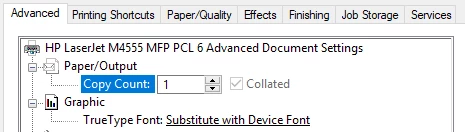
Are you still facing this issue? If yes, try setting the number of copies by going into printer's properties and check if that changes this behavior. Click Properties next to printer under Print dialogue. Below is a sample screenshot of the copies option available under Advanced tab:

Also, check if Reader is updated to the latest patch by clicking "check for updates" option under Help menu.

Could you let us know dot version of Reader installed on the machine: Identify the product and its version for Acrobat and Reader DC And, the operating system you are using- Mac/Windows?

Thanks,

Shivam

1 reply

Adorobat
AdorobatCorrect answer
Participating Frequently
March 27, 2018

Hi Mrwhitebread,

Sorry for the delay in response.

Are you still facing this issue? If yes, try setting the number of copies by going into printer's properties and check if that changes this behavior. Click Properties next to printer under Print dialogue. Below is a sample screenshot of the copies option available under Advanced tab:

Also, check if Reader is updated to the latest patch by clicking "check for updates" option under Help menu.

Could you let us know dot version of Reader installed on the machine: Identify the product and its version for Acrobat and Reader DC And, the operating system you are using- Mac/Windows?

Thanks,

Shivam