


- Home
- Acrobat Reader
- Discussions
- Adobe Acrobat Reader DC trava ao clicar em Assinar
- Adobe Acrobat Reader DC trava ao clicar em Assinar
Adobe Acrobat Reader DC trava ao clicar em Assinar

Copy link to clipboard
Copied
Olá,
Estou tentando assinar um arquivo pdf com a assinatura digital, porém ao clicar em "Assinar" o sistema trava, ou seja, ele para não abre a caixa para salvar o arquivo.
Na imagem abaixo me refiro a opção que clico e nada acontece

A tela que deveria abrir seria a seguinte:

OBS: Desisntalei e instalei o Adobe, também já reisntalei o certificado mas não obtive sucesso.


 8
Replies
8
8
Replies
8




Copy link to clipboard
Copied
Thank you for reaching out.
Could you please confirm if this happens with all the PDFs you try to add signatures to?
Did you try creating another digital signature and check if that also crashes the application?
Share the Acrobat and OS versions on the machine.
It would be helpful if you could share the screen recording of the issue.
Thanks,
Meenakshi
Copy link to clipboard
Copied
Sim está acontecendo em todos os PDFs que tento assinar com o certificado sefanet, já entrei em contato com eles e todos os certificados estão válidos.
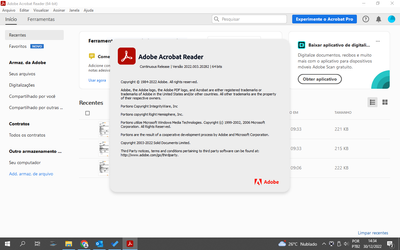
Já tentei criar outra assinatura digital porém não funciona trava quando seleciono assinar, estava utilizando Windows 10 e não estava funcionando, formatei para o Windows 11, estou utilizando a ultima versão do adobe
Copy link to clipboard
Copied
Teria algum contato que posso te enviar o vídeo do erro e tenha um retorno mais rapido

Copy link to clipboard
Copied
estou com o mesmo erro, poderia me orientar em como corrigilo?


Copy link to clipboard
Copied
[MOVED TO THE ACROBAT READER DISCUSSIONS]
Acrobate du PDF, InDesigner et Photoshopographe

Copy link to clipboard
Copied
Im in this same problem, id like the solution
Copy link to clipboard
Copied
teve alguma respostas?

Copy link to clipboard
Copied
Hello @moesio_reis
I hope you are doing well. We are sorry for the trouble and for the delayed response.
Could you please share more details about the issue? Is Acrobat crashing when you try to add a digital signature? Is it occurring with all the PDFs or with a specific PDF? Are you on a Mac or a Windows machine, and what is the version?
Please ensure you have the latest version of Acrobat installed on the machine: 25.001.20630, Planned update, Aug 18, 2025. Check for any pending updates from the Menu > help > check for updates, install the updates, restart the app and the machine, and try again.
Delete Signature Cache Files. Corrupted signature cache files can cause crashes. Try deleting these:
Delete files like:
acrobat_fss_signature_initials
acrobat_fss_signature_initialsi
acrobat_fss_signature_initialsk
Recreate the Digital Signature, and try again.
Turn Off Protected Mode (Temporarily). Open Menu→ Preferences → Enhanced Security. Uncheck “Enable Protected Mode at startup” and “Enhanced Security”, then click OK and reboot. After testing, re-enable them for security.
Clean Installation (If Needed). If the issue persists, uninstall Acrobat and use Adobe’s Cleaner Tool to remove the remaining traces. Reinstall Acrobat.
Let us know how it goes.
Thanks,
Anand Sri.


Get ready! An upgraded Adobe Community experience is coming in January.
Learn more
 AdChoices