
Participant
June 10, 2025
Question

Adobe Acrobat shuts down. Sends request to admin

  • June 10, 2025
  • 1 reply
  • 455 views

Hi, 


I am logged into my Adobe account and when I open a PDF in Adobe Acrobat Reader, I get a message saying a request has been sent to the admin -- I'm the admin and I do not get any emails. I click close on the pop-up message (below) and Adobe shuts down. Has anyone come across this before?
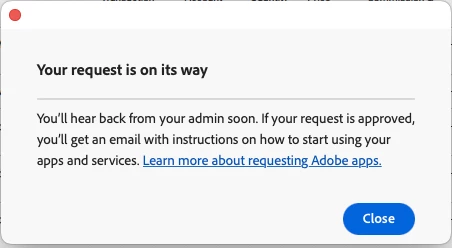


For what it's worth, I have an Adobe Cloud account.

1 reply

Participant
June 11, 2025

Hello!

It sounds incredibly frustrating to be locked out of Adobe Acrobat Reader by an admin request, especially when you're the administrator and aren't receiving any emails! This typically points to a glitch with Adobe's licensing or your local user profile permissions, rather than an actual admin approval process. The software thinks it needs external permission, but the system for granting it is broken.

Here's what you should try:

First, ensure you're fully logged in and updated: open your Adobe Creative Cloud desktop app and make sure you're signed in and all your Adobe apps, especially Acrobat Reader, are updated.  HumanToDog
Next, try running Acrobat Reader as an administrator. You can do this by right-clicking the Acrobat Reader icon and selecting "Run as administrator."
If that doesn't work, consider repairing or reinstalling the application. Go to the Creative Cloud app, find Acrobat Reader, and look for an option to "Manage" or "Repair" the installation. If all else fails, a clean uninstall and reinstall of Acrobat Reader (downloading the latest version directly from Adobe's website) often resolves these kinds of deep-seated permission issues. 

Meenakshi_Negi
Legend
June 13, 2025

Hi stahl78,


Thank you for reaching out, and sorry about the trouble.


Please let us know if you get this message only in the Acrobat Reader application. Are you using any other Adobe application on the machine? If so, please check if you can access it.


In the meantime, please check if you can access the Acrobat web account with the Adobe ID. Open the link https://adobe.ly/4l7VPPK and sign in using your Adobe credentials.


Let us know how it goes.


Thanks,

Meenakshi