
Participant
December 6, 2022
Answered

Adobe Acrobat XI Pro keeps crashing when we open it

  • December 6, 2022
  • 3 replies
  • 3619 views

New PC, installed some other apps before it. Installed XI, all good, open up an Adobe document and within 5 seconds, it shuts down. Event viewer showing the following

~~~~~~~~~~~~~~~~~~~~~~~~~~~~~~~~~~~~~~~~~~~~~~~~~~~~~~~~~~~~~~~~~~~~~~~~~~

Fault bucket 107886285922, type 1

Event Name: APPCRASH

Response: Not available

Cab Id: 0


Problem signature:

P1: Acrobat.exe

P2: 11.0.0.379

P3: 505fd1ce

P4: Acrobat.dll

P5: 11.0.0.379

P6: 505fd1b6

P7: c000041d

P8: 00c57530

P9:

P10:


Attached files:

\\?\C:\ProgramData\Microsoft\Windows\WER\Temp\WER5535.tmp.dmp

\\?\C:\ProgramData\Microsoft\Windows\WER\Temp\WER567F.tmp.WERInternalMetadata.xml

\\?\C:\ProgramData\Microsoft\Windows\WER\Temp\WER569F.tmp.xml

\\?\C:\ProgramData\Microsoft\Windows\WER\Temp\WER56AE.tmp.csv

\\?\C:\ProgramData\Microsoft\Windows\WER\Temp\WER56CF.tmp.txt


These files may be available here:

\\?\C:\ProgramData\Microsoft\Windows\WER\ReportArchive\AppCrash_Acrobat.exe_bb4e88e2df8811d4447681669c21c7683dae2114_a7294721_095dba03-81fc-4674-9a95-8a1c4fd99253


Analysis symbol:

Rechecking for solution: 0

Report Id: 1211e744-aead-4e66-9615-c8c398f962e9

Report Status: 268435456

Hashed bucket: 01a01c78f535909b158e0493e77d2208

Cab Guid: 0


~~~~~~~~~~~~~~~~~~~~~~~~~~~~~~~~~~~~~~~~~~~~~~~~~~~~~~~~~~~~~~~~~~~~~~~~~~


Faulting application name: Acrobat.exe, version: 11.0.0.379, time stamp: 0x505fd1ce

Faulting module name: Acrobat.dll, version: 11.0.0.379, time stamp: 0x505fd1b6

Exception code: 0xc0000005

Fault offset: 0x00c57530

Faulting process id: 0x23d0

Faulting application start time: 0x01d909b46a840599

Faulting application path: C:\Program Files (x86)\Adobe\Acrobat 11.0\Acrobat\Acrobat.exe

Faulting module path: C:\Program Files (x86)\Adobe\Acrobat 11.0\Acrobat\Acrobat.dll

Report Id: 8ab5769a-441c-478d-b548-f241e27bf7c2

Faulting package full name:

Faulting package-relative application ID:

~~~~~~~~~~~~~~~~~~~~~~~~~~~~~~~~~~~~~~~~~~~~~~~~~~~~~~~~~~~~~~~~~~~~~~~~~~

So then I figured I needed to update it to work with the latest version of Win10 and when I did that, I got this.
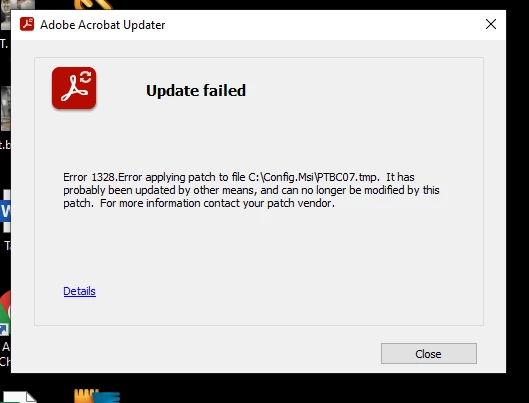


Then I found this document

https://helpx.adobe.com/gr_en/acrobat/kb/error-1328-applying-patch-to-file.html#

Followed the steps and after all of that, still have the same issue.

Is it time to upgrade to the cloud version, away from the desktop version? My installation (same version of software) is working just fine


This topic has been closed for replies.
Correct answer try67

What's your OS version? Acrobat XI is an old and unsupported version, and is no longer compatible with Windows 10 or newer, or any Mac OS version. To increase the chances of it working properly make sure you have all updates installed (up to 11.0.23) and run it in Compatibility Mode with an earlier OS, like Windows 7.

Updates are available here:
ftp://ftp.adobe.com/pub/adobe/acrobat/win/11.x/
(You must use a dedicated FTP client to open the link, it won't work in most browsers.)


And there's no "cloud" version of Acrobat. All versions of it run on the local computer. The DC version is subscription-based, though, so you must have internet access for the subscription to be validated, from time to time.

3 replies

Participant
February 17, 2024
Legend
December 6, 2022

The original release 11.0.0 will crash (in any Windows system, not just Windows 10). You need to get it up to date for sure. The message suggests you didn't use the standard installer for 11.0. Where is that from?

Participant
December 7, 2022

it was a boxed version that was purchased from eBay I beleive. All legit. Confirmed the serial number with Adobe support after we purchased it just to make sure.

try67
Community Expert
Community Expert
December 7, 2022

Neither of those things mean it's legit. In fact, being sold on eBay is a strong indicator it's not...

But if Adobe accepted your s/n then it should be fine. Either way, you have to install all available updates.

try67
Community Expert
try67Community ExpertCorrect answer
Community Expert
December 6, 2022

What's your OS version? Acrobat XI is an old and unsupported version, and is no longer compatible with Windows 10 or newer, or any Mac OS version. To increase the chances of it working properly make sure you have all updates installed (up to 11.0.23) and run it in Compatibility Mode with an earlier OS, like Windows 7.

Updates are available here:
ftp://ftp.adobe.com/pub/adobe/acrobat/win/11.x/
(You must use a dedicated FTP client to open the link, it won't work in most browsers.)


And there's no "cloud" version of Acrobat. All versions of it run on the local computer. The DC version is subscription-based, though, so you must have internet access for the subscription to be validated, from time to time.

Participant
December 7, 2022

thank you for that suggestion, just downloading the update and will give it a go