
Participant
March 11, 2025
Answered

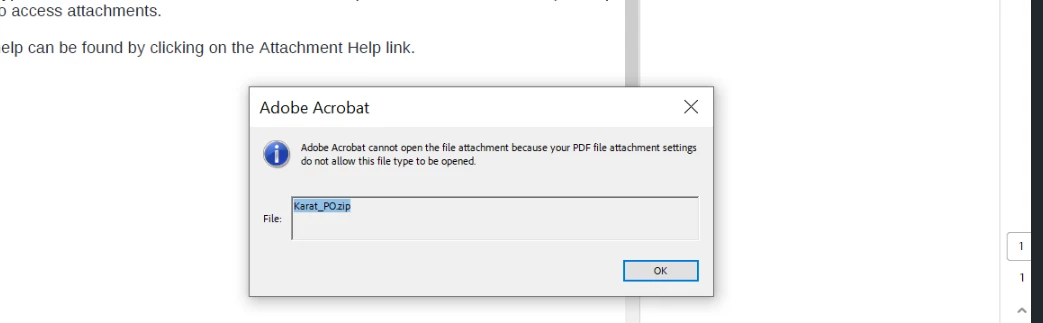
Adobe cannot open the file attachment because your pdf file attachment settings do not allow

  • March 11, 2025
  • 3 replies
  • 2628 views

Hi I am getting this error when using zip with Adobe, I am looking at this old thread here: 

Other's say opening zip files in Adobe will not work, just wanted confirmation if that is still true? Other's recommended editing the Registry to allow Zip files to be opened in Acrobat DC.  Can you help? 
Correct answer Tariq Ahmad

Hi @it_8499


Thank you for reaching out. 

Acrobat won't open a zip file, however, it allows you to download the file and then unzip it. Also, check the "Add attachment" section here: https://adobe.ly/3GTJ5Nz and check the "Caution" note.


Check this option to download the attachment and then open it, and as @creative explorer mentioned, you need to check if you are allowed to work with this type of files


~Tariq

3 replies

JR Boulay
Community Expert
Community Expert
May 6, 2025

When an attachment is placed in Acrobat, it is automatically zipped, so there's no need to do this beforehand.

Acrobate du PDF, InDesigner et Photoshopographe
Tariq AhmadCommunity ManagerCorrect answer
Community Manager
May 6, 2025

Hi @it_8499


Thank you for reaching out. 

Acrobat won't open a zip file, however, it allows you to download the file and then unzip it. Also, check the "Add attachment" section here: https://adobe.ly/3GTJ5Nz and check the "Caution" note.


Check this option to download the attachment and then open it, and as @creative explorer mentioned, you need to check if you are allowed to work with this type of files


~Tariq

creative explorer
Community Expert
Community Expert
March 13, 2025

@it_8499 if you have already tried what was suggested in that post and nothing worked, I would suggest asking your IT team. I know at my workplace, certain files we can't download. Some of us are using VPN, and some aren't, but this error message may indicates that your organization's security policies are preventing you from accessing the file. This is typically due to restrictions set by your IT department to protect sensitive data. The most direct solution is to contact your system administrator or IT support team. They can explain the specific policy in place, determine if the file should be accessible, and potentially adjust the policy or provide you with an alternative method to access the document. In some cases, they might need to move the file to a different location or grant you specific permissions. If the file is legitimate and necessary for your work, they can help you navigate the restrictions and ensure you can access it securely.

m