
Adobe Extension in Google Chrome Toolbar switching?!?!
Hey Guys,
i got one big Problem. I just installed the Adobe Reader Extension on my computer in the Google Chrome Browser. First it works fine, since i tested by the customer system.
Mayber Adobe got a Problem or i did a failure thing.
The Toolbar items are on currently 2 PC not exactly the same. I tested it addionally on a Windows Server. Downloaded Google Chrome and the Extension.
On my Computer it got these Buttons like "Start in Desktop App" behind it "Tools". All these buttons I'ved never seen on the second PC.
There are no differents between the computers.
We got the same Windows Version with same Build.
We got the same Chrome Version and same Extension Version
We got same local Adobe Reader Version with MUI about our Company
Same config on the Chrome such as for the Extension to open PDFs with Adobe Reader.
Same config for standard PDF App
PC who works with:

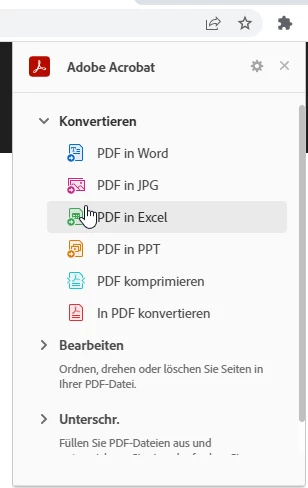
Pc who don't works with:

The Extension Manuel on this PC is much shorter then as on the Pc who works.
It seems like that there are other extensions used but they are the same.
I dont know why.
Thanks forward for help in this case!
Best Regards!
 AdChoices