
Participant
November 23, 2024
Question

Adobe Form Checkbox Condition Question

  • November 23, 2024
  • 2 replies
  • 133 views

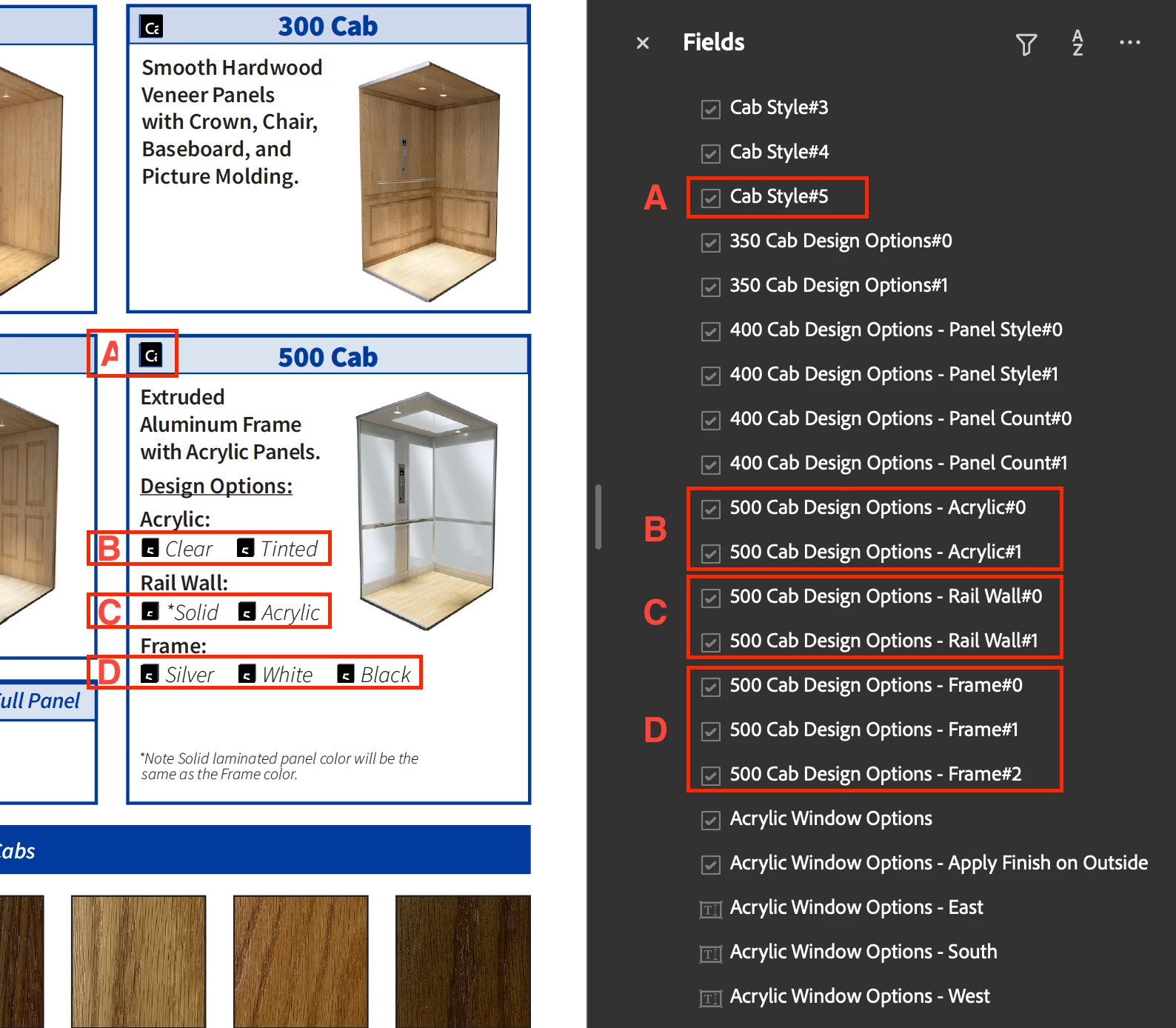
I'm having an issue figuring out how to disable a set of checkboxes unless its parent checkbox is checked. I only want the checkboxes in lines B, C, and D to be enabled if checkbox A is checked. If checkbox A is unchecked, anything in lines B, C, and D should reset. I've attached a screenshot below. Thank you for your help!
 

This topic has been closed for replies.

2 replies

try67
Community Expert
Community Expert
November 23, 2024

You can use this code as the Mouse Up event of the first check-box:


var subFields = ["500 Cab Design Options - Acrylic", "500 Cab Design Options - Rail Wall", "500 Cab Design Options - Frame"];
if (event.target.valueAsString=="Off") {
	for (var i in subFields) this.getField(subFields[i]).readonly = true;
	this.resetForm(subFields);
} else {
	for (var i in subFields) this.getField(subFields[i]).readonly = false;
}


Edited: Small mistakes fixed in the code

PDF Automation Station
Community Expert
Community Expert
November 23, 2024

What is the export value of Cab Style#5?

Participant
November 23, 2024

Thank you for the quick reply! Listing name first, followed by export value (ex. Name, Export Value):


Checkbox A:

Cab Style; 500 Cab


Checkbox B:

500 Cab Design Options - Acrylic; Clear

500 Cab Design Options - Acrylic; Tinted


Checkbox C:

500 Cab Design Options - Rail Wall; Solid

500 Cab Design Options - Rail Wall; Acrylic


Checkbox 😧

500 Cab Design Options - Frame; Silver

500 Cab Design Options - Frame; White

500 Cab Design Options - Frame; Black