
Participant
April 12, 2024
Answered

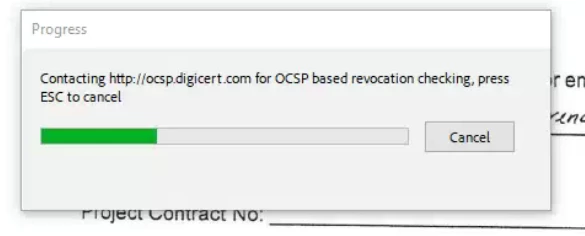
Adobe Freezing: Contacting http://ocsp.digicert.com for OCSP based revocation checking

  • April 12, 2024
  • 8 replies
  • 44671 views

Running into an issue with all of our users having this pop up and freezing their Adobe Pro, they have to exit out of Adobe via Task Manager to allow processes to continue. 

I did find a workaround for this by disabling protected mode (Edit>Preferences>Security (Enhanced)) but was wondering if there was a better way to handle this as we have quite a bit of users running into the same issue?
Any suggestions greatly appreciated.
Correct answer chintan_2471

Thank you so much! I spent a lot of time cleaning and reinstalling without finding a solution. Thanks to your tip, I'm now able to use it again without crashing


You can also Whitelist following Digicert IP addresses to your firewall and it works too.

  • 192.229.211.108
  • 192.229.221.95
  • 152.195.38.76
  • 192.16.49.85

New Dedicated IP Addresses (digicert.com)


8 replies

Participant
October 23, 2024

Absolutely anoying every time I open PDF thinking of canceling Adobe ....cant belive it .....and its not ADOBE thge supplier trying to repair fix and wasting time trying to resolve the issue its us 

Participant
September 12, 2024

Come on Adobe; I am paying an arm and a leg for Adobe Acrobat and this issue is just not going away.  I can't bill my clients for time wasted trying to edit a PDF they sent me !

Participant
September 12, 2024

Actually, I found the fix. But I had to change that setting on each of my users.

Note: You need to be quick to change this setting before the message appears. You have about 10 to 15 seconds to make these changes.


  1. Open PDF
  2. Click on Menu on top left of the screen and select Preferences.


3. In the Preferences window, click on Signatures at the bottom. Under the Verification section, click on the More button.


4. In the Signature Verification Preferences window, uncheck all the checkboxes shown in the screenshot below. Click OK on the current screen and then click OK on the Preferences screen. Restart Adobe Acrobat, and you should no longer see the popup.


Participant
September 13, 2024

Thank you so much! I spent a lot of time cleaning and reinstalling without finding a solution. Thanks to your tip, I'm now able to use it again without crashing

Participant
June 27, 2024

I also had same issue, it is resolved  by  changing  " disable new acrobat " 

Participant
September 3, 2024

I just did that and it didn't work.

Participant
September 13, 2024

I have used this method, but later I found good fix , 

I found that in firewall one of the ip of digital was blocked. In host I used another ip which was working.

https://knowledge.digicert.com/alerts/new-dedicated-ip-addresses


Participant
June 15, 2024

Adobe Freezing issue often occurs due to the software contacting for OCSP-based revocation checks, causing delays or disruptions in operations. Consider troubleshooting network settings or Adobe configurations to resolve the issue promptly.

Participant
June 15, 2024

I've had exactly the same problem for half a year... I stopped using Adobe...

Participant
June 3, 2024

I just started having the same issue. Adobe, what happened and have you figured out a solution yet??


Amal.
Legend
June 3, 2024

Hi there


Have you tried the troubleshooting steps shared above?


Let us know how it goes.


~Amal

Participant
September 3, 2024

I followed same steps above and it didn't work for me.
I uninstalled adobe and creative cloud then restarted by computer and install Adobe standard by it self.
I've also disabled new acrobat but that din't help. It still freezing.


Participant
May 9, 2024

I have exactly the same isssue. 😞

Participating Frequently
April 18, 2024

ADOBE Acrobat reader hangs forever with trying to contact http://ocsp.digicert.com  on opening certain pdf files.  Cannot access the PDF file for even viewing.  How do I fix this for all time.  How do I stop this so that I can open the PDF file.   tried downloading file again with new name.  it is fillable.  I can print to PDF the file and open it but it is no longer fillable.  Win10  64 bit   adobe acrobat reader.  fully updated windows, and adobe up to date.   


Amal.
Legend
April 22, 2024

Hi there,


Hope you are doing well and thanks for reaching out.


Plese go through the correct answer marked in the similar discussion https://adobe.ly/3UdFE7o and see if that works for you.


Let us know how it goes.


~Amal

Participant
May 9, 2024

No, it is not working. Link for adobe cleanup tool not working. Uninstall and install adobe do not work.