

S. Brewer
Participant
January 4, 2023
Answered

Adobe javascript for auto populate dollars field based text cell that user enters name in

  • January 4, 2023
  • 4 replies
  • 856 views

Community I am new here and working on a file to benefit opur department.  Google and Youtube have been helpful for somethings, but I cannot seem to locate a basic script for my project.  Basically I have three word/text boxes one (name/TRVL 2 Name), two (dollar amount/TRVL 1 Trans Cost), and three (TRVL 2 Trans Cost) field to copy the dollar amount from word/text box two into.  I only want the dollar amount to appear if TRVL 2 Name box has a name typed in it requardless of length (Bob Brewer, Mike Brewer, Michael Brewer, etc.) and if not then remains blank.

I have tried multiple ways, but I am not proficient in this realm of javascript and as mentioned I cannot find anything that works on my test page.
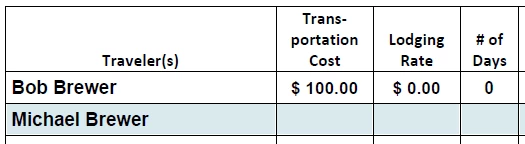
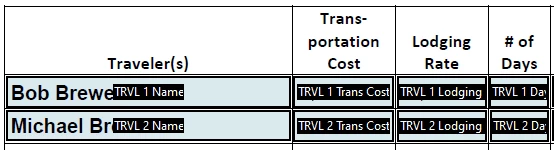
Thanks for any and all guidance.  Hopefully this can be done and assist other people with the same issue.

Shannon Brewer

    This topic has been closed for replies.
    Correct answer Nesa Nurani

    So you want to show value from field "TRVL 1 Trans Cost" in field "TRVL 2 Trans Cost" only if field "TRVL 2 Name" is not empty otherwise field "TRVL 2 Trans Cost" is empty?

    You can use this in "TRVL 2 Trans Cost" field as custom calculation script:

    var Tname = this.getField("TRVL 2 Name").valueAsString;
    var Tcost = this.getField("TRVL 1 Trans Cost").value;
    if(Tname != "")
    event.value = Tcost;
    else
    event.value = "";

    4 replies

    Nesa Nurani
    Community Expert
    Nesa NuraniCommunity ExpertCorrect answer
    Community Expert
    January 4, 2023

    So you want to show value from field "TRVL 1 Trans Cost" in field "TRVL 2 Trans Cost" only if field "TRVL 2 Name" is not empty otherwise field "TRVL 2 Trans Cost" is empty?

    You can use this in "TRVL 2 Trans Cost" field as custom calculation script:

    var Tname = this.getField("TRVL 2 Name").valueAsString;
    var Tcost = this.getField("TRVL 1 Trans Cost").value;
    if(Tname != "")
    event.value = Tcost;
    else
    event.value = "";

    S. Brewer
    S. BrewerAuthor
    Participant
    January 4, 2023

    Nesa Nurani,

    THANK YOU!  This worked very much for sharing your knowledge. Now I can finalize my document.  

    Shannon

    S. Brewer
    S. BrewerAuthor
    Participant
    January 4, 2023

    I apologize my Government computer has Adobe Acrobat Pro XI.

    kglad
    Community Expert
    Community Expert
    January 4, 2023

    <moved from cc services>

    Nancy OShea
    Community Expert
    Community Expert
    January 4, 2023

    [A moderator moved this from Using the Community.]


    Which Adobe App or Service are you using?


    Nancy O'Shea— Product User & Community Expert
    John T Smith
    Community Expert
    Community Expert
    January 4, 2023

    When you post a question you always need to tell the Adobe program you are using
    There are MANY programs in a full subscription, plus other non-subscription programs
    Please post the exact name of the Adobe program you use so a Moderator may move this message to that forum