Participating Frequently
July 12, 2017
Answered

Adobe PDF Printer files larger using Windows 10 than Windows 7

  • July 12, 2017
  • 3 replies
  • 8599 views

Hello,

I save files from a program called eDrawings using the Adobe PDF printer, and even with all my settings the same (same dpi, etc), file sizes are consistently 20-30% larger when saved on my Windows 10 system than they were on my previous Windows 7 system. Even after optimizing the files, they are still larger. Does anyone know why the operating system would increase the file size even with identical settings?

Thanks!

This topic has been closed for replies.
Correct answer Dov Isaacs

I'm attaching the files you provided for others to see.

However, looking at the files themselves, it is very easy to see the difference.

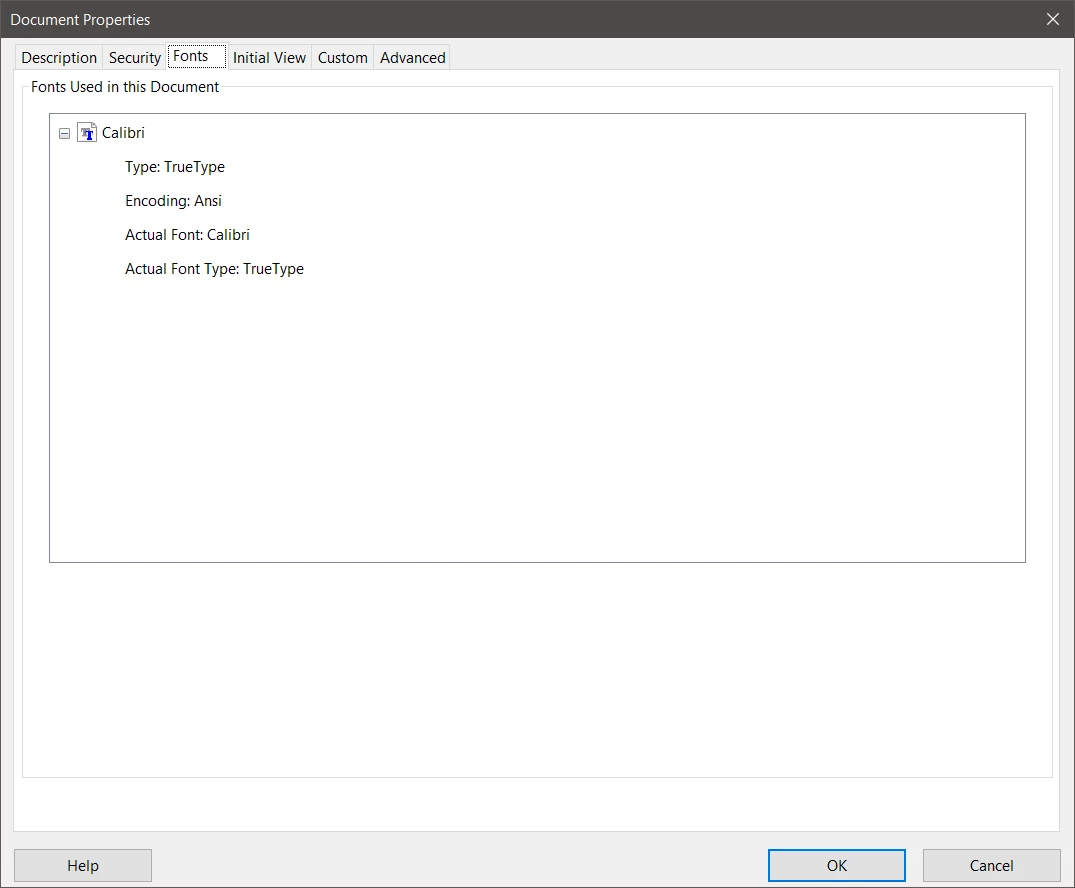
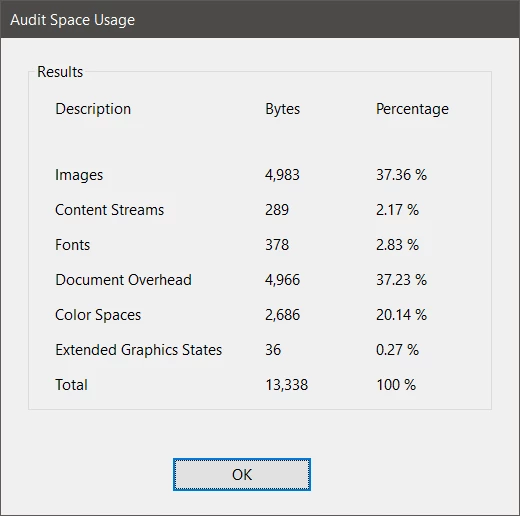
The Windows7Test.pdf file has no fonts embedded. It assumes that the Calibri font is available on the system on which the PDF file is displayed (very bad assumption for cross-platform consumption!). The Document Properties and Audit Space Usage for this file:
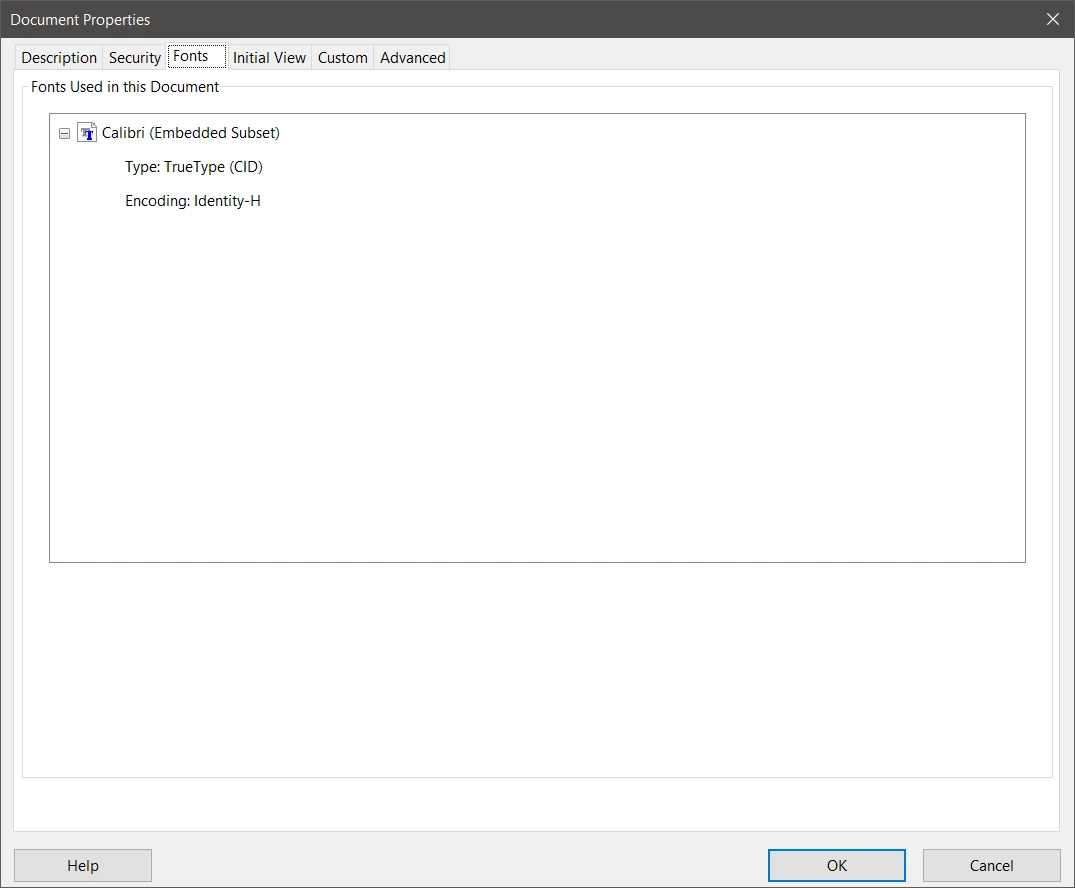
The Windows10Test.pdf file has fonts subset embedded. It makes no assumption that the Calibri font is available on the system on which the PDF file is displayed. The Document Properties and Audit Space Usage for this file:
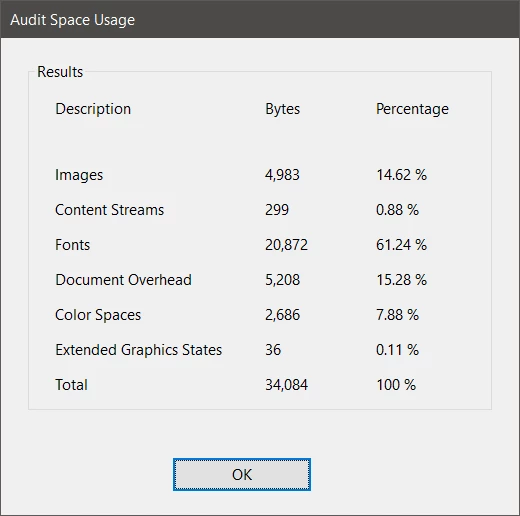
The only significant difference between the two PDF files is the amount of space required for the embedded font! And the more fonts or characters within such fonts you use in your original document, the greater the difference would be.

What this does show, though, is that you could not have actually used the same exact Distiller joboptions on both systems. Ironically, the Smallest File Size joboptions do embed all fonts that are available and thus, the PDF file from your Windows 10 system is technically the correct one.

For the PDF file from your Windows 7 system either you were using modified joboptions that prohibited font embedding or your Distiller was improperly configured.

          - Dov

3 replies

swapnilsrivastava
Community Manager
Community Manager
October 23, 2019

Hello Adrien,


With the latest release of Acrobat on 2nd Oct, 2018, this issue has been addressed.

If your product is not already updated, you can manually do so from within the product.  Click on the menu Help-> Check for updates.


Thanks & Regards,

Swapnil Srivastava

Participant
October 18, 2017

Well, hopefully *fingers-crossed* that with this being addressed again by me today - they will put it on their list of things to do! :-)

Thanks again,

Nicole

Dov Isaacs
Legend
July 12, 2017

There is no way to readily tell this unless you can provide us with PDF files produced from the same eDrawings file sent to Adobe PDF using the exact same driver settings and Distiller .joboptions. One can then look inside the PDF files and see what aspects of the newer file are different than the older file.

If you want to post samples, we can look at them.

          - Dov

- Dov Isaacs, former Adobe Principal Scientist (April 30, 1990 - May 30, 2021)
Participating Frequently
July 12, 2017

Windows7Test.pdf Windows10Test.pdf

(Posting files)

Thank you for your response. Unfortunately my eDrawings files contain proprietary information. However, I tried creating a Word document and then printed it to pdf on Windows 10 and had my colleague do the same on hers running Windows 7. Mine is 13KB and her is 33KB. They were both generated using the "Smallest File Size" setting. I'm afraid I'm not seeing how to post them here though (I just see the options to attach image or video.)

Dov Isaacs
Legend
October 18, 2017

Hello Dov,

Did you get a response from the Acrobat development team back in July regarding your findings for this conversation? 

I ask because I am suffering the same issue in which I typically take a Corel WordPerfect document and use the Print to Adobe option to create PDFs. 

Last May I had a document for a client that when converted using the print method - resulted in an 8KB file.  At that time, I was working with Adobe Acrobat DC in Windows 7.  Now that I have been upgraded to Windows 10 (as of last week), I am finding that when I use my typical WordPerfect documents and use the Print to Adobe option, the files are almost 10 times larger.  For instance, the same PDF from May (8KB) becomes a 97KB file now when I use the Print to Adobe option to convert it from WordPerfect. 

After much comparing and research, I found the embedded fonts as you have been addressing with adriennerm317

For now, I have noted to use the Publish to PDF in WordPerfect since it only appears to double the size (it converted the same PDF referenced above to a file of 18KB) but I have to do so using the PDF Style option of “Publishing Online (Smallest file size)” and am concerned that may cause issues with some of the documents when printed.

As I conclude, it was interesting, today I received a request from the Feedback Hub of Microsoft in which they asked me about my Windows 10 experience.  I let them know about this issue by referring them to the discussion page.  So maybe, just maybe this will be addressed by them as well.

Thank you, Dov!

-Nicole


Hi Nicole,

The problem turns out to be a Windows 10 problem associated with fonts put into the PostScript stream when printing. Microsoft has acknowledged the bug but we don't yet have information as to when and how they will fix it.

Sorry for the bad news.

          - Dov

- Dov Isaacs, former Adobe Principal Scientist (April 30, 1990 - May 30, 2021)