
Participant
October 13, 2022
Question

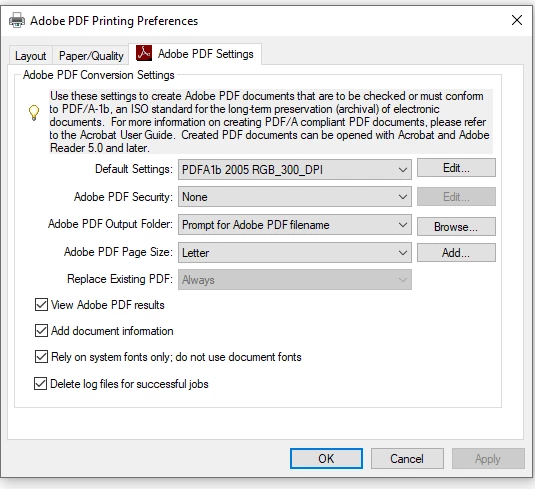
Adobe PDF Printer settings reverting

  • October 13, 2022
  • 1 reply
  • 2286 views

Hello, Adobe Community!

In my workplace I have users that utilize the Adobe Acrobat DC application and need to save all PDFs to PDF/a-1b standard due to storage standards. That said, I have gone through the Windows Settings menu to get to the Printer Preferences and edited the PDF/A-1b standard for 300 DPI and created a new job option for that standard named PDFA1b 2005 RGB_300_DPI so that when my users create a PDF through the Adobe PDF printer object the standard should be automatically applied as the Default Settings, and it is in most instances. However, there is an issue where my users are seeing that the Adobe PDF printer object's printing preferences Default Settings field reverts to Standard.

That said, I always have my users reinstate the created 300_DPI settings as needed via the Windows OS Settings menu, however eventually the issue returns. I'm not really sure what might be causing this other than maybe an update to the Acrobat DC application, however I haven't been able to pin down a distinct answer regarding this issue. Also of note is that our Adobe Acrobat DC is managed and udpated through the Adobe Creative Cloud application.

Any advice or information will be greatly appreciated!
1 reply

Participant
January 31, 2024

Is there anyone help this issue? All the printer prefference keep reverting to default after few weeks. Very annoying...

Participant
January 31, 2024

This is the 5th I changed the printing prefference but it kept reverting back to factory defaults

Amal.
Legend
August 14, 2025

Hi Amal
Thank you for the response. There are no updates available. 
I'm using Acrobat DC, 64 bit on Windows 11. I was also having the same problems with the defaults resetting on Windows 10. I'm repeatedly doing this over and over... 


Hi there 


Hope you are doing well and sorry to hear that. 


Is this an IT managed work machine? If yes, please contact your IT admin and check the group policy at your organization and see if that helps.


If its a personal machine, This usually happens if the printer preferences aren’t being saved correctly, or if another application or system update is resetting them. 


Some system updates or print management software may overwrite saved printer preferences. Try disabling any third-party printer management tools to see if it helps.

If the issue continues, you might want to repair Acrobat via the Help menu or reinstall the Adobe PDF printer driver to reset any corrupted configuration.


~Amal