Inspiring
February 21, 2024
Answered

Adobe PDF will not save rotated pages...why?

  • February 21, 2024
  • 8 replies
  • 16860 views

I've attached a video of the Adobe PDF not being able to save pages  when rotated. 

At first,  it looks like it's saved but it's not. Watch the whole video please.  


Please see attached. 


Correct answer JR Boulay

8 replies

JR Boulay
Adobe Expert
October 16, 2024

Adobe respects the PDF specifications (which it created), which is not necessarily the case for other programmers.
If Blurb.com's machines don't recognise the rotation of a page, the problem is probably theirs.

Acrobate du PDF, InDesigner et Photoshopographe
New Participant
October 31, 2024

I am not using Blurb but I seem to be having a similar problem all of the sudden. Never had this problem before and I've used Acrobat Pro for years.

New Participant
September 18, 2025

Agree with the above, and its 2025.  Same issues.  And have rotated pages, and saved.  Opens up later in a reader program un-rotated.  

JR Boulay
Adobe Expert
October 15, 2024

This is a Blurb.com issue, you should ask them about.

Acrobate du PDF, InDesigner et Photoshopographe
Participating Frequently
October 15, 2024

Ha, and they will just say it's an Adobe issue... (sigh)

JR Boulay
Adobe Expert
February 22, 2024

Carlisle1500,  watching your video again, I realise that it's the interface of the new Acrobat that's confusing.
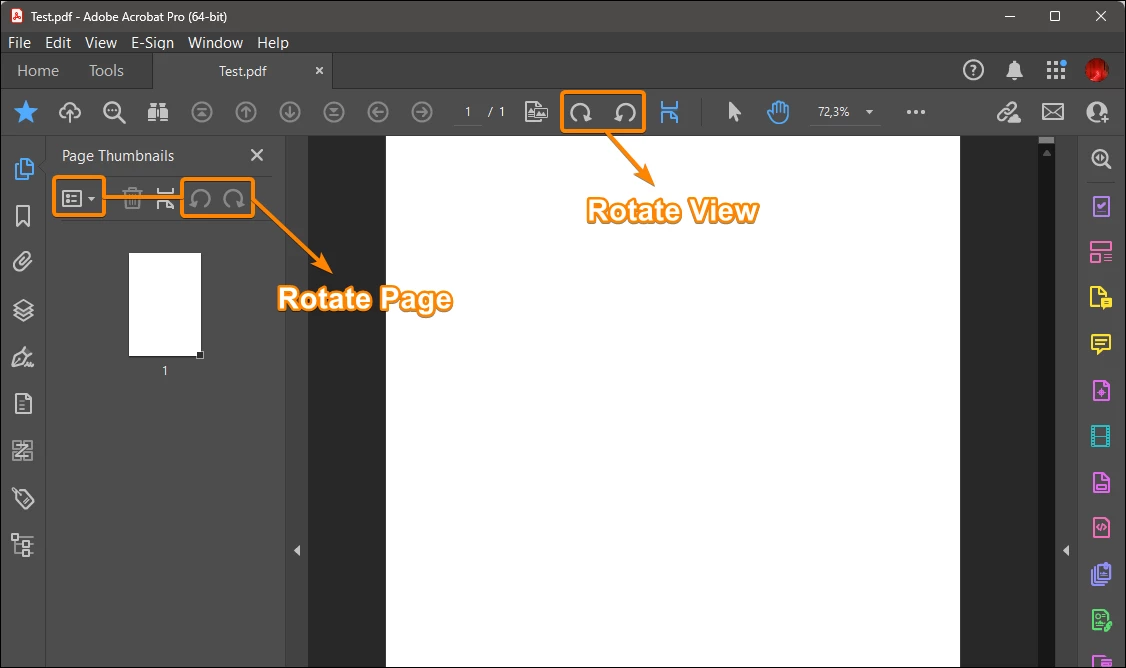
In the video you're using the "Rotate View" tool, but the tooltip says "Rotate Document", which is a design error.
In fact, after using this tool on a document that has just been saved, you can see that the "Save" menu item remains greyed out, which means that it is indeed a "Rotate View" because it doesn't modify the document.
If it were a 'Rotate Page', this would not be the case and the Save item would be enabled.


Amal., I think you should report this issue to the development team as soon as possible.


The video:


The tooltip:


The greyed out Save menu item after using this tool:

Acrobate du PDF, InDesigner et Photoshopographe
Participating Frequently
October 14, 2024

I rotated pages correctly with EDIT>ROTATE PAGES (and save the file) and also in organize pages tool > Rotate but when I upload the pdf to Blurb.com those pages are still all flipped back upright.

New Participant
October 31, 2024

I appear to be having the same problem. I am using a Macbook Pro and I have Adobe Acrobat Pro. I assembled a report with 47 pages, and even though I thought I had them all rotated in portrait, somehow they saved as landscape (sideways) as I sent the report to my agent. Not pretty. I tried both the toolbars on the right AND the Tools - Organize pages - select all - rotate (to vertical) - SAVE. Looks like portrait. I email to another email address of mine, try two different browsers just to be sure. All the pages are back to landscape. I guess I'll be hearing from my agent tomorrow.

JR Boulay
JR BoulayCorrect answer
Adobe Expert
February 22, 2024

Acrobate du PDF, InDesigner et Photoshopographe
JR Boulay
Adobe Expert
February 22, 2024

Don't confuse "rotate view", which has always been available in Acrobat Reader, Acrobat Pro and Acrobat Standard to prevent the reader from having to tilt their head or their screen WITHOUT modifying the document, with "rotate page", which has never been available in Acrobat Reader (only in Acrobat Pro and Standard) and which is used to modify the document.

In both cases, you can apply the rotation to several pages at once, depending on the selection.

Acrobate du PDF, InDesigner et Photoshopographe
Inspiring
February 22, 2024

@JR Boulay  I have only EVER used Adobe PRO. I'll research the view vs. rotate pages. I have reading the Actual Acrobat Book on my to-do-list. https://www.peachpit.com/store/adobe-acrobat-classroom-in-a-book-9780137983636 


I'll try to start reading it in March because I need to use these tools with greater precision but I have probably saved 20,000 documents using the previous method, lol. Finally, Adobe giving 55% off books here, https://www.peachpit.com/store/adobe-acrobat-classroom-in-a-book-9780137983636

JR Boulay
Adobe Expert
February 22, 2024

This is because you're not rotating the page, you're rotating the view.

Acrobate du PDF, InDesigner et Photoshopographe
Inspiring
February 22, 2024

@JR Boulay Can you explain to me what  you mean when you say "View?"  


When I set the pages to what I want, how is "View" diffferent than layout? 


I've doing this for years with Adobe PDF and would save the changes and when I open files years later they would be set to my settings. Also, I was about to make and save the changes using the "inside" tools. 

Amal.
Community Manager
Community Manager
February 22, 2024

[Edited response]


Hi @Carlisle1500 


I hope this message finds you well, and I appreciate you bringing this matter to our attention.


As correctly mentioned by JR Boulay


You will find success by rotating the page through the following steps: navigate to Tools > Organize Pages, adjust the page orientation as needed, then save the PDF file.


Got your issue resolved? Please label the response as 'Correct Answer' to help your fellow community members find a solution to similar problems.


~Amal

Inspiring
February 22, 2024

@Amal. @JR Boulay In the past version of PDF,  I used this feature to adust the layouts "Globally"  Example, I scan books and then chop them up to read on planes/train/cruises. Sometimes, I would put the books into the scanner backwards to avoid glue that's in the books. This is whyI have to rotate the pages later. 


Moving along, I will try new suggestion but I think it will be more work for me. The default  feature allowed me in two clicks to adjust the whole scanned book. I'll will try now as you recommended and record the results from a test folder and post the results.   

Inspiring
February 21, 2024

This is my Adobe Acrobat Version and Windows Version Statistics.