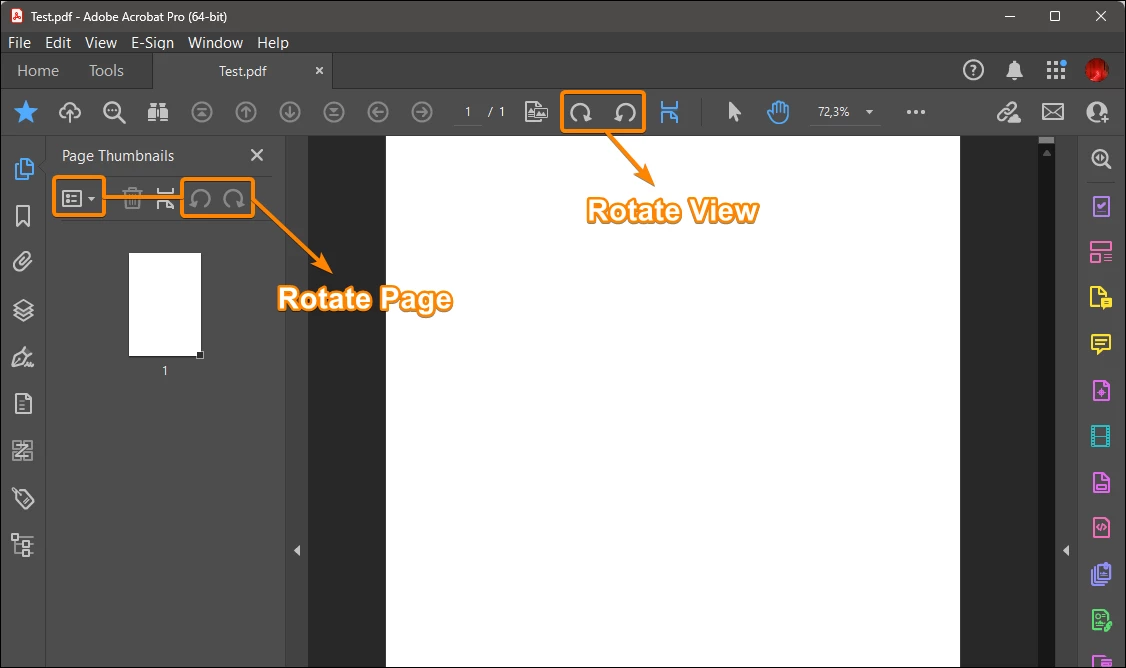
It’s usually because Acrobat is just changing the View rather than the actual page attributes. If you're just hitting the rotate button in the top toolbar, it doesn't always 'stick' when you save. You usually have to go into 'Organize Pages' and rotate them there to make it permanent. If the file permissions are being weird and won't let you save the changes in Acrobat, I’ve had luck using this quick web tool- https://www.thetoolapp.com/rotate-pdf-pages/. It’s much faster than troubleshooting the Adobe settings when you’re in a rush.
Adobe respects the PDF specifications (which it created), which is not necessarily the case for other programmers. If Blurb.com's machines don't recognise the rotation of a page, the problem is probably theirs.
No it is not, I have the same issues and I used all options in the program, saved it under all different options and different names, closed the program,... and the document will still open with the pages not turned. Sitting 2h for a simple 5sec. task, that used to work fine in the last 15 years is very frustrating.
Carlisle1500, watching your video again, I realise that it's the interface of the new Acrobat that's confusing. In the video you're using the "Rotate View" tool, but the tooltip says "Rotate Document", which is a design error. In fact, after using this tool on a document that has just been saved, you can see that the "Save" menu item remains greyed out, which means that it is indeed a "Rotate View" because it doesn't modify the document. If it were a 'Rotate Page', this would not be the case and the Save item would be enabled.
Amal., I think you should report this issue to the development team as soon as possible.
The video:
The tooltip:
The greyed out Save menu item after using this tool:
I rotated pages correctly with EDIT>ROTATE PAGES (and save the file) and also in organize pages tool > Rotate but when I upload the pdf to Blurb.com those pages are still all flipped back upright.
I appear to be having the same problem. I am using a Macbook Pro and I have Adobe Acrobat Pro. I assembled a report with 47 pages, and even though I thought I had them all rotated in portrait, somehow they saved as landscape (sideways) as I sent the report to my agent. Not pretty. I tried both the toolbars on the right AND the Tools - Organize pages - select all - rotate (to vertical) - SAVE. Looks like portrait. I email to another email address of mine, try two different browsers just to be sure. All the pages are back to landscape. I guess I'll be hearing from my agent tomorrow.
Don't confuse "rotate view", which has always been available in Acrobat Reader, Acrobat Pro and Acrobat Standard to prevent the reader from having to tilt their head or their screen WITHOUT modifying the document, with "rotate page", which has never been available in Acrobat Reader (only in Acrobat Pro and Standard) and which is used to modify the document.
In both cases, you can apply the rotation to several pages at once, depending on the selection.
@JR Boulay Can you explain to me what you mean when you say "View?"
When I set the pages to what I want, how is "View" diffferent than layout?
I've doing this for years with Adobe PDF and would save the changes and when I open files years later they would be set to my settings. Also, I was about to make and save the changes using the "inside" tools.
You will find success by rotating the page through the following steps: navigate to Tools > Organize Pages, adjust the page orientation as needed, then save the PDF file.
Got your issue resolved? Please label the response as 'Correct Answer' to help your fellow community members find a solution to similar problems.
@Amal.@JR Boulay In the past version of PDF, I used this feature to adust the layouts "Globally" Example, I scan books and then chop them up to read on planes/train/cruises. Sometimes, I would put the books into the scanner backwards to avoid glue that's in the books. This is whyI have to rotate the pages later.
Moving along, I will try new suggestion but I think it will be more work for me. The default feature allowed me in two clicks to adjust the whole scanned book. I'll will try now as you recommended and record the results from a test folder and post the results.




 AdChoices