

After splitting document into parts editable fields' appearances are broken
Hi everyone,
I use Windows 10 and Acrobat Pro DC version 2019.008.20081.
The Client sent me a pdf file with editable forms. My task is to split the document into smaller parts, maybe single pages. After that, based on some criteria those pages will be merged into single document.
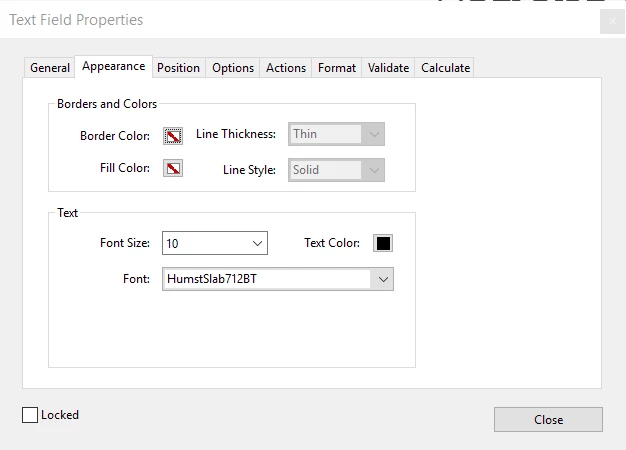
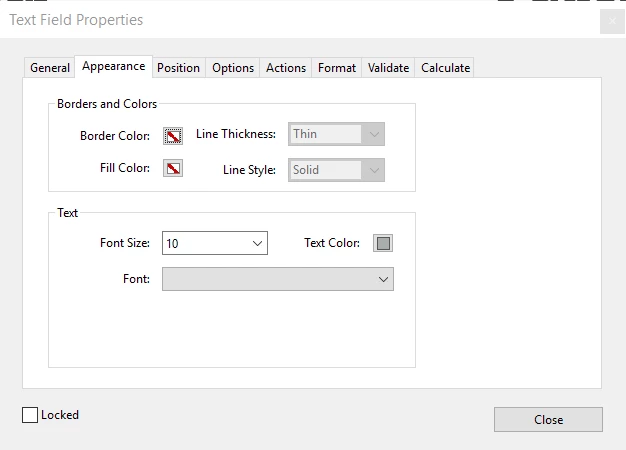
But after splitting, appearance of some fields (not all) are different than previously.
What's more I can't see the font any more in the dropdown list, so I can't fix the problem manually.
I also tried to extract single page to test if the problem occur. In this case the font is also missing, but the color stayed the same.
I checked if is it only problem in editing the document, but when I filled up the fields the font and the color was changed.
Before:
After:
Does anyone experienced this behavior before? Is there a workaround?
Thanks in advance,
Blazej
 AdChoices