
Known Participant
March 17, 2025
Answered

Alternate description missing for an annotation

  • March 17, 2025
  • 1 reply
  • 544 views

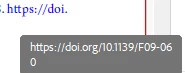
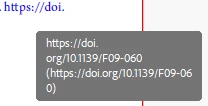
Acrobat pdf document containing hyperlinks are validated in PAC it shows 'Alternate description missing for annotation', to resolve this executed the 'Fix problems in PDF tagging structure' in preflight option acrobat,  the issue resolved but in the pdf tool tip text highlights have extra texts for the url links. Why this has happened in the pdf?


PDF before preflight execution
After preflight execution


Correct answer S_S

Hi @dt0245d3009278,


Hope you are doing well. Sorry for the trouble.


When you used "Fix problems in PDF tagging structure" in Preflight, Acrobat likely attempted to automatically generate missing alternate text for annotations (including hyperlinks). This process can sometimes introduce extra text in the tooltips of hyperlinks because Acrobat may extract surrounding text, URL data, or metadata to fill in the missing alternate description.


To fix this, you can try the below steps:


  • Open Acrobat Pro and go to Accessibility > Reading Order tool.
  • Find the hyperlink and right-click on it.
  • Choose Edit Alternate Text.
  • Remove unnecessary text and keep only relevant link descriptions.
  • Save the file and revalidate in PAC.

Hope this helps.


Regards,
Souvik.

1 reply

S_S
Community Manager
S_SCommunity ManagerCorrect answer
Community Manager
March 17, 2025

Hi @dt0245d3009278,


Hope you are doing well. Sorry for the trouble.


When you used "Fix problems in PDF tagging structure" in Preflight, Acrobat likely attempted to automatically generate missing alternate text for annotations (including hyperlinks). This process can sometimes introduce extra text in the tooltips of hyperlinks because Acrobat may extract surrounding text, URL data, or metadata to fill in the missing alternate description.


To fix this, you can try the below steps:


  • Open Acrobat Pro and go to Accessibility > Reading Order tool.
  • Find the hyperlink and right-click on it.
  • Choose Edit Alternate Text.
  • Remove unnecessary text and keep only relevant link descriptions.
  • Save the file and revalidate in PAC.

Hope this helps.


Regards,
Souvik.

Known Participant
March 18, 2025

Hi Souvik,


Thanks for the response, Is there any way to achieve through scripting in acrobat as I have no exposure to acrobat scripting because the pdf file contains lot of hyperlinks.