
Known Participant
October 31, 2018
Answered

Alternative description missing for annotation - table of contents

  • October 31, 2018
  • 1 reply
  • 14606 views

Hello

I have what seems to be, a properly structured TOC in a PDF. When I run the pac 3.0 checker, I get the above message for every single item in the table of contents.

I viewed the tutorial on taggedpdf.com site on this error message and see that i have to edit each link but I wonder why this is the case for a table of contents? Also, if i do edit each item, what is it that I'm editing? Is it the Reference tag? Link tag? Link OBJR tag?

thanks, Marion
This topic has been closed for replies.
Correct answer hammer0909

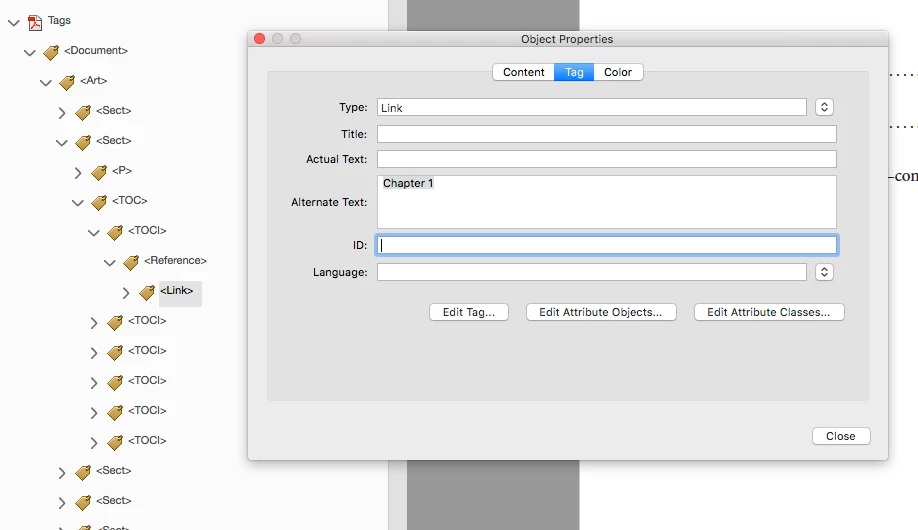
The PAC 3.0 checker requires that every hyperlink contains alternate text for that link. Personally I feel this is redundant for something like a TOC link but the PAC 3.0 checker doesn't discriminate between link types. So to fix the errors, you basically need to select the link tag, right click on the Link tag and choose Properties, then add alternate text in the Alternate Text field. This will fix the errors that you are getting for the Alternative description missing for annotation.

1 reply

hammer0909
Community Expert
hammer0909Community ExpertCorrect answer
Community Expert
November 6, 2018

The PAC 3.0 checker requires that every hyperlink contains alternate text for that link. Personally I feel this is redundant for something like a TOC link but the PAC 3.0 checker doesn't discriminate between link types. So to fix the errors, you basically need to select the link tag, right click on the Link tag and choose Properties, then add alternate text in the Alternate Text field. This will fix the errors that you are getting for the Alternative description missing for annotation.

Inspiring
November 6, 2018

If the links you are dealing with are already clear to a user - as would be the case for entries in a Table of Contents - you could also try the Preflight fixup "Create Content entry for Link annotations" - it derives the text to be used for the Content entry from the destination for the link.

You should only use this fixup after you have verified that any links in need of a non-generic Content entry have an Alternate Text entry before you apply the fixup to the document.

And as always - for such wholesale fixing operations it is always a very good idea to keep a backup copy of the document, so you can go back to a previous state in case something does not work out the way you expected it to work out.

Olaf

Minka316Author
Known Participant
November 6, 2018

Thank you Olaf. I will also try your suggestion and see how this works out too.

Marion