
Copy link to clipboard
Copied
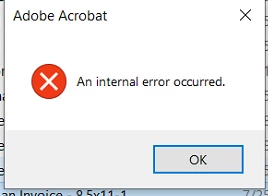
I have a user that is gettting the following error message. I have unstalled Adobe via the creative cloud app and also renamed the app data profiles. Please advise on how this could be resolve. Adobe allows me to open 1 or two pdf and then it freezed and crash with the below error message.
Faulting application name: Acrobat.exe, version: 22.3.20258.0, time stamp: 0x63352602
Faulting module name: Acrobat.dll, version: 22.3.20258.0, time stamp: 0x633525fe
Exception code: 0xc0000005
Fault offset: 0x0000000000105360
Faulting process id: 0x381c
Faulting application start time: 0x01d8e306bfd9f2b8
Faulting application path: C:\Program Files\Adobe\Acrobat DC\Acrobat\Acrobat.exe
Faulting module path: C:\Program Files\Adobe\Acrobat DC\Acrobat\Acrobat.dll
Report Id: 85026b8e-e4db-4275-b0a2-1781d3d6c704
Faulting package full name:
Faulting package-relative application ID:
Faulting application name: Acrobat.exe, version: 22.3.20258.0, time stamp: 0x63352602
Faulting module name: Acrobat.dll, version: 22.3.20258.0, time stamp: 0x633525fe
Exception code: 0xc0000005
Fault offset: 0x0000000000105360
Faulting process id: 0x3790
Faulting application start time: 0x01d8e30823f22389
Faulting application path: C:\Program Files\Adobe\Acrobat DC\Acrobat\Acrobat.exe
Faulting module path: C:\Program Files\Adobe\Acrobat DC\Acrobat\Acrobat.dll
Report Id: be02f0e8-1776-4139-a48d-100259c86619
Faulting package full name:
Faulting package-relative application ID:
Copy link to clipboard
Copied
Would you get the same error if you repair the installation followed by reboot?
Copy link to clipboard
Copied
I'm having the same issue. Fresh install from 4 days ago.
Copy link to clipboard
Copied
If you're getting the exact same error, can you please share more details about your operating system version.
The error posted seems like it could be related to either a 32bit version or a 64 bit version of Adobe Acrobat Pro where traces of a prior version update of the Acrobat software might still be present.
In the case of a Windows 10 computer, it is relevant to specify what version of Acrobat Pro was installed through the Creative Cloud.
Copy link to clipboard
Copied
Fair enough. The issue occurs when opening a pdf file, or just opening the application via it's shortcut. The same error in the thread pops up "An internal error occured". Clicking 'Ok' on the error allows the application to be used. but the popup is very intermittent.
Edition Windows 10 Pro
Version 22H2
Installed on 24/10/2022
OS build 19045.2193
Experience Windows Feature Experience Pack 120.2212.4180.0
Adobe Acrobat 2022.003.20263 64-Bit
Faulting application name: Acrobat.exe, version: 22.3.20263.0, time stamp: 0x634c3bf9
Faulting module name: Acrobat.dll, version: 22.3.20263.0, time stamp: 0x634c3bf5
Exception code: 0xc0000005
Fault offset: 0x0000000000105360
Faulting process ID: 0x65c8
Faulting application start time: 0x01d8eec840e2f88e
Faulting application path: C:\Program Files\Adobe\Acrobat DC\Acrobat\Acrobat.exe
Faulting module path: C:\Program Files\Adobe\Acrobat DC\Acrobat\Acrobat.dll
Report ID: fc57cd78-e0ad-4638-9b3c-a0514319e901
Faulting package full name:
Faulting package-relative application ID:
Copy link to clipboard
Copied
The renaming of the AppData hidden folder might not be enough.
Since you're editing a profile that belongs to the current user account, it would've been more appropriate to backup all your documents and uninstall Acrobat Pro completeley. Then use the Adobe Labs cleanup tool to remove old traces of the software, and last recheck all temporary cache folders, specifically the AppData cached folders and manually delete the content from those.
Copy link to clipboard
Copied
@adobe please can we have an update on this? The solutions mentioned aren't working for everyone. It's been months. PDFs are a staple part of my day to day, and they're constantly crashing my machine, not saving, not loading, not previewing, crashing programs etc etc. Whats going on, when will this be fixed?
Copy link to clipboard
Copied
I used a solution I found in another post: Solved: Re: "An Internal Error Occured" when clicking on a... - Adobe Support Community - 13196694
"I had to go C:\Users\[me]\AppData\Local and right click the Adobe folder, click properties and go to security tab. I had a bunch of left-over "Account Unknown" listed besides my three main ones (System, [me], Admin). I deleted all the account unknowns."
It solved it for me. Hope it helps 🙂
Copy link to clipboard
Copied
Cheers, yeah i tried it but that solution isn't working for me (I dont have any 'unknown accounts' to delete in there). Theres loads of other people who haven't got it fixed yet either. Its unreal. This is the biggest blackout ive had from adobe since i started using it. Literally no help from them at all so far.
Copy link to clipboard
Copied
deleted
Copy link to clipboard
Copied
Did you solve your problem ? I'm experiencing the same trouble and tried everything mentioned in these threads...
Find more inspiration, events, and resources on the new Adobe Community
Explore Now