

Participating Frequently
February 3, 2024
Question

Annoying pop-ups in Acrobat

  • February 3, 2024
  • 12 replies
  • 29275 views

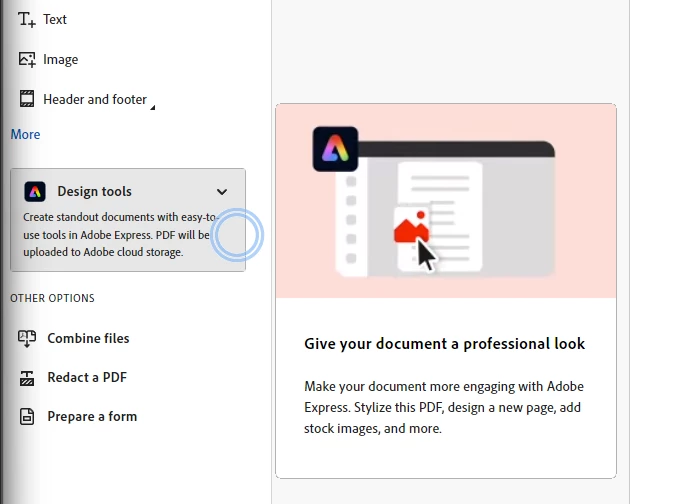
How can you turn off these annoying pop-ups in Acrobat. Why did Adobe think this was a good idea? They are so distracting when I am working.

12 replies

New Participant
June 19, 2025

Deleting Adobe and Cancelling My Plan Because of this. Every Document that I open asks me if I'd like to fix typo's. What a literal nightmare. Such a joke.

S_S
Community Manager
Community Manager
June 20, 2025

Hi @tucker_4207,


Hope you are doing well. Sorry for your trouble with Acrobat.


Have you tried the steps mentioned above?


Please try and let us know how it goes.


Regards,
Souvik.

Participating Frequently
June 4, 2025

Good Day All

I have been trying to research on how to do this. I think I have found the solution to these annyoning popups.

Try this: go to main MENU, PRFERENCES, GENERAL and de-select the "SHOW QUICK ACTIONS ON TEXT SELECTION". This works on both the old and new versions. I hope these are the annyoing popups that everyone is referring to. I tried both the old and new apps and no popups appear on editing or inserting an image. I hope this helps.


Participating Frequently
June 4, 2025

Good Day

The pop ups that I am referring to are when EDITING or ADDING an image and these were popping up and interfering with the images and text. I managed to disable those. But the other pop-ups are built in the programme somehow as there are no pop-up options to choose from to switch these off.

S_S
Community Manager
Community Manager
June 5, 2025

Hi @Lara Vandelli,


Hope you are doing well. Sorry for your experience with using Acrobat.


You might want to try the steps below:

1. Go to Start > Registry Editor;

2. Go to Path: HKEY_CURRENT_USER\SOFTWARE\Adobe\Adobe Acrobat\DC\AVGeneral

3. Create a DWord: bInfobubble

4. Set the Value: 0


More info here: https://adobe.ly/45GRLRO.


Note: Please close Acrobat and terminate any task from Task Manager before following the step.


Hope this helps.


Regards,
Souvik.

New Participant
March 27, 2025

Did anyone find a fix for this? I unchecked everything I could think of and I'm still having the messages all over the place.

Any help would be greatly appreciated.

Thanks

New Participant
May 30, 2025

Adobe, when will you actually listen to your users?

This problem persists.

It is a hindrence to productivity and you need to provide a setting to turn it all off.

Any software updates should remember the setting.

Many of us are users of Acrobat for years and don't need a pop up telling us how to tie our shoe laces.

Meenakshi Negi
Community Manager
Community Manager
May 30, 2025

Hi rodderco,


Thank you for reaching out, and sorry about the trouble caused.


Please let us know the pop-ups that you are referring to. It would be helpful if you could share the screenshot. 

We will check with the team if we can disable those.


You may share your suggestion with the team via the following page: https://adobe.ly/4kgiLfo


Thanks,

Meenakshi

New Participant
March 13, 2025

Mind-bogglingly ridiculous. Even if there is a solution that works for some, why do we all have to search for it?

Participating Frequently
June 4, 2025

Good Day

I have been trying to research on how to do this. I think I have found the solution to these annyoning popups.

Try this: go to main MENU, PRFERENCES, GENERAL and de-select the "SHOW QUICK ACTIONS ON TEXT SELECTION". This works on both the old and new versions. I hope these are the annyoing popups that everyone is referring to. I tried both the old and new apps and no popups appear on editing or inserting an image. I hope this helps.


New Participant
October 11, 2024

Preferences | Accessibility | Uncheck "Enable assistive technology support" worked for me to turn off those annoying blue "assistive" popups on how to use Acrobat such as "Request E-signatures" EVERY time I open a file.  I had already turned off the "Show me messages when I launch Adobe Acrobat", which did not get rid of these blue pop-ups but this did.

New Participant
October 22, 2024

Thx, we'll see if this works for me too.

New Participant
September 20, 2024

Please stop the annoying pop-ups!!! How was thinking this was a good idea?! Such a platform, who is it possible? Please fix this. I read the comments and what they say is trough. Disabling the checkmark doesn't work!


Participating Frequently
June 4, 2025

Good Day All

I have been trying to research on how to do this. I think I have found the solution to these annyoning popups.

Try this: go to main MENU, PRFERENCES, GENERAL and de-select the "SHOW QUICK ACTIONS ON TEXT SELECTION". This works on both the old and new versions. I hope these are the annyoing popups that everyone is referring to. I tried both the old and new apps and no popups appear on editing or inserting an image. I hope this helps.


New Participant
September 13, 2024

Based on reading this feed, I'm now actively looking for an alternative. I'm paying for a premium product and basically getting ads about features I already know how to use... seriously.

New Participant
November 8, 2024

Bluebeam is a pretty good PDF editor. More functional without the all the annoying pop-ups. I am also considering the switch back. 

Pariah Burke
Community Expert
November 8, 2024

I've never tried Bluebeam, but it looks interesting. How are its accessibility features?


New Participant
September 5, 2024

Adding my voice to asking Adobe to please, please give us a way to turn off these annoying and distracting pop-ups while working. It is even worse now with the constant prompts to use their AI features. I realize that Adobe wants to let people know about new features, but we get the message after the first few dozen reminders. 

New Participant
August 23, 2024

Would also like to figure out how to turn off ALL these popup ads, tooltips, tutorials, whatever... I'm working here, stop interrupting me Adobe!!!!!


For context, in photoshop (which i use the most), i keep getting the tooltips for how to use the libraries... which is really annoying because the "next" buttons are hidden by the layers panel, and no way to get rid of it without going through each slide, then when i open the library i want, i have a whole new set of tooltips to go through. I've done this every day since install weeks ago, Adobe, please make it stop!!!!

New Participant
April 22, 2024

PLEASE PLEASE help us find a way to turn off the very annoying popups tool tips! The suggested "Show me messages when I launch Adobe Acrobat" was already unchecked.

New Participant
June 24, 2024

Same for me. That box is unchecked and I still get the stupid pop-up when I open a new PDF.
I don't want Adobe's unhelpful spam pop-ups. PLEASE HELP TO TURN THEM OFF.

New Participant
July 3, 2024

I open Acrobat Pro to actually get work done. I instantly get interrupted by some annoying pop up - which I always cancel. It happens almost every time

I find it very very irritating from a user persepctive. Perhaps you should rethink this as it doesn't serve the customer well at all.