
Anti-aliasing issue with Acrobat Reader
Hello all, I'm using Indesign to create a PDF to send to other people via email so they can view it on their computers.
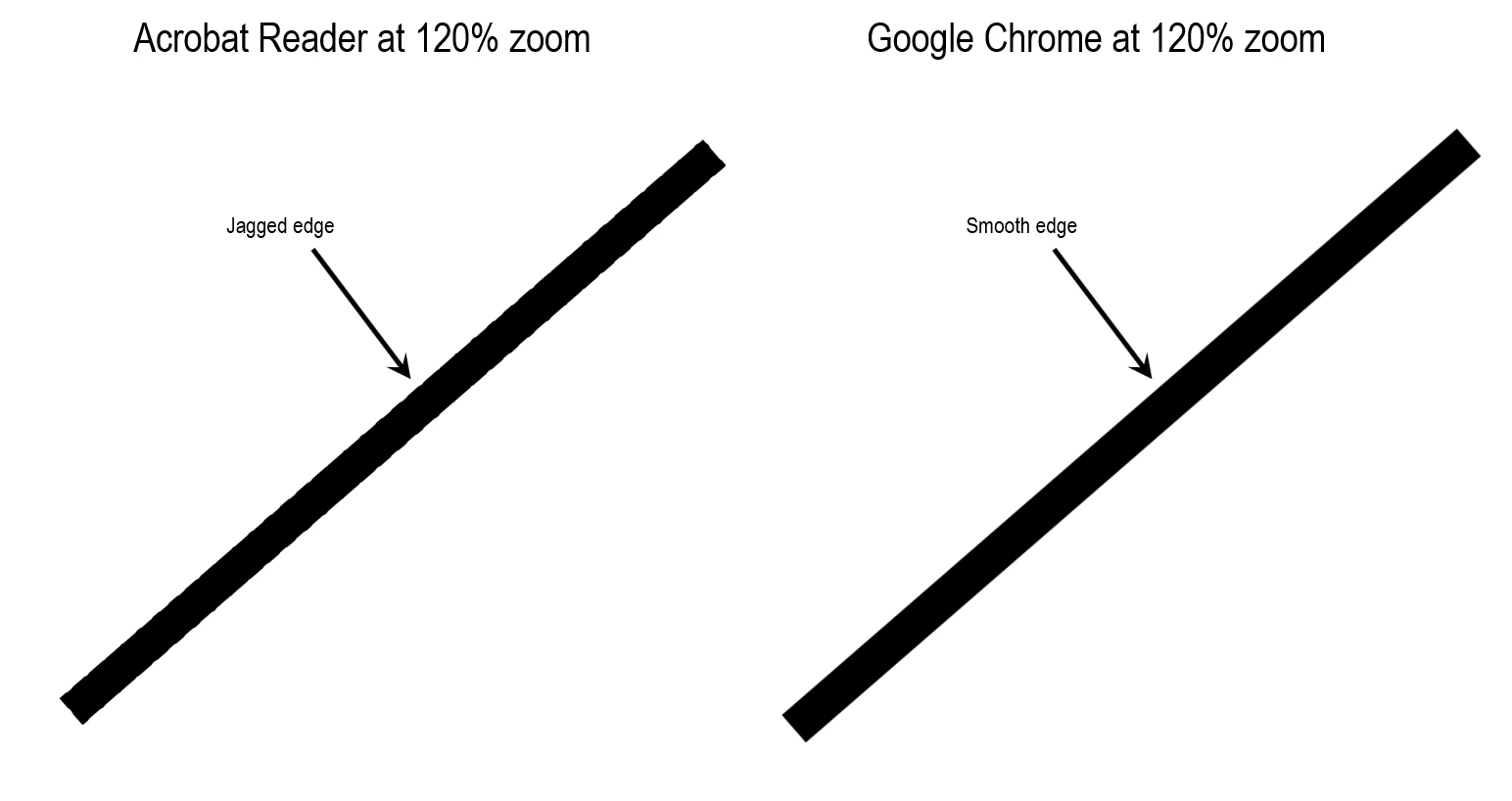
After exporting the PDF and opening it in Acrobat Reader I discovered that images, particularily slanted edges against a white background, appear jagged except for the 150% zoom level. Text always appears smooth, however. After testing the various Acrobat Reader preferences, I've found that only the setting Page Display > Smooth Images improves the situation slightly. However, by opening the PDF by right-clicking on the file and choosing Open With > Google Chrome, the PDF displays perfectly at all zoom levels. The same with Microsoft Edge. Microsoft Photos also has no problem displaying the original image perfectly at all zoom levels.
The main question is, why can't Acrobat Reader make images display correctly, whereas Chrome and Edge can? Is there an export setting in Indesign that can fix this? I've attached the test files so others can verify the issue.
 AdChoices