Answered
Any way to clean up text in an OCR'd document?
It seems that OCR provides the ability to copy and search text, but ugly fonts remain ugly. What is the best way to have clear, standard characters swapped in in place of the ugly-looking text?

It seems that OCR provides the ability to copy and search text, but ugly fonts remain ugly. What is the best way to have clear, standard characters swapped in in place of the ugly-looking text?
The settings in the OCR feature controls how the output looks. There are 3 output settings, and only you can tell which is best by running tests using them all.
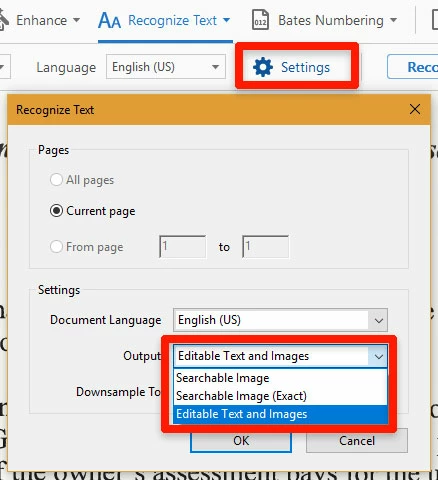
You could also run the OCR, and export as a Word document, clean it up, and remake a PDF that might look great.
I hope this is helpful.
My best,
Dave
Already have an account? Login
Enter your E-mail address. We'll send you an e-mail with instructions to reset your password.
 AdChoices