
Brian_Raila
Inspiring
October 2, 2021
Answered

app.execMenuItem() -- Needing to whitelist this function ?

  • October 2, 2021
  • 3 replies
  • 4823 views


I wish to execute Menu Items as button actions, created apart from the GUI 'Select Action' options.


If I understand correctly, privilege rules require that 'Execute a Menu Item' actions need be whitelisted, in a folder that regulates Trust, so that I can execute the action, when I 'Run a JavaScript' containing said execution, as an Action from a button on a document page.  And I understand that Trust 'exceptions' are on a per-machine basis.


I have read the advice written by Thom, Gilad, Karl, JR, and others.  I've now found the locations of both User, and Global, folder repositories, but can't figure out:

  1. What name is to be given to the relevant White List Folder ?
  2. How do I list therein the Menu Items I will be executing.  Is this a folder of scripts, which I might name such as FullScreenMode.js  –


app.execMenuItem("FullScreenMode");

and PreviousPage.js  –

app.execMenuItem(“PrevPage”);​


  • Or is it a list of the privileged language-independent Menu Item Names, e.g. FullScreenMode, PrevPage, SinglePage, OneColumn, which I seek to 'un-privilege' ?
  • In either case, when I set up the button action: 'Run a JavaScript', would I be typing a script filename, or the app.execMenuItem() command of the now-unprivileged action ?


– – –


It could be that I'm off track, still.  I noted no requirement of whitelisting to add a script to Document JavaScripts [re app.execMenuItem("Find"); -- posted by Gilad, 9-14-21, "Find Tool auto-open"].  But I was unable to replicate jimmyd88's success, with the function executing upon document open.  However, with app.execMenuItem("Find"); fired from the Console, the Find window does appear.


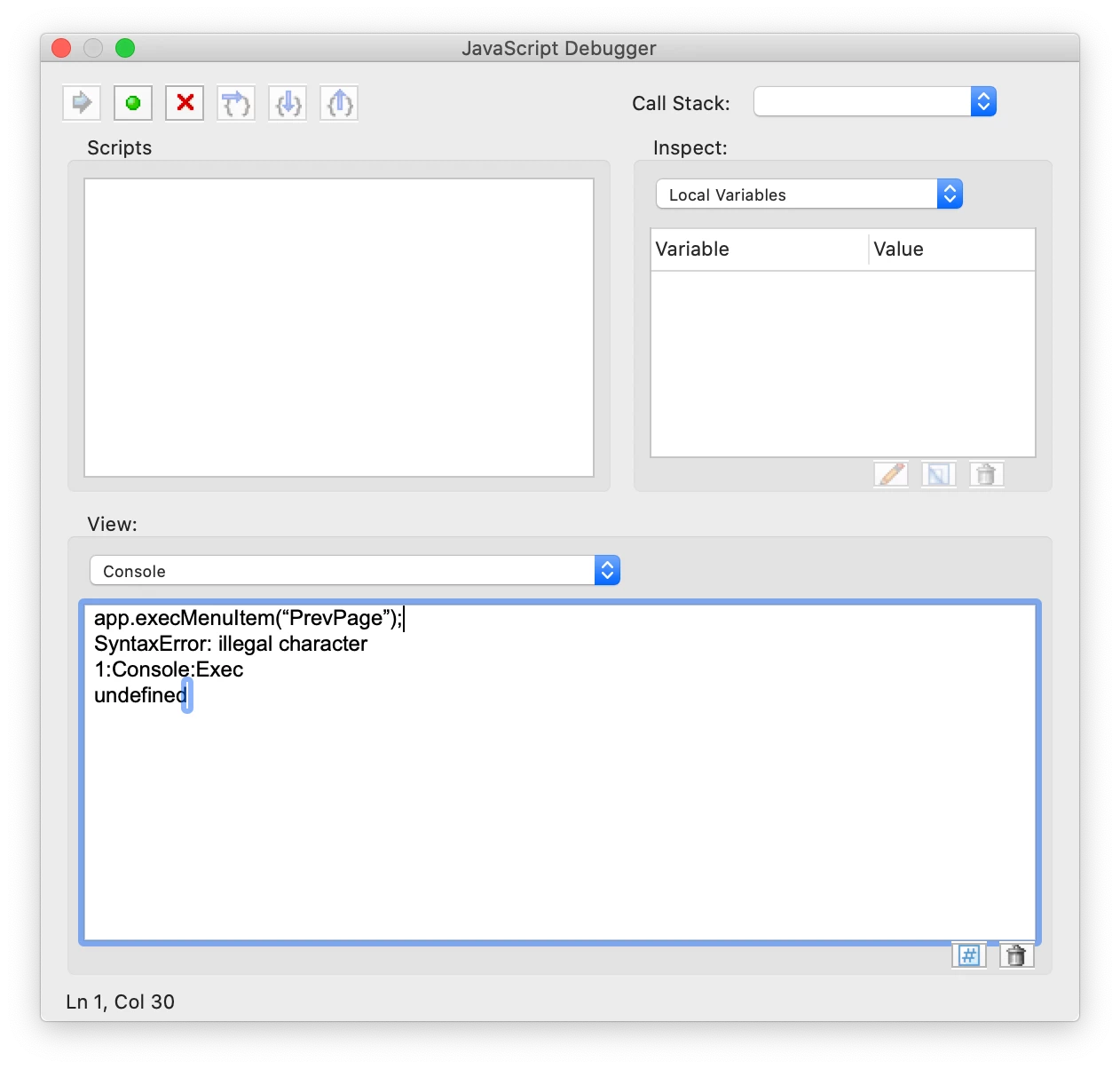
And when I do the equivalent with app.execMenuItem(“PrevPage”); , here's what the Console reports [which I took to be perhaps from non-whitelisting, but that doesn't jibe with the behavior of app.execMenuItem("Find")]: 
 

Some pointers would be most welcome.


– BR


This topic has been closed for replies.
Correct answer JR Boulay

You don't need a whitelist nor privileges nor app.execMenuItem to use such basic functions.


// previous vue:
app.goBack();


// previous page:
this.pageNum--;


// next page:
this.pageNum++;


// first page:
this.pageNum = 0;


// last page:
this.pageNum = this.numPages - 1;


// full screen mode:

app.fs.isFullScreen = true;


// 100% zoom
this.zoom = 100;

3 replies

Brian_Raila
Inspiring
October 3, 2021


I knew I was asking in the right place. My heartfelt appreciation is earnestly expressed in regards to y'all's prompt replies. (I'd have said so sooner, except that the 'Email me when someone replies' checkmark seems here recurrently unpredictable.) I am now right on target — BINGO !


JR Boulay
Community Expert
JR BoulayCommunity ExpertCorrect answer
Community Expert
October 2, 2021

You don't need a whitelist nor privileges nor app.execMenuItem to use such basic functions.


// previous vue:
app.goBack();


// previous page:
this.pageNum--;


// next page:
this.pageNum++;


// first page:
this.pageNum = 0;


// last page:
this.pageNum = this.numPages - 1;


// full screen mode:

app.fs.isFullScreen = true;


// 100% zoom
this.zoom = 100;

Acrobate du PDF, InDesigner et Photoshopographe
Brian_Raila
Inspiring
October 3, 2021


Straight and to the point, man.


Last night, you sold me on BBEdit 14.0.1, which I obtained in preparation for external-folder scripts which, as you adroitly advise, are a moot point point when it comes to these functions [but "bound to be of benefit", to quote TEST SCREEN NAME]. And donchaknow, I had already used app.fs.isFullScreen, successfully.


Legend
October 2, 2021

Your console shows a syntax error. You should believe this, not chase white lists unrelated to getting the syntax right. (You may need that later, but one thing at a time). Look very closely at your screen shot and you can see the double quotes around PrevPage are not the same as each other. These are typographic quotes, and neither one is the simple double quote you need - you can see all three kinds in your post. This commonly happens when scripts are composed in a word processor, as word processors often "improve" quotes. It's also a hazard when copying and pasting code eg from a blog. 

try67
Community Expert
Community Expert
October 2, 2021

My code did not contain these quotes. They were added by whoever copied and edited it. My guess is they used Word, instead of a plain-text editor.

Brian_Raila
Inspiring
October 3, 2021


try67 -- Yes, that "whoever copied and edited it" would be me. But I didn't even gain the benefit of copying your code verbatim.


I had retrieved the names, thanks to Thom’s Acquiring Menu Item Names for Acrobat.pdf, but was initially unaware of the need for quotes in the function. And when I added them, even though in TextEdit, I failed to insure plain text characters, and to review sufficiently closely.