


Applying template to document for e-signature
I've been playing around with the e-signature tool/testing to get a feel for it before I use it for anything "real". Hoping someone can help me with this. Here is an image of where the option I refer to was located: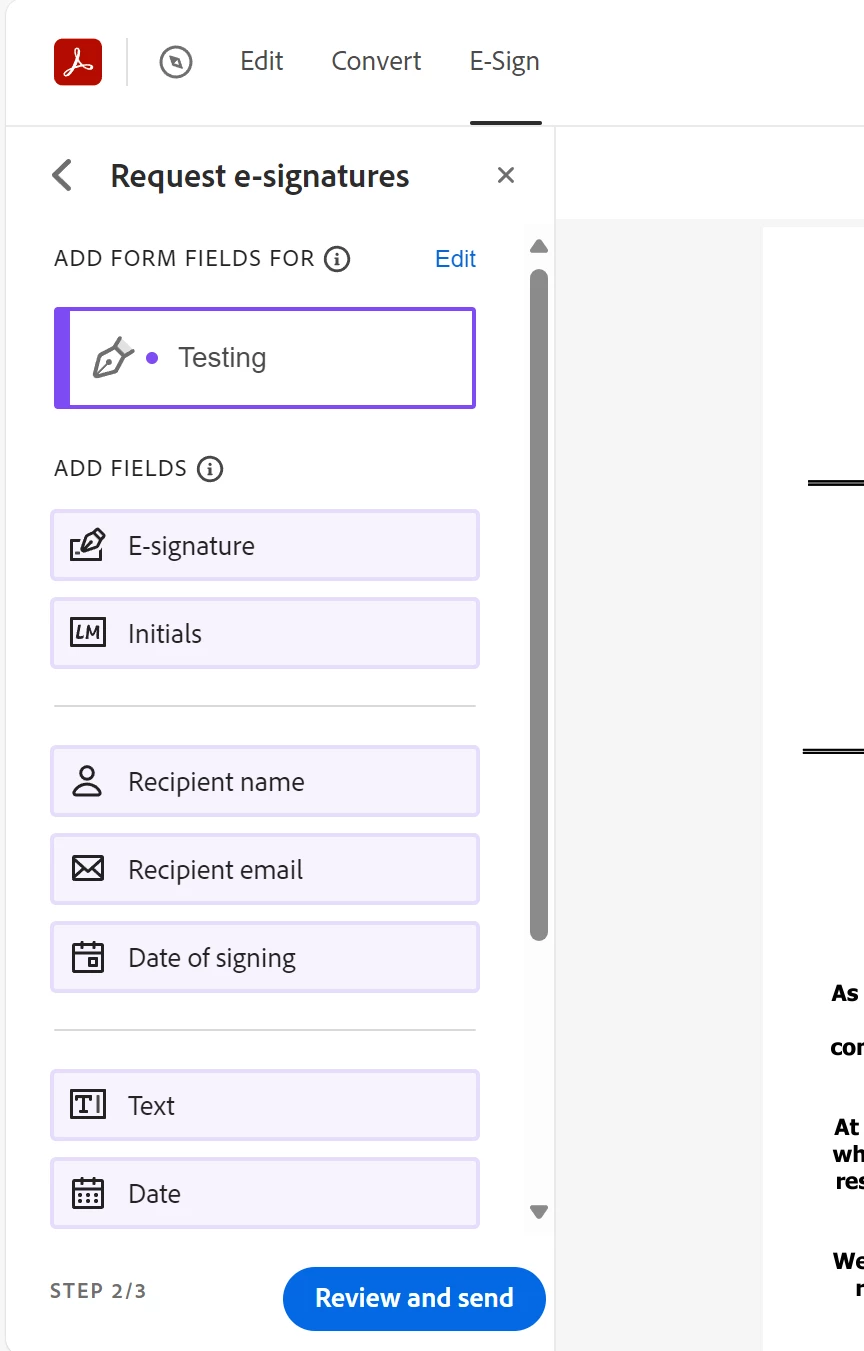
I created a template to apply to different documents (same PDF layout, just different text each time). I then opened the "request e-signatures" tool and uploaded the pdf to my computer. On the left side of the screen there was a toolbar and there was a drop-down. When I clicked this drop-down, it showed my template file I had just created. I clicked on this and the template was applied to the document. I tried this with another document and now the option is no longer there. The drop-down is completely gone. I know for sure this tool was an option, so at this point I don't know what it could be other than a bug. Is anyone familiar with this option on the "request e-signatures" tool? I'm wanting to be able to apply this template to multiple documents with different text content so the user doesn't have to add every input element each time they upload a document.
If it helps, there was also a blue rectangle pop-up that appeared at the bottom of the screen when the template was applied. I didn't pay too much attention to it, but I know it said something along the lines of "some _____(fields?) were deleted" and I think the word "participants" was also included. However, all my fields in the template were applied. The drop-down was below the recipient name "Testing" (changed for the purpose of the post).
Also, the template definitely exists in my documents.
 AdChoices