judelkca
Participant
June 15, 2018
Answered

Auto rotate on print settings not working

  • June 15, 2018
  • 1 reply
  • 8896 views

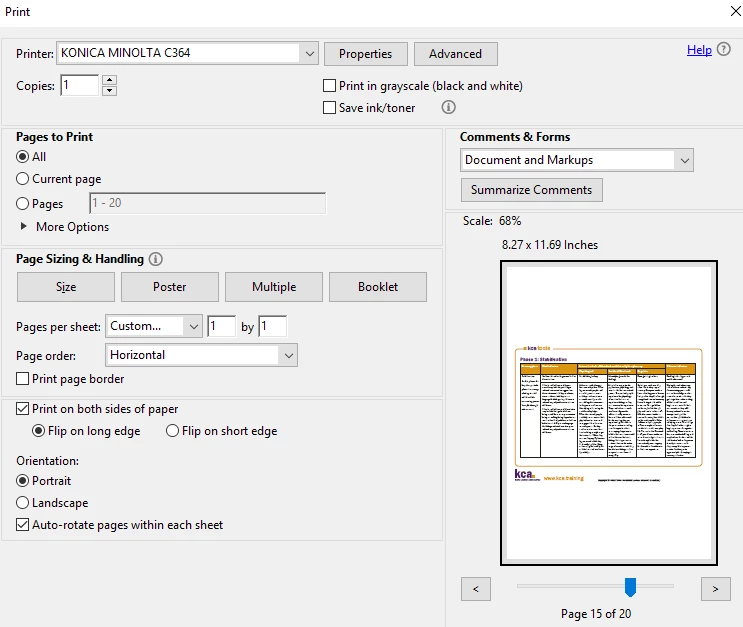
I have a pdf document with mostly portrait pages but some landscape pages at the back.  My printer settings are on portrait but with auto-rotate ticked.  The lanscape pages are still showing as small landscape across the middle of the portrait page instead of rotating to full size on it's side.  How do I fix this?
This topic has been closed for replies.
Correct answer Abambo

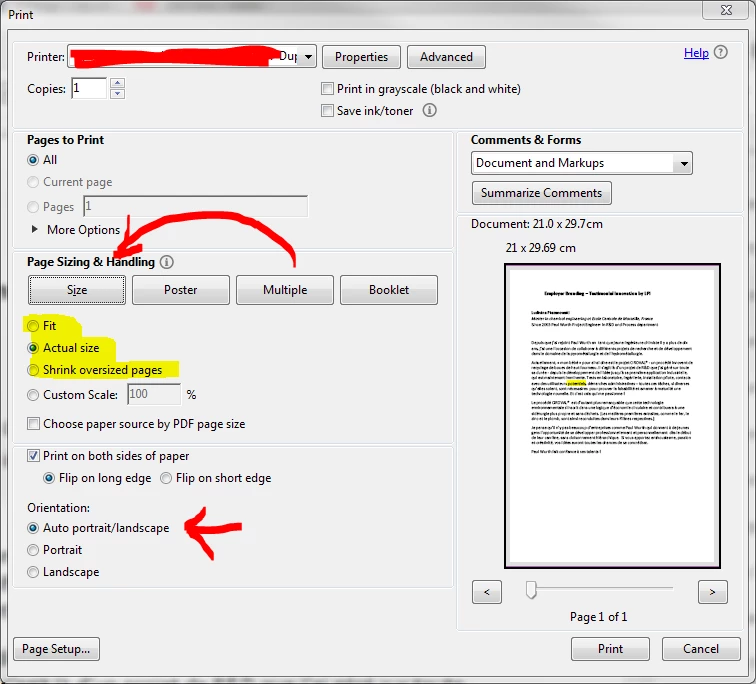
Please change from "Multiple"  to "Size" and choose either fit, actual size or shrink. Orientation should be Auto.

1 reply

Abambo
Community Expert
AbamboCommunity ExpertCorrect answer
Community Expert
June 15, 2018

Please change from "Multiple"  to "Size" and choose either fit, actual size or shrink. Orientation should be Auto.

ABAMBO | Hard- and Software Engineer | Photographer
judelkca
judelkcaAuthor
Participant
June 15, 2018

Perfect!  Thank you for your help!

Abambo
Community Expert
Community Expert
June 15, 2018

You're welcome. Multiple rotates too, but not the way you described.

ABAMBO | Hard- and Software Engineer | Photographer