
danf12648217
Participant
February 20, 2018
Answered

autofill a text box with editable script after selection is made from a drop down

  • February 20, 2018
  • 1 reply
  • 567 views

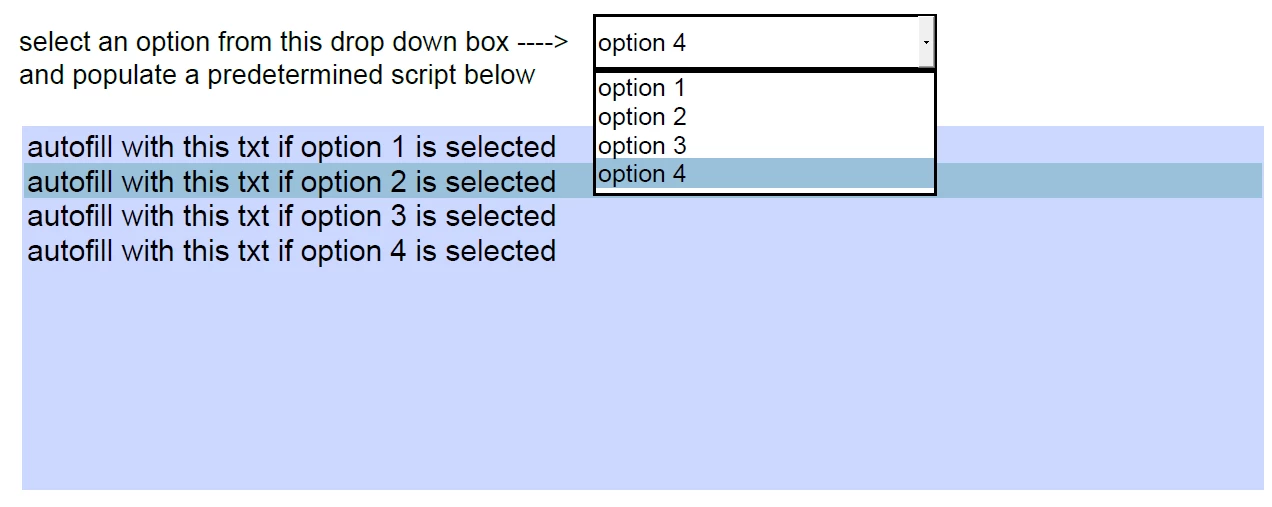
rather than explain this, here is an image to describe what i want to happen. should be self explanatory

Running Acrobat Pro DC
.

still a few questions: assuming this is possible..

-where does the predetermined script live?

-what type of text box do i use? (the script is long, and needs multi-line functions) its my understanding multi-line is not possible with drop downs

-auto-filled text will needs to be editable (contains numbers that are variable)

thanks!

This topic has been closed for replies.
Correct answer Thom Parker

Read this article:

https://acrobatusers.com/tutorials/change_another_field

You'll find more general info on list fields and Acrobat JS programming here:

https://www.pdfscripting.com/public/List-Field-Usage-and-Handling.cfm

1 reply

Thom Parker
Community Expert
Thom ParkerCommunity ExpertCorrect answer
Community Expert
February 20, 2018

Read this article:

https://acrobatusers.com/tutorials/change_another_field

You'll find more general info on list fields and Acrobat JS programming here:

https://www.pdfscripting.com/public/List-Field-Usage-and-Handling.cfm

Thom Parker - Software Developer at PDFScriptingUse the Acrobat JavaScript Reference early and often