

Bates Numbering cannot be removed and improper formatting.
I'm having an issue with Adobe Acrobat Pro X. When we go in to add the number in the bottom right as a footer, we check the two appearance options, then the preview looks fine. After applying it to the PDF though, the last two pages always have the Bates number bleeding through the text instead of correctly adjusting the page. Also if you try to remove it after applying it like this, it will tell you that there are no Bates Numbering located in the current PDF. I found that it was all linked to this checked option:
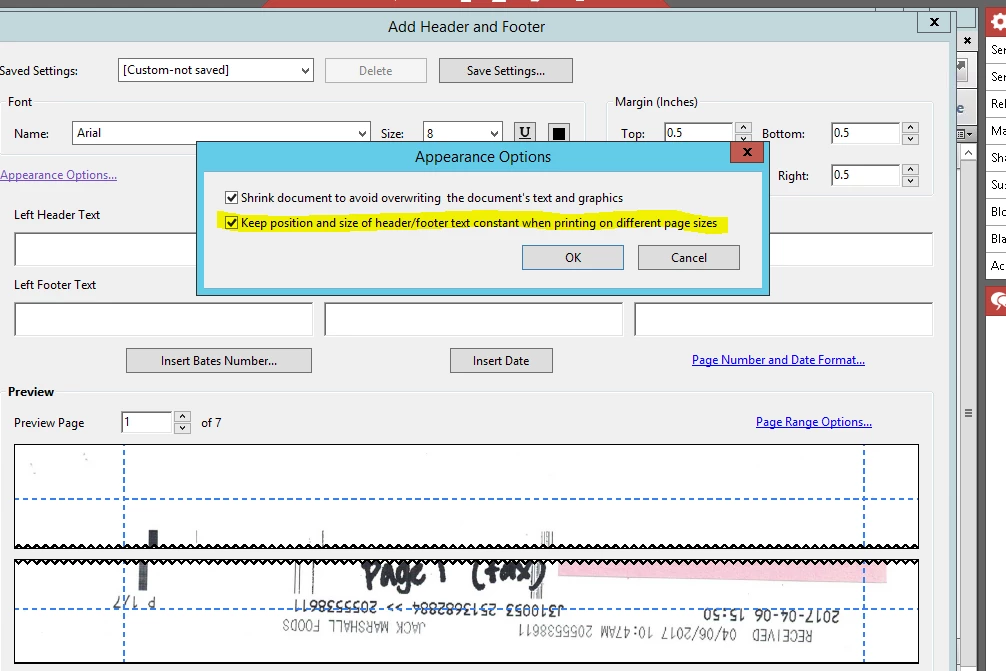
When I removed this option, Bates Numbering works fine and formats correctly. I can also remove the Bates number afterwards. When this option is selected the last two pages are incorrectly formatted and you cannot remove the Bates Number.
I talked with our client and found that they do actually use different page sizes for certain legal documents and she needs it to stay checked. They had this program working and then suddenly it stopped a few weeks/months back. (Not sure of the exact time line of when it stopped.)
Is there any older Adobe Acrobat Pro X installations that I can try? Or any fix to this current issue that I could look for? Thank you for your help.
Garett Brooks - Business Information Solutions


 AdChoices