
Participant
May 19, 2020
Answered

blank box crashing adobe pdf upon opening

  • May 19, 2020
  • 5 replies
  • 5514 views

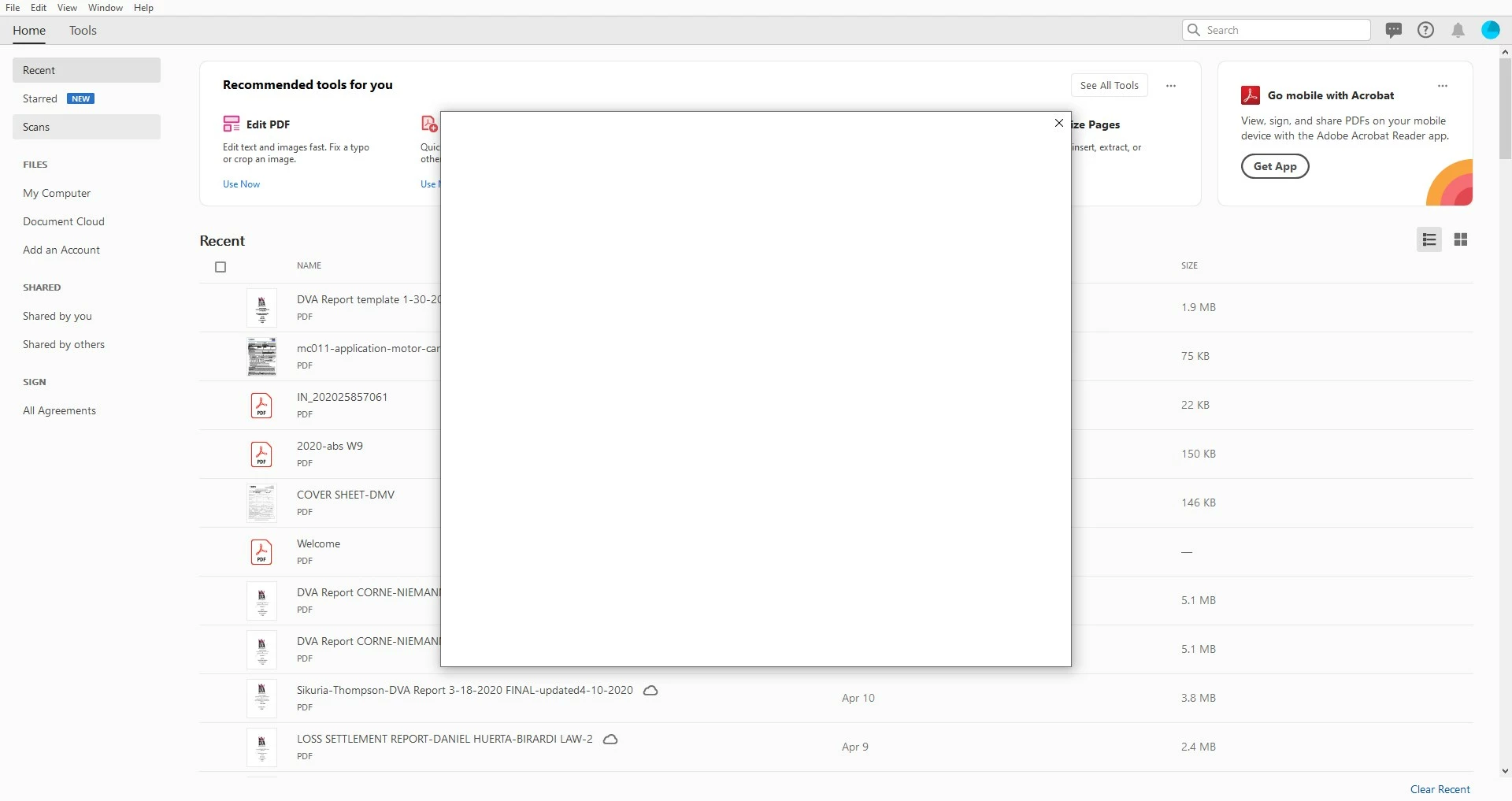
All of a sudden Adobe is crashing. I click on a pdf and as soon as it opens a blank box appears over it. Can't do anything but X out of the blank box, which closes the PDF. I can open a PDF through the chrome extension, but this deosnt help with editing and creating documents. Cloud or desktop, doesnt matter. I have uninstalled and "cleaned" it 100 times. Spent 1.1/2 hrs on hold 2x. Had 2 different chat staff spend a total of 5.5 hour and nothing. It's the same problem. Anyone?  HELP!!!

Thanks,

SARAH
 

This topic has been closed for replies.
Correct answer Josh34336543ko5m

Same thing happened to me, no fixes worked with cleaner, uninstall, reinstall. I just decided to try one more thing - went online and looked up my activated devices. I deactivated my device and then opened adobe again, problem seems to be gone!

5 replies

Josh34336543ko5mCorrect answer
Participant
February 18, 2024

Same thing happened to me, no fixes worked with cleaner, uninstall, reinstall. I just decided to try one more thing - went online and looked up my activated devices. I deactivated my device and then opened adobe again, problem seems to be gone!

Participant
March 5, 2024

Yes, this worked for me. Seemed to be an issue of having two installs and trying to use Acrobat on a third device.

Participant
September 17, 2024

i have only 1 device connected. i tried everything mentioned above but the issue still persist. help! i pay to get nothing

Participant
January 19, 2024

A reply for anyone still having this issue:

If acrobat is closing after a blank popup comes up immediately after opening, it might be failing to load the "Too many devices" menu. An easy fix is to go into any other adobe suite app, you'll be met with the popup, make sure to disable one of the other active devices and once it accepts your changes you should be good to try acrobat again. Hope this helps, my issue was similar and this fixed it.

Participant
July 29, 2023

I had the same problem, 4 seconds after trying to open a pdf file, a blank dialog box would appear for 4 seconds, then would disapear closing the app at the same time. Removed all Adobe apps, removed all certificates, used 2 uninstaller apps and Adobe cleaner tool several time but did not help...
But what did work was go to https://account.adobe.com
Login in

Go to "Plans and Payments" tab
Select "Activated devices" from the drop down box
Deactivate all devices
The PC you are currently using will come back as activated in a few seconds
Try to open your pdf again, mine worked fine.
Good Luck
Adobe fix this blank dialog box issue!

Amal.
Legend
May 20, 2020

Hi Sarah


we are sorry for the trouble and the experience. As described the application is crashing on opening.


Would you mind sharing the version of the Adobe Acrobat DC you are using? To check the version go to Help > About Adobe Acrobat DC
Make sure you have the latest version 20.009.20063 installed. Go to Help > Check for Updates


Also, please try to repair the installation (For Windows Only) Go to Help > Repair Installation.


If it still doesn't work, please try to turn off the protected mode for testing and see if that helps. Go to Edit > Preferences > Enhanced Security > Turn off the protected mode and uncheck the enhanced security.
Note: please turn on the security after testing


Let us know how it goes


Regards

Amal

Participant
August 24, 2020

I have ran into the same issue as Sarah above.  I am unable to do any of the solutions listed above because the box opens up over the program, rendering it useless.  I have to close the blank box, which then closes Acrobat Pro.  I have uninstalled, reinstalled, logged out, logged back in, installed from Adobe Creative Cloud...any other ideas?


Thanks,

Jeff

Amal.
Legend
August 27, 2020

Hi Jeff,


We are sorry to hear that. Are you getting the blank box while opening the PDF file? If yes, please try the following preference setings and see if that works for you.


Go to Edit (Windows), Adobe Acrobat (Mac) > Preferences > General > Uncheck 'Show online storage when opening files' & 'Show online storage when saving files' > Click OK and reboot the application.


Let us know how it goes


Regards

Amal

Participant
May 19, 2020

Hi Sarah,


Apologies for the trouble you had using Acrobat.

Could you please try login on www.adobe.com from your web browser, using the same Adobe ID you are using in Acrobat.

If you see updated terms of use, please accept it and then try relaunching Acrobat.