
Booklets of smaller pages print poorly
A lot of boardgame publishers provide PDFs of their instruction manuals. These are rarely a standard page size, and often a standard size won't fit in the box. The white boarders of a full-size, printed manual can be cut off, but then it either needs stapled in the top corner (like a report) or stapled on an edge. Both of those are ugly options.
Printing them as a booklet could be a solution. Booklets of full, letter size documents come out really nice. Unfortunately, Acrobat centers each of the smaller-than-letter pages inside a white boarder instead of connecting the printed areas in the center of the paper and bordering just the outsides. Thus, the booklet doesn't print in a way to make a nice booklet. Even if I cut down the outer edges, there is a weird-looking white "spine" (i.e. the red box in the image).
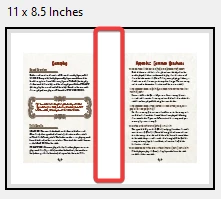
How can I "mush" the pages together so that when printed, it will make a nice booklet? So it prints like this: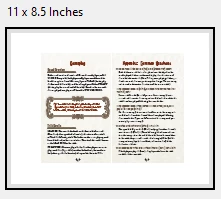
Thanks!
 AdChoices