
Participating Frequently
April 30, 2025
Question

Booklets of smaller pages print poorly

  • April 30, 2025
  • 3 replies
  • 1326 views

A lot of boardgame publishers provide PDFs of their instruction manuals.  These are rarely a standard page size, and often a standard size won't fit in the box. The white boarders of a full-size, printed manual can be cut off, but then it either needs stapled in the top corner (like a report) or stapled on an edge.  Both of those are ugly options.


Printing them as a booklet could be a solution.  Booklets of full, letter size documents come out really nice. Unfortunately, Acrobat centers each of the smaller-than-letter pages inside a white boarder instead of connecting the printed areas in the center of the paper and bordering just the outsides. Thus, the booklet doesn't print in a way to make a nice booklet.  Even if I cut down the outer edges, there is a weird-looking white "spine" (i.e. the red box in the image). 
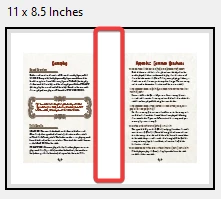
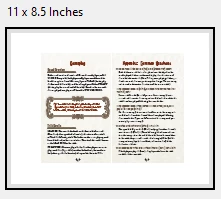
How can I "mush" the pages together so that when printed, it will make a nice booklet?  So it prints like this:
Thanks!

3 replies

A-Doh!-beAuthor
Participating Frequently
May 14, 2025

The solution is to "print" a booklet to the Adobe PDF virtual printer but create and use a custom paper size.  Like this:

Then, print the resulting PDF to regular paper at whatever scale suits you.

Participant
June 14, 2025

Thank you so much for posting this solution; it solved a problem I've been fighting with for days. I have no idea how Adobe could think this is an acceptable user experience.

Dave Creamer of IDEAS
Community Expert
Community Expert
May 1, 2025

What program created the original layout?

And do you have access to the layout file?


David Creamer: Community Expert (ACI and ACE 1995-2023)
A-Doh!-beAuthor
Participating Frequently
May 1, 2025

No idea and no. 

In this case, these are rulebooks published by various companies, but my question is generic.  

Thanks.

Dave Creamer of IDEAS
Community Expert
Community Expert
May 1, 2025

My questions were generic too.

(In the Acrobat Fle>Properties menu, it usually lists the original program.)

Did you try cropping the white space before printing your booklet?


David Creamer: Community Expert (ACI and ACE 1995-2023)
Legend
May 1, 2025

Hi @A-Doh!-be 


Wait for more inputs from experts.

Thank you for reaching out with your question. Since this is file file-specific issue, the following are some suggestions I can offer: 


1. Use High-Quality Print Settings

  • In the print dialog:

    • Set “Booklet” mode.

    • Under Page Sizing & Handling, choose:

      • Booklet subset = Both sides (or Front Side Only/Back Side Only as needed).

      • Binding = Left.


    • Ensure “Actual Size” is selected—not “Fit” or “Shrink”.


2. Match PDF Page Size with Printer Settings

  • If your pages are A5:

    • In the printer properties, set the paper size to A5 or A4 if you are printing 2 A5 pages per A4 sheet.

    • Acrobat should correctly arrange the pages side-by-side as a booklet on A4.


3. Disable Printer Driver Scaling

  • Check your printer’s driver preferences (outside Acrobat).

    • Make sure scaling or “fit to page” isn’t being applied again by the printer software.

    • Use 600dpi or 1200dpi for better sharpness.


If the problem persists: https://adobe.ly/4jXmE8u;

  • Open Print Production > Preflight in Acrobat Pro.

    • Use fixup: “Scale pages to a specified size” to normalize page sizes before booklet printing.


Let us know how it works.


~Tariq

A-Doh!-beAuthor
Participating Frequently
May 1, 2025

Your answer was not helpful at all:


  1. Sizing is not available in booklet mode:
  2. The pictures are clearly for "11 x 8.5 inches", so not A4 or A5.
  3. How could the printer's "fit to page" possibly insert a blank space in the middle of the page Adobe created from two pages? (Also, it's not enabled.) My question isn't about sharpness, so why mention it?
  4. I don't want to scale the pages.  I want to print them actual size, but in booklet mode without an artificial space between them. 


The whole point of booklet mode is to produce a booklet.  With full-sized "metric" (i.e. A3/4/5) pages, that is easy because the proportions of half a sheet match that of the full sheet.  With imperial (i.e. letter) pages, the "half-sized" pages will touch in the middle with some whitespace top and bottom (i.e. along the long side of a sheet). However, with any non-standard size, why in the world would Acrobat not place the two sides of pages that should be next to each other and add whitespace on the outsides?  Who would ever want a booklet with a huge whitespace margin in the middle of the booklet?