
Inspiring
August 31, 2023
Answered

Calculate hours and minutes worked

  • August 31, 2023
  • 4 replies
  • 4252 views

Hi everyone, I'm hoping someone can help me with this.

I'm looking to add up my hours and minutes I've worked into a total box on a job sheet, so in one day if I've spent 3 hours, I enter 3.0, then the next day I worked 1 hour and 55 minutes I will enter 1.55 then if the next day I work 25 minutes I will add 0.25. the total box will sum these up to 4.8, but I'm wanting to keep the hour minute format, so want to to sum it to 5.20.
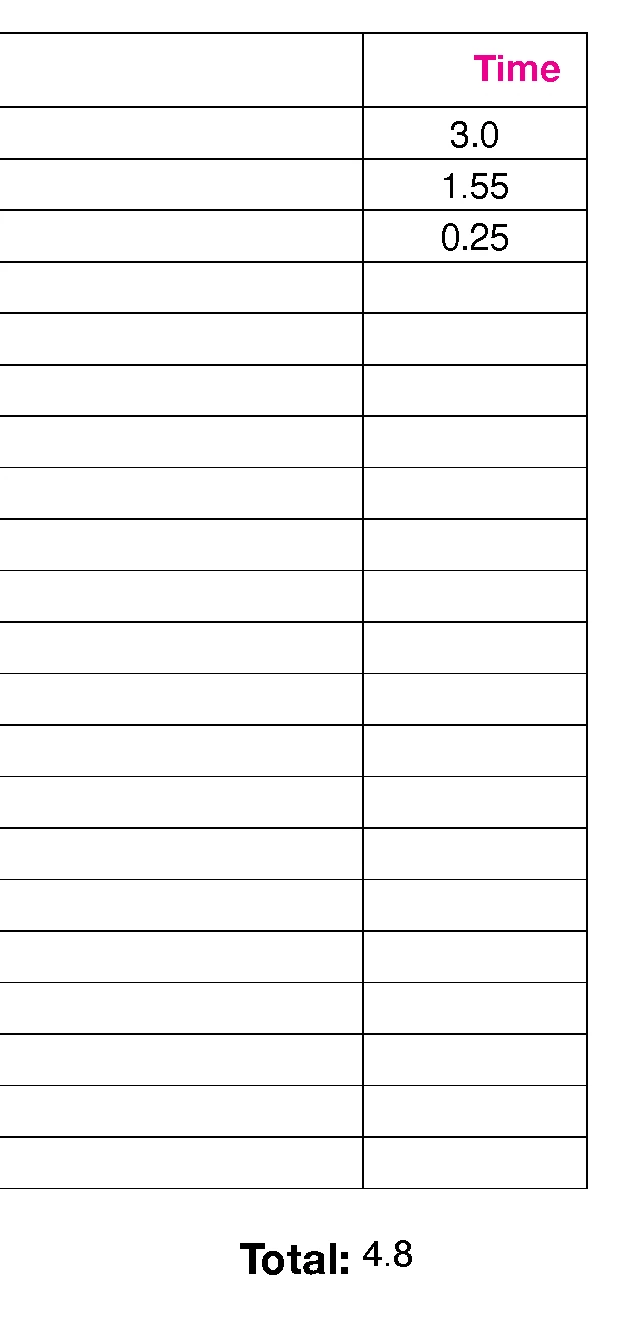
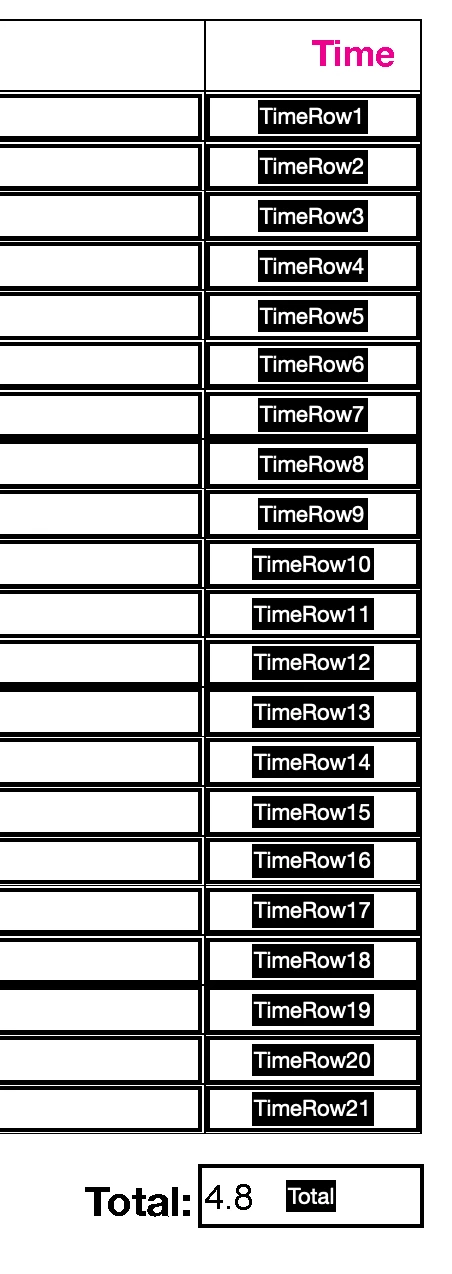


Is this possible?

This topic has been closed for replies.
Correct answer Nesa Nurani

Try this as 'Custom calculation script' of "Total" field:

var totalMinutes = 0;

for(var i=1; i<=21; i++){
 var time = this.getField("TimeRow" + i).valueAsString;
  if(time){
   var parts = time.split('.');
   var hours = parseInt(parts[0]);
   var minutes = parts[1] ? parseInt(parts[1]) : 0
   totalMinutes += hours * 60 + minutes;}}

var totalHours = Math.floor(totalMinutes / 60);
var remainingMinutes = totalMinutes % 60;

event.value = totalHours + '.' + (remainingMinutes < 10 ? '0' : '') + remainingMinutes;


4 replies

Participant
June 5, 2024

Hey there! I completely understand your frustration with keeping track of work hours in both hours and minutes. Here are a couple of approaches you can take:

  1. Use a dedicated time tracking tool: Many project management or time tracking apps can handle these calculations automatically. They often offer features like start and stop timers, automatic breaks, and reports that can be helpful for managing your workload.

  2. Manual calculation with conversion: If you prefer a manual approach, you can convert your minutes to decimal hours before adding them. For example, 1 hour and 55 minutes becomes 1.92 hours (1 hour + (55 minutes / 60 minutes)). Then, you can simply add these decimal values to get your total time.

Bonus tip: If you're looking for a quick online tool to convert between time formats or perform basic time calculations, check out Date and Time Calculator It's a free resource that can be handy for situations like this!

Nesa Nurani
Community Expert
Nesa NuraniCommunity ExpertCorrect answer
Community Expert
August 31, 2023

Try this as 'Custom calculation script' of "Total" field:

var totalMinutes = 0;

for(var i=1; i<=21; i++){
 var time = this.getField("TimeRow" + i).valueAsString;
  if(time){
   var parts = time.split('.');
   var hours = parseInt(parts[0]);
   var minutes = parts[1] ? parseInt(parts[1]) : 0
   totalMinutes += hours * 60 + minutes;}}

var totalHours = Math.floor(totalMinutes / 60);
var remainingMinutes = totalMinutes % 60;

event.value = totalHours + '.' + (remainingMinutes < 10 ? '0' : '') + remainingMinutes;


Inspiring
September 1, 2023

Thank you very much, this is spot on.

Bernd Alheit
Community Expert
Community Expert
August 31, 2023

Use a script for this.

Convert hours and minutes to minutes.

Create the sum of all minutes.

Convert the result in hours and minutes.

Inspiring
August 31, 2023

I've searched for scripts and coun't find one that works. And they all seem to include time and well as duration e.g. a column to input time 05:20pm then a duration column 1 hour 20 mins, which isn't what I need, just the duration.

I'm not proficient enough in scripting to add, delete or create my own.

try67
Community Expert
Community Expert
August 31, 2023

I've developed many similar scripts in the past, and no, it's not a trivial task.


If you're interested in hiring a professional to create it for you, feel free to contact me privately by clicking my user-name and then on "Send a Message".

Bernd Alheit
Community Expert
Community Expert
August 31, 2023

How does you calculate the sum?

Inspiring
August 31, 2023

At the moment I'm just using the below in the 'Text Field Properties', where it just adds all the number entered in the selected text fields, in this case, all the 'TimeRow' fields (1-21). 

But this just sums them up as standard numbers so for example enterent 1.30 (1 hours 30 mins) and two of the fields sums it to 2.6, which I'm wnating it to show 3.0 as in 3 hours, like it needs to cut off at 0.60 and anything after this i.e 0.70 would be showb as 1.10.

Hope this makes sense.