
Participating Frequently
January 26, 2024
Answered

Calculating Radio Button Multiple Choices

  • January 26, 2024
  • 2 replies
  • 2056 views

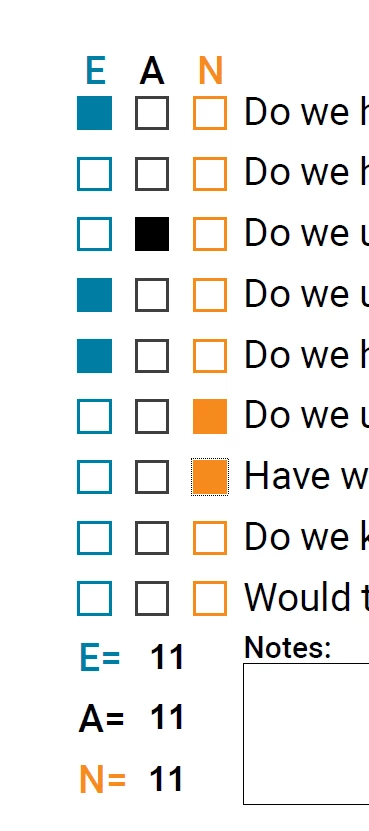
Hi Acrobat Community... I am developing a project criteria form that will need to calculate the choices made to provide a project assessment. There are three choices per line. If I calculate using 'Value is the sum (+)' it works—if there is only one choice, but since there are three, I need to calculate them individually.  And when I do this for each choice's summary text frame, I get a combined calculation (see attachment).  If there are 3 E's, that number needs to be shown.

I think that I will need a 'Simplified field notation' script to help, but I don't know how to create scripts. I did see this post, but I don't know if it will work or how to modify it to fit my needs. 

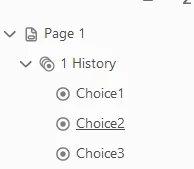
Attached is a screenshot to give context. Each category line radio buttons have the same name. Line one's name is "1 History" line two is "1 Problems", etc. and the user can select either E, A, or N. In the end, there will be 9 different categories, but for now, I'm just testing one to see if doable to do the calculations.

I hope that I am cleary, but if not, please ask questions if you need further clarity. Thanks in advance!!
This topic has been closed for replies.
Correct answer Nesa Nurani

Use this as custom calculation script in one of the text fields:


var fields = ["1 History", "1 Problems"];// add all radio button field names here
var e = 0, a = 0, n = 0;

for ( var i in fields){
 if(this.getField(fields[i]).valueAsString === "Choice1")e++;
 else if(this.getField(fields[i]).valueAsString === "Choice2")a++;
 else if(this.getField(fields[i]).valueAsString === "Choice3")n++;}

this.getField("E Total").value = e;
this.getField("A Total").value = a;
this.getField("N Total").value = n;


2 replies

try67
Community Expert
Community Expert
January 26, 2024

Do you mean that you want to count the number of times "E" was selected, for example?

mz-ccAuthor
Participating Frequently
January 26, 2024

Correct. Once that particular project assessment is completed (all 9 categories), they would like to see the total of  E's (excellent), A's (average), etc. it has received. Thanks

Nesa Nurani
Community Expert
Nesa NuraniCommunity ExpertCorrect answer
Community Expert
January 26, 2024

Use this as custom calculation script in one of the text fields:


var fields = ["1 History", "1 Problems"];// add all radio button field names here
var e = 0, a = 0, n = 0;

for ( var i in fields){
 if(this.getField(fields[i]).valueAsString === "Choice1")e++;
 else if(this.getField(fields[i]).valueAsString === "Choice2")a++;
 else if(this.getField(fields[i]).valueAsString === "Choice3")n++;}

this.getField("E Total").value = e;
this.getField("A Total").value = a;
this.getField("N Total").value = n;


mz-ccAuthor
Participating Frequently
January 26, 2024

Thank you... I'll take a look and see if this works. Clarity question: Since I need to calculate all the E's, A's, and N's individually, would I need to add this same script for all 3 text frames? So, in the example screenshot that was provided earlier, in each place that the number 11 is showing, they are 3 different text frames with the same calculated property info value. But I'm sure I need to provide different script info to make them total correctly. Thanks

Nesa Nurani
Community Expert
Community Expert
January 26, 2024

No, just put script in one field (any text field is fine).