kellyjaye1
Known Participant
February 23, 2012
Answered

Can fonts in a PDF be converted to outlines with Acrobat Pro 9?

  • February 23, 2012
  • 4 replies
  • 71244 views

Acrobat Pro 9.....Sometimes I get a PDF that I will have to do some edits to.  Because I dont have some of the fonts used, I cant edit the file without losing the fonts used.  Is there a way to have Acrobat maybe resave itself with all the fonts converted to outlines so this wont be a problem along with any othe font errors I may get?

This topic has been closed for replies.
Correct answer JR Boulay

Converting fonts to outlines is frowned upon do to the loss of font hinting, loss of editability, and inherant fattening of the font.

In your seat, you have to do what has to be done. 

http://indesignsecrets.com/converting-text-to-outlines-the-right-way-updated.php

I may have read that this hack is not working in CS5 or 5.5

Place the pdf into InDesign. Create a box or small stroke on the page, in the case of non native ID elements (this pdf) the object needs to touch/overlap the pdf. Color the object, perhaps .1% black, apply transparency to it, as little as 1%. You effectivly have something unseeable, but will force the Transparency Flattener to kick in.

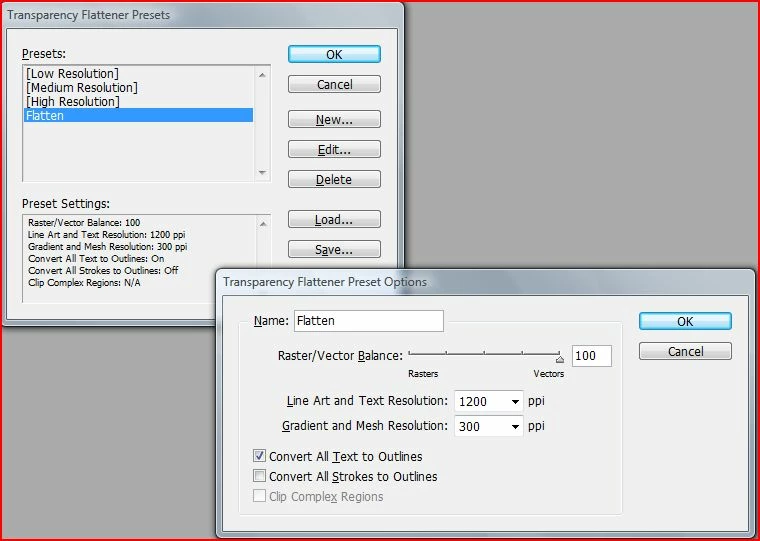
Create a new Transparency Flattener Setting, see my example,

Check the effect with the Flattener Panel, see my example

Place the pdf into InDesign...

Argl! Never do that, this is a total heresy!

==> Using Acrobat Pro:

- apply an invisible transparent object to all pages to force flattening (e.g. apply a little white square with an 1% opacity as a watermark in a corner),

- then go to the Transparency flattening : http://help.adobe.com/en_US/Acrobat/9.0/Professional/WS58a04a822e3e50102bd615109794195ff-7b87.w.html

and use a flattener preset that convert fonts to outlines.

4 replies

Participant
November 24, 2015

There's no need to work with the transparency flattener.

In the preflight panel of acrobat there's (a well hidden option) text to outlines.

You can download it here:

Dropbox - Text to curves.kfp   

In acrobat - preflight choose " new profile" and import this.

Works perfect!

Bernd Alheit
Community Expert
Community Expert
November 24, 2015

It is not hidden. In the preflight tool search for outlines.

Participant
November 24, 2015

You're right Bernd! I didn't notice that before

Participating Frequently
September 10, 2014

in InDesign i always use the transparency flattener,

Do not use 1% white - this will surely change the color values

- use a white rectangle with multiply on a top level layer

- go to edit -> transparency flattener presets -> create a new one with "convert all text to outlines" checked

- use your new preset in the transparency flattener window to preview

- in PDF export dialog go to Advanced and in flattener options choose your new preset

- export your pdf with outlined text

JR Boulay
Community Expert
Community Expert
September 4, 2014

My pleasure.

Acrobate du PDF, InDesigner et Photoshopographe
Daniel Flavin
Inspiring
February 23, 2012

I haven't looked at this in the Preflight and Fixup panel. I would look through there; but as it is frowned upon officially, I wouldn't gaurantee to find it.

Are you familiar with the InDesign convert fonts to outlines via transparency flattener technique (hack)?

kellyjaye1
Known Participant
February 23, 2012

I dont see anything in the preflight about it.  Also I frown on a lot of the "print ready" stuff clients send to me ;-).  I would think it would be a useful enough feature to see in there somewhere though.

I know about ID converting fonts to outlines, I do it now and then but this wasnt created by me and I dont have an ID file of it (Im guessing Publisher).  Not sure of the hack technique you mentioned though

JR Boulay
Community Expert
JR BoulayCommunity ExpertCorrect answer
Community Expert
February 24, 2012

Converting fonts to outlines is frowned upon do to the loss of font hinting, loss of editability, and inherant fattening of the font.

In your seat, you have to do what has to be done. 

http://indesignsecrets.com/converting-text-to-outlines-the-right-way-updated.php

I may have read that this hack is not working in CS5 or 5.5

Place the pdf into InDesign. Create a box or small stroke on the page, in the case of non native ID elements (this pdf) the object needs to touch/overlap the pdf. Color the object, perhaps .1% black, apply transparency to it, as little as 1%. You effectivly have something unseeable, but will force the Transparency Flattener to kick in.

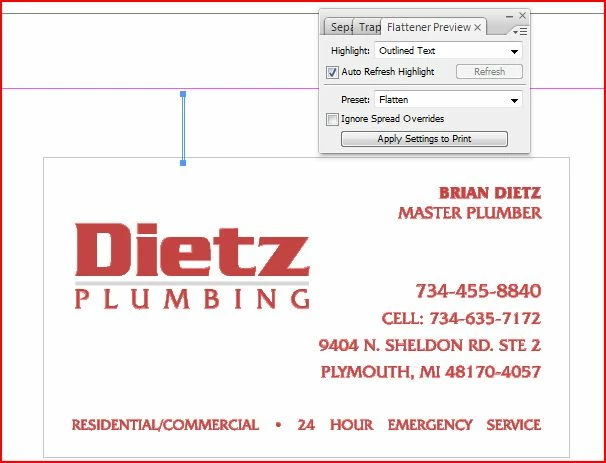
Create a new Transparency Flattener Setting, see my example,

Check the effect with the Flattener Panel, see my example

Place the pdf into InDesign...

Argl! Never do that, this is a total heresy!

==> Using Acrobat Pro:

- apply an invisible transparent object to all pages to force flattening (e.g. apply a little white square with an 1% opacity as a watermark in a corner),

- then go to the Transparency flattening : http://help.adobe.com/en_US/Acrobat/9.0/Professional/WS58a04a822e3e50102bd615109794195ff-7b87.w.html

and use a flattener preset that convert fonts to outlines.

Acrobate du PDF, InDesigner et Photoshopographe
