
Participant
January 14, 2020
Question

Can I stop blue popup "tips" appearing?

  • January 14, 2020
  • 14 replies
  • 42150 views

Hi


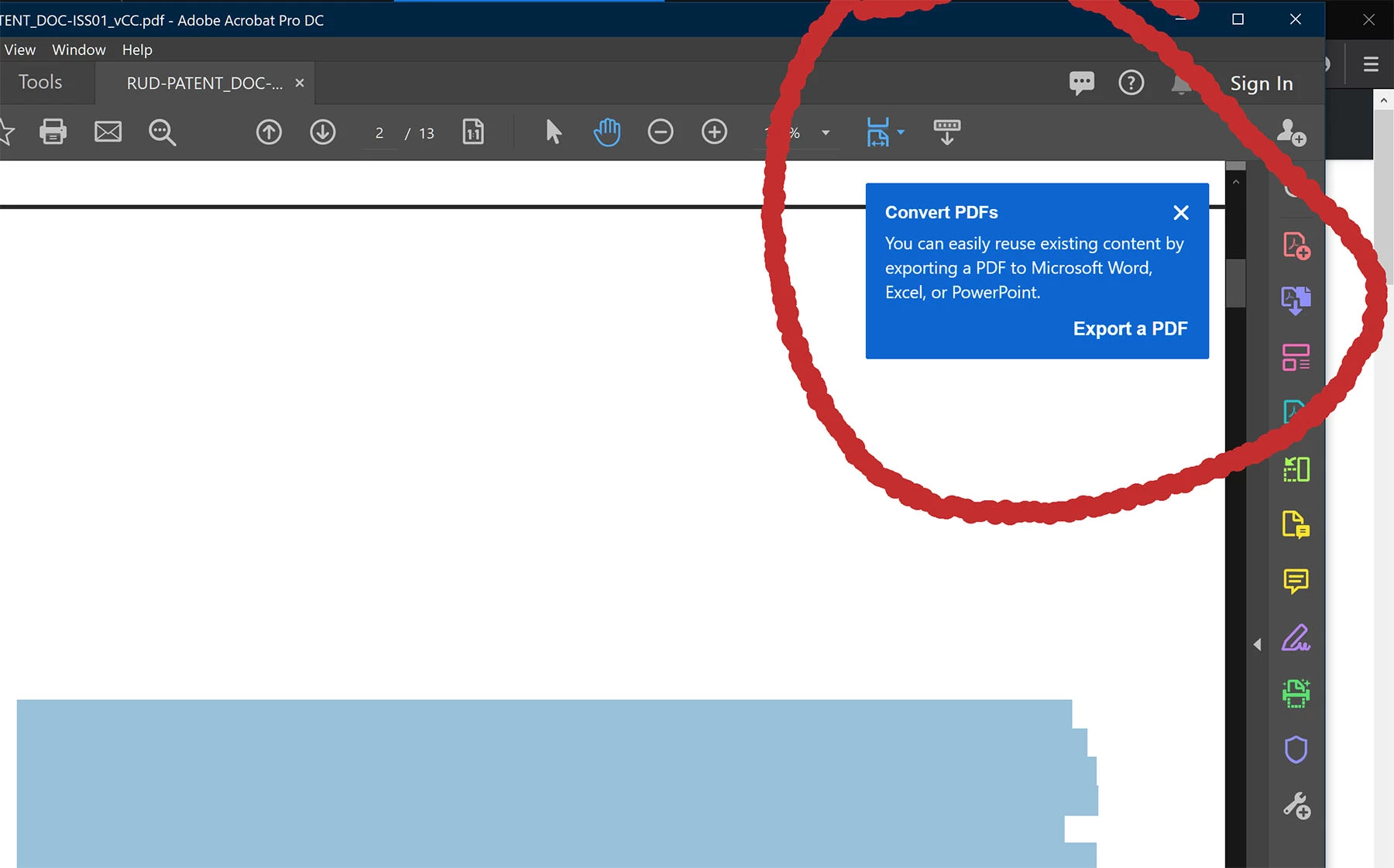
Recently, blue popup "tips" have started to appear in Acrobat. Unless dismissed, they hang around, and do not time out. This is hugely annoying thing for a program to do.


Is there anything I can do to stop them forever?


A
14 replies

Participant
November 2, 2020

Doesn't work, so annoying.  Please someone figure out how to turn these off.

Participant
November 5, 2020

If you are comfortable with registry edits, you should look at https://www.adobe.com/devnet-docs/acrobatetk/tools/PrefRef/Windows/index.html

Go to Hive --> FeatureLockdown --> Context menus, tips, tools

You'll find the registry setting for disabling the help tips

Remember to always backup our current registry settings before making changes!

Participant
December 15, 2020

Seriously? Edit the registry? That is a horrible solution and just plan laziness from Adobe. Fix the problem and make these annoying tool tips something the user can turn off themselves. For the record, I have unchecked "Show me messages when I launch Adobe Acrobat" and am still getting them.

Participant
October 9, 2020

Thank you for posting!


I did what was suggested but still have these insesant popups every time I open up a PDF.


gregg4gia
Known Participant
October 26, 2020

I have the same problem.  
  
For the record, I recently got a new iMac and did not use Migration Assistant or any other process to transfer my apps and files to the new computer. I installed fresh versions of all my apps, including the Creative Cloud app, which I used to manage installation of my Adobe apps.  
  
One of the first things I did was turn off "Show me messages" as illustrated in the screen shot above.  
  
Contextual tips continue to appear regularly.  
  
When did I set up my new iMac? Five months ago. This is far more than enough time for the app to "settle down" and stop interrupting my workflow.  
  
What is there about the word "Pro" that suggests seasoned users need contant "did you know" or "why don't you try" messages destroying their ability to get real work done?  
  
Please, Adobe, help us. I do love your products, believe it or not. But I don't love this annoyance.  
  
Thank you for listening to this rant.

gregg4gia
Known Participant
February 8, 2024

Update on the post above from October 2020. It’s now 2024, and this issue persists for me. 
 
Why? I think it’s because the Adobe developers don’t see this as a problem to be solved. 
 
But it is. Most of us work for publishers, ad agencies, or as an independent graphic designers. We’re stressed out a lot of the time, desperately trying to do our best work under impossible deadlines. 
 
These popups are—to me, at least—the equivalent of kids or co-workers tapping you on the shoulder every four minutes to say, “Can I ask you a question?” 
 
This is where most of us live. That’s why, for the past three-plus years, I’m regularly reminded of this thread by an email notification saying that my above post has been upvoted. 
 
I’m not a programmer, but I do know that making even the smallest change to an app as  complex as Acrobat Pro is insanely hard. 
 
So what? That’s your job. “It’s hard” is not a valid reason for not removing a hindrance to your professional users. 
 
This. Issue. Isn’t. A. Minor. Nuisance. 
 
As always, thank you for listening.

Participant
August 11, 2020

Hello, I hate these annoying blue tips that pop up every time I edit a PDF.  However, turning off the button in preferences that you show does not stop this from occuring.  Is there another solution?  Thanks!

Legend
September 18, 2020

I also have this problem. It's so annoying. With every new version Adobe puts new nasty things in the software.

The "General" settings page is now so big that it won't fit the screen of Full HD resolution (24" monitor) anymore.

Joel Geraci
Community Expert
Community Expert
January 14, 2020

You can turn them off in preferences.

Inspiring
August 7, 2021

That doesn't work. I still get these annoying popups! What a waste of time trying to solve this!!!!!!!