Participant
June 15, 2018
Question

Can not open up PDF file on Adobe X PRO

  • June 15, 2018
  • 1 reply
  • 449 views

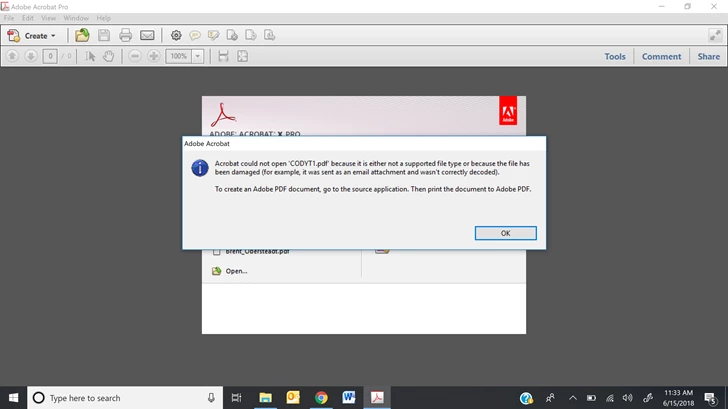
I am having an issue opening up a pdf file with Adobe X Pro. The originally document was created using Adobe Pro DC. The document was then uploaded to the google drive and that is where I am downloading the pdf from onto my computer. I can download it but when i try to open it in Adobe Reader Pro This is the error message I get! Also, I used to be able to open the files just fine from the drive but all the sudden I cant. Nothing has changed on my end.
This topic has been closed for replies.

1 reply

Known Participant
June 15, 2018

Just a note - on June 6 we got an alert from Google which might be part of your problem too?

"

Hello Google Drive Customer,

We recently launched a new feature in Google Drive that allows users to comment on binary files while in the Google Drive preview pane. Binary files are files stored in Drive other than Google Docs, Sheets, Slides, and Drawings - e.g. Microsoft Office files and PDFs. As a part of this launch, the "Can view" permission setting for binary files is also changing. Users with "Can view" access to binary files can now view comments on that file, but they can't reply to those comments or create new comments.

We're reaching out to you because you have binary files that contain "legacy" comments in your Google Drive account. These are comments inserted into a file using the Google Drive API, or via a third party application prior to the launch of this feature. They will remain invisible to users with "Can view" access.

On July 31st, 2018

  • Legacy comments in binary files will be hidden from the Google Drive preview pane and the Drive API, and will no longer be accessible to end users.
  • If you’d like to recover these legacy comments, please make sure you are logged into your Google account and fill out this Google Forms survey by checking the confirmation checkbox. We will process your request and recover your legacy comments within 2 weeks of your form submission. These recovered legacy comments will be made visible to users with “Can view” access. If you don’t want recovered legacy comments to be visible to users with “Can view” access, we recommend unsharing the document after recovering the comments from their legacy state.
  • The new "comments in Google Drive preview pane" feature will still not be enabled on these binary files with legacy comments.

On August 30th, 2018

  • We will delete and deprecate the legacy comments in these binary files.
  • The new comments in Google Drive preview pane feature will be enabled on all binary files.

Why we are making this change to "Can view" sharing role permission for binary files
With this change, we're ensuring easier interoperability between Google Drive, Microsoft Office, and other popular applications. Historically, users with "Can view" access to a binary file stored in Drive could not see comments, action items, and/or suggested edits in the file. However, certain applications (such as Microsoft Office and PDF) allow users with view access to see comments and tracked changes. For example, if you share a read-only Microsoft Word file as an email attachment, the recipient can see comments and tracked changes in the Word application.

Users with “Can view” access
Google Docs files stored in Google Drive
(Docs, Sheets, Slides, Drawings)
- Can’t see comments
- Can’t make new comments
- Can’t reply to existing comments
Binary files stored in Google Drive (e.g. images, videos, Microsoft Office files, PDF files, etc.) that have no legacy comments - Can see comments
- Can’t make new comments
- Can’t reply to existing comments
Binary files stored in Google Drive (e.g. images, videos, Microsoft Office files, PDF files, etc.) that have legacy comments- Can’t see comments
- Can’t make new comments
- Can’t reply to existing comments
- These legacy comments are visible through the ‘Details’ sidebar in Google Drive preview pane, only to users with “Can comment”, “Can edit” or “Owner” access.