
Participant
April 28, 2020
Question

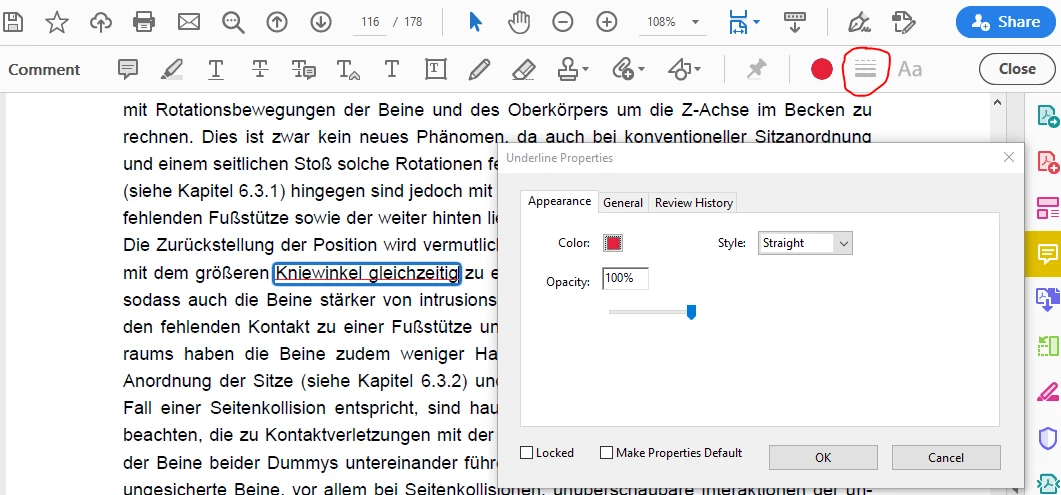
can´t change the thickness by comment

  • April 28, 2020
  • 3 replies
  • 1964 views

Hi! I am using Acrobat Reader DC 20.006.20042, but when I do underline or highlight by comment, the thickness change function is grey on the tool bar and there isn´t this function of the properties windows.


Dose anyone maybe know why?
 

This topic has been closed for replies.

3 replies

Participant
August 5, 2022

Hi,


I think it is related to how you are using it. The line weight function only applies to drawing of lines - not strikethrough or underline. I am using Adobe Reader DC version 15.23.20070.215641 and while your version might be more fully featured, play with the drawing objects  available in the commenting tools. The stright line drawn there is made thicker/thinner by adjusting the weight. In fact other properties including style, start,end, weight and colour can be controlled by drawing the line and thenselecting the object > right-click context menu > properties 

Necroing a dead thread as I didnt find this explanation anywhere.


Community Expert
April 28, 2020

I think is a feature available only in Acrobat, not in Acrobat reader. I think you have to ask the creator of the document to save the PDF with that option.

Community Expert
April 28, 2020

Hi, Maybe it can be depends on this:

Note: In Acrobat Reader, complete commenting tools are available only in PDFs that have commenting enabled.

Take a look here:

https://helpx.adobe.com/acrobat/using/commenting-pdfs.html

YSKikAuthor
Participant
April 28, 2020

Hey,


Thanks for your quick reply! I tried to follow the instruction commenting enabled  but I weirdly don't have the choice SaveAs Other >Reader Extended PDF in my Acrobat reader.  So I still have to find other way to fix this....