
Participant
January 24, 2019
Question

Can't find "keep tool selected" option

  • January 24, 2019
  • 3 replies
  • 13401 views

I think I accidentally turned off the "keep tool selected" option for highlighting, and now I can't find how to turn it back on...!

I'm on a Mac using the updated Adobe Acrobat Reader DC, and this is the little menu that pops up when I use cmd+e :
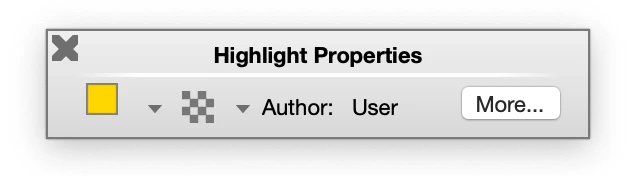
The older discussions I could find suggested that this is where I would find the "keep tool selected" option, but obviously it's moved since then. Any help either resolving this, or another fix that would allow me to use the highlighting tool continuously (without having to re-select it after each use) would be greatly appreciated!

3 replies

Participant
April 16, 2024

And what happens if you don't HAVE a pushpin icon to click?  How do you keep the tool selected then?  

Participant
July 11, 2024

Hello, 

I use the draw tool for highlighting and what worked for me was to push Ctrl+E with no tools selected. This brought up a plain properties window. Once I selected the draw tool, the properties filled into the plain box and it had a check box for "keep tool selected".  Hope that works in your case!

Participant
July 16, 2024

Thank you so much for this reply!!! I tried this and finally got the box tool to stay selected!  You've made my day, thank you again!! 

Participant
June 20, 2023

thank you i git it

Document Geek
Community Expert
Community Expert
January 25, 2019

It’s the pushpin icon in the toolbar.