
Participant
October 30, 2017
Answered

Cannot edit individual pages inside a PDF

  • October 30, 2017
  • 1 reply
  • 1148 views

Hey all... not a noob with Creative Suite but I don't use Acrobat extensively. I'm having a problem with editing a PDF document and Adobe's responses have been less than helpful. I don't need information on Reader v. Pro features, or a tutorial on how to edit text or how to create a text box... so I'm turning to the community for ideas.

Acrobat Pro DC 2017 installed

Here's my problem. I have a multipage PDF document that was created by someone else. I need to edit a couple of spelling/grammatical mistakes. I can open and edit the document. Most pages allow me to edit the text and images just fine. But a couple of pages won't allow me to do anything. I suspect it's not outlines because I can place the selection tool cursor in the text line... but any time I try to click into the "Edit PDF" tool I get a arrow cursor with a little white box and it won't allow me to select anything on the page. I also tried just adding a text box over the top but no text is showing up in the box. I'm lost... any ideas?

This topic has been closed for replies.
Correct answer Cari Jansen

Is this the cursor you are seeing?

I've never paid much attention to the way the cursor looks in Acrobat to be honest, but I see the above cursor when I select Edit in the Edit PDF toolbar, and click in an empty spot on a page and move the cursor over objects I can't edit.

For example if I move over a filled out text field it in Edit PDF mode I won't be able to edit that. However, I can use the Selection tool (black pointer) and highlight the text in the field.

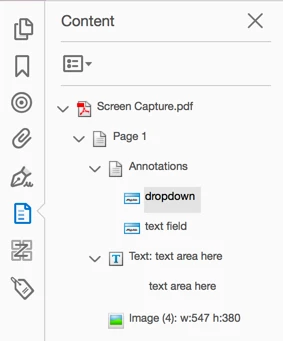
To discover what type of content you are dealing with on the page (and hopefully figure out what is going on):

  • Choose View > Show /Hide > Navigation Panes > Content

The Content pane will show you what type of content you are dealing with on the page.

1 reply

Cari JansenCorrect answer
Legend
October 30, 2017

Is this the cursor you are seeing?

I've never paid much attention to the way the cursor looks in Acrobat to be honest, but I see the above cursor when I select Edit in the Edit PDF toolbar, and click in an empty spot on a page and move the cursor over objects I can't edit.

For example if I move over a filled out text field it in Edit PDF mode I won't be able to edit that. However, I can use the Selection tool (black pointer) and highlight the text in the field.

To discover what type of content you are dealing with on the page (and hopefully figure out what is going on):

  • Choose View > Show /Hide > Navigation Panes > Content

The Content pane will show you what type of content you are dealing with on the page.