
Participant
July 20, 2023
Question

Cannot Find or Create the font "XXX" - workaround is to close and reopen PDF

  • July 20, 2023
  • 1 reply
  • 8468 views

I have a user who is receiving the following message when opening PDFs: 
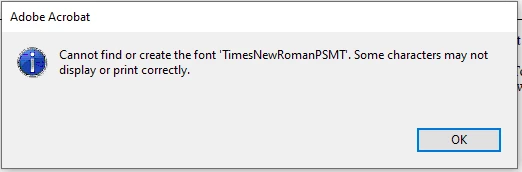
 

The font name changes from PDF to PDF, but the behavior is the same.


She will open a PDF, get that error, see that some information is not being displayed correctly, close the file and reopen, and everything will work fine.


I have tried every troubleshooting tip found on this forum for this error and nothing has worked.


Before you reply - please note:


It is NOT the indvidual PDF file.  This is proven by the fact that it can be closed, and immediately reopened, and work as intended.


Can someone please explain how to fix this?  This user is asking me for an update every day.


This topic has been closed for replies.

1 reply

Brad @ Roaring Mouse
Community Expert
Community Expert
July 21, 2023

Is the font properly embedded/subsetted? (What does the Document properties say?) What program created the PDF?

What is the setting for Use Local Fonts (in Preferences > Page Display). If it's off, try turn on (or vice versa) and see if that makes a difference.


Participant
July 21, 2023

- Is the font properly embedded/subsetted? 

   > Yes - as I stated, it does not throw this error message when it is opened again.


-What program created the PDF? 

    > I have no idea, but all other users in the organization can open the file without incident, and as stated above, it opens correctly on the second try.


-What is the setting for Use Local Fonts (in Preferences > Page Display). If it's off, try turn on (or vice versa) and see if that makes a difference.

   > I have tried this setting both ways and it still happens.


I didn't mention in my first post - this happens at random to many different PDFs.  She views lots of different PDFs throughout the day, and this error will randomly pop up on certain documents.  She may open that document earlier in the day, not see the error, open it later and then see it.


Brad @ Roaring Mouse
Community Expert
Community Expert
July 21, 2023

- Is the font properly embedded/subsetted?

> Yes - as I stated, it does not throw this error message when it is opened again.

That does not answer the question. What does it say in Document Properties > Fonts for one of the affected documents? A screen grab would help.

Document properties will also say what program created it. Some programs are not good at creating PDFs, so it would be good to see if there's a pattern. Also, WHEN was the document created? The reason I ask is te font you mention is an old Postscript version of Times New Roman font file, and from a quick search online, people who have this issue tend to mention the same batch of fonts.

Also: what System are you using where it's going awry?

Don't forget, this is a user-to-user forum, so we are mostly sharing experinces and answers. We are not Adobe and we can't just "fix it" for you.