



JR Boulay
Community Expert
Community Expert
February 10, 2022
質問

Cannot install Acrobat Reader with Acrobat Pro

  • February 10, 2022
  • 返信数 15.
  • 24634 ビュー

Hello


To remove some bugs in Acrobat Pro I followed the Adobe procedure: uninstall Acrobat and then use the AcroCleaner.
It took me several hours but it didn't fix any of the concerned bugs.


When I reinstalled Acrobat Pro (64 bits) I got a message telling me that Acrobat Reader (32 bits) would be uninstalled, which was done.

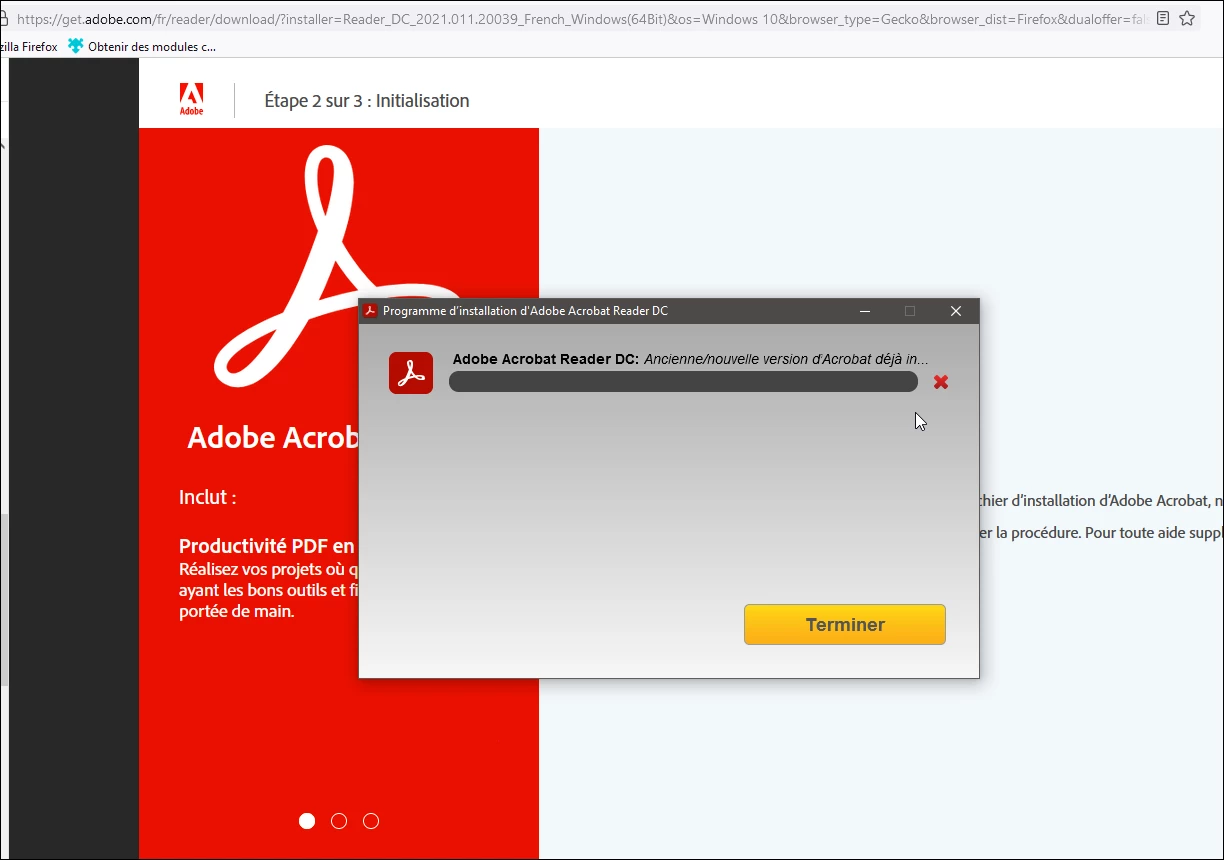
The problem is that now I can't reinstall Acrobat Reader, each time the installation ends on this truncated and incomplete message (attached) which seems to say that Acrobat Reader is already installed.

It says : "Old/new version of Acrobat already in........"

What can I do?


I'm a developer of PDF forms and I absolutely need to have Acrobat Reader to test them.

Thank you for your help.
 

返信数 15

Participant
August 13, 2025

This thread is redundant and should be closed or at least this comment pinned as the 'solution'. Adobe have provided an official solution to this that works and I use now across dozens of my clients (I am a senior network engineer and work for an MSP that deals with hundres of different clients and environments). Installing side-by-side does NOT work for most scenarios as suggested by multiple people/'Adobe employees' in this thread. 


Adobe's actual solution is to install the '64-bit Unified App Installer' and add the registry key

HKEY_LOCAL_MACHINE\SOFTWARE\Policies\Adobe\Adobe Acrobat\DC\FeatureLockDown:“bIsSCReducedModeEnforcedEx”=dword:00000001

(This will default Acrobat to run in 'Reader mode' by default but automatically enable full Acrobat features when signing in)

All described in this article here:

https://www.adobe.com/devnet-docs/acrobatetk/tools/DesktopDeployment/singleinstaller.html

Can find installer from official location here:

https://helpx.adobe.com/au/acrobat/kb/download-64-bit-installer.html


Participant
March 30, 2023

To those that have this same issue, if you can get your hands on the following versions:

Adobe Acrobat May 2022 with

Acro Reader 220012017_en_US 

works, and then you can upgrade to latest versions as a workaround for now.

Participant
March 21, 2023

I was able to get around this today by installing pro in the normal way and then using our deploy software (PDQ Deploy - there is a free version) to deploy to the machine. In our case we need both on a Remote Desktop Server, some users need to use Acrobat some just Reader.

JR Boulay
Community Expert
JR BoulayCommunity Expert作成者
Community Expert
March 17, 2023
Participant
March 17, 2023

Is Adobe serious with not fixing this issue after at least one year of people complaining?


Participant
October 30, 2022

For me Acrobat Pro would not instal because it said, a more capable function was already installed. I hadn't realised the free reader had become more functionally useful. However, I use Acrobat Pro to scan documents to pdf. The supposedly more capable app can't interface with my scanner. I will now uninstall reader and hope to install Acrobat Pro.

There are work rounds but nowhere as efficient.

Participating Frequently
October 15, 2022

what might work for parallel installation: full offline installer of Acrobat Reader 32 bit from here: https://get.adobe.com/de/reader/otherversions/ 

Sonion
Participant
October 15, 2022

That's what I ended up doing and it worked!

Sonion
Participant
April 26, 2022

I'm a home user on Windows 11 and have Adobe Acrobat PRO. My wife and I both share the same desktop computer and use Acrobat to digitally sign documents. In order for this to work, we have our own Adobe IDs and in the past I used to sign in to my PRO and she signed in on the Reader. But now since I can't install both, I've been forced to install the older Reader 11 to use for my wife to sign documents, but the signature can only be stored locally because Reader 11 doesn't support Adobe ID sign in. She can't digitally sign documents with my PRO version because, of course, her ID doesn't have the PRO license and it forces the application to close. I'm furious about this and considering switching to an alternate PDF program

Participating Frequently
August 10, 2025

I have the same problem. I agree, this all makes me want to drop adobe subscription altogether.


AnandSri
Community Manager
Community Manager
August 11, 2025

Hello @lauram225916


I hope you are doing well. Thanks for reaching out, and we're sorry for the trouble you had.


Could you please share more details about the issue? Is it the same as the one the previous user posted in 2022 in this old thread? If not, could you please share more details? 

Please note that Named-user Acrobat/Creative Cloud licenses are for one person per Adobe ID; sharing an Adobe ID with multiple people is against Adobe’s policy and can force the app to sign out or close. See more details here.

Workarounds: 

Switch Windows user accounts (recommended for a shared desktop)
Create a separate Windows user for your wife. Each Windows account can sign into Acrobat/Reader with its own Adobe ID without conflict. (This keeps settings, user profiles, and Adobe sign-ins separate.)

Sign out before switching users
If you must use one Windows account, always Sign Out of Acrobat (and Creative Cloud desktop) before the other person signs in. This prevents the app from closing or forcing a license conflict.

Use Acrobat Sign/browser signing (no Pro required for signer)
If you send the document from Acrobat Sign (or create a signature request), the recipient can sign in a web browser without needing an Acrobat Pro license. This is often the easiest route for occasional signers. 


I hope this helps, and we're here to help; we just need more info.

Thanks,

Anand Sri.


JR Boulay
Community Expert
JR BoulayCommunity Expert作成者
Community Expert
February 14, 2022
Acrobate du PDF, InDesigner et Photoshopographe
JR Boulay
Community Expert
JR BoulayCommunity Expert作成者
Community Expert
February 14, 2022

Amal., this absurd situation offers me only one possibility to test and guarantee the correct functioning of the PDF forms I sell with Acrobat Reader: create them with Foxit Phantom or with PDF Studio Pro...


I can't believe that this is intentional, I also find it hard to believe that developers are so ignorant of how their software is used.

Acrobate du PDF, InDesigner et Photoshopographe