
Exit
  • Global community
    • Language:
      • Deutsch
      • English
      • Español
      • Français
      • Português
  • 日本語コミュニティ
  • 한국 커뮤니티
0

Cannot properly copy text from pdf

New Here ,
Feb 13, 2022 Feb 13, 2022

I have generated a pdf using the htmlto pdf script.

Now when I want to copy part of the text by dragging my mouse pover it, Acrobat selects only parts of the text and even text where my mouse has not yet been (see image below)

How can I prevent this or how can I correct this? Thanks

Roger
 

2022-02-13_14-03-02.png

TOPICS
Create PDFs , Edit and convert PDFs
535
Translate
Report
Community guidelines
Be kind and respectful, give credit to the original source of content, and search for duplicates before posting. Learn more
community guidelines
Community Expert ,
Feb 13, 2022 Feb 13, 2022

Use Adobe Acrobat to create the PDF file.

Translate
Report
Community guidelines
Be kind and respectful, give credit to the original source of content, and search for duplicates before posting. Learn more
community guidelines
New Here ,
Feb 13, 2022 Feb 13, 2022

Hi Bernd,

Thanks for the suggestion.

However, Acrobat Pro does not produce a proper pdf file (items misssing)

Also I want to include a table of contents and Acrobat Pro cannot do that.

So I looked for another solution HTMLtoPDF provides many options

Roger

Translate
Report
Community guidelines
Be kind and respectful, give credit to the original source of content, and search for duplicates before posting. Learn more
community guidelines
LEGEND ,
Feb 13, 2022 Feb 13, 2022

Please share the PDF you are trying out. There are several possibilities to account for.

Translate
Report
Community guidelines
Be kind and respectful, give credit to the original source of content, and search for duplicates before posting. Learn more
community guidelines
New Here ,
Feb 13, 2022 Feb 13, 2022

An excerpt of the file is attached.

Translate
Report
Community guidelines
Be kind and respectful, give credit to the original source of content, and search for duplicates before posting. Learn more
community guidelines
LEGEND ,
Feb 13, 2022 Feb 13, 2022

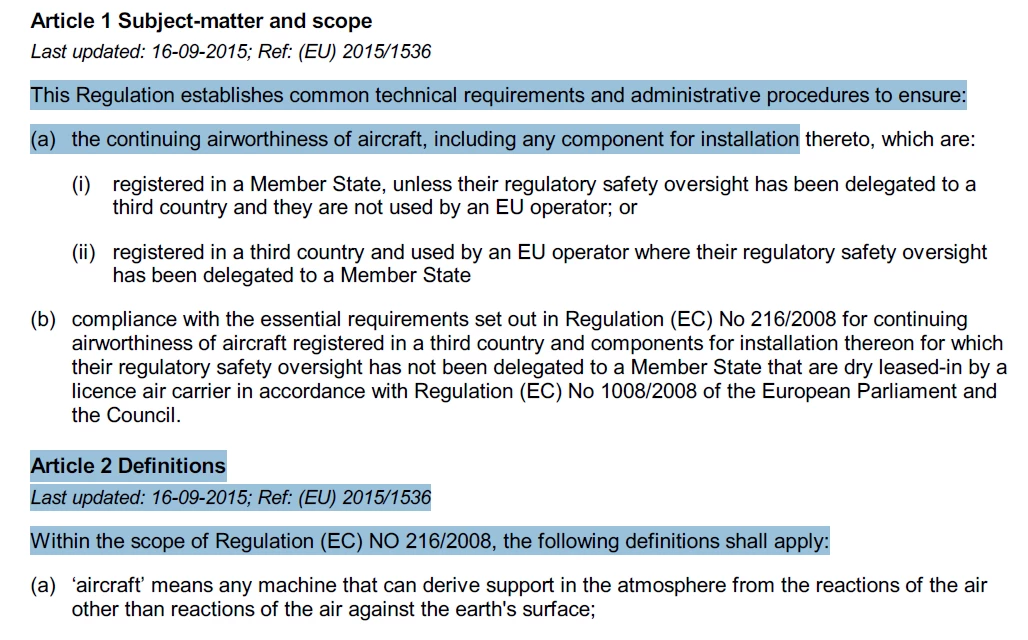
Thanks for the file. I can report that the PDF creation tool you use sets the text in a very strange order. And the select tool chooses text in the order it is set. See this image for details

TestScreenName_0-1644765876374.png

for example after

"This Regulation establishes common technical requirements and administrative procedures to ensure:"

it jumps down to set 

"Article 2 Definitions
Last updated: 16-09-2015; Ref: (EU) 2015/1536
Within the scope of Regulation (EC) NO 216/2008, the following definitions shall apply:"

then goes back, ignoring the (a) at the start, to 

"the continuing airworthiness of aircraft, including any component for installation (a) thereto, which are:"

and then sets the 

"(a)" from the start.


What your PDF creation tool has done is not wrong; it will display correctly. But it also is likely to cause weird and wonderful selection issues with different tools. Of course you can report to Adobe, but there is little realistic prospect that they will change this after 25 years, and also millions of people would still use the old software.


Adobe can do a better job sometimes, but this PDF states it is tagged, even though it is not tagged properly, so this probably makes it fail. Note that posting a wrongly tagged PDF may be illegal for many organisations in many countries.

Translate
Report
Community guidelines
Be kind and respectful, give credit to the original source of content, and search for duplicates before posting. Learn more
community guidelines
New Here ,
Feb 14, 2022 Feb 14, 2022
LATEST

Thank you for your detailed comment.

Indeed, it seems as if the pdf was created incorrectly.

I do nt expect or ask Adobe to chsange theri software.

I was just wondering if there is somethion I can do to convert this into a correct pdf file with proper copy behaviour.

What do yuo mean with this file is improperly tagged?

Thanks

Translate
Report
Community guidelines
Be kind and respectful, give credit to the original source of content, and search for duplicates before posting. Learn more
community guidelines